

Basecamp
by 37signals LLC
Flat-priced projects with built‑in team chat.
Score
Score
Our verdict
Basecamp is a clean, opinionated take on project management that bundles chat, message boards, tasks, kanban, schedules, docs/files, and reports under flat per‑account pricing. The 2026 lineup is simple: Free for one project, then tiered by active projects with no per‑seat fees on Studio, Pro, and Unlimited. In testing, Basecamp 5 felt faster and more focused than sprawling work suites, and its Everything Views, Hill Charts, and Client mode make status and external collaboration easy. The API, SDKs, CLI, and agent skills are welcome for teams experimenting with AI workflows. The trade‑offs are real: no SSO/SAML, no SOC audit, and no native Gantt/critical path, which will limit some PMOs and regulated orgs. Billing is annual, so month‑to‑month shoppers may balk. For agencies and SMB teams that want less tool sprawl and predictable pricing, Basecamp offers strong value and a low learning curve.
Overview
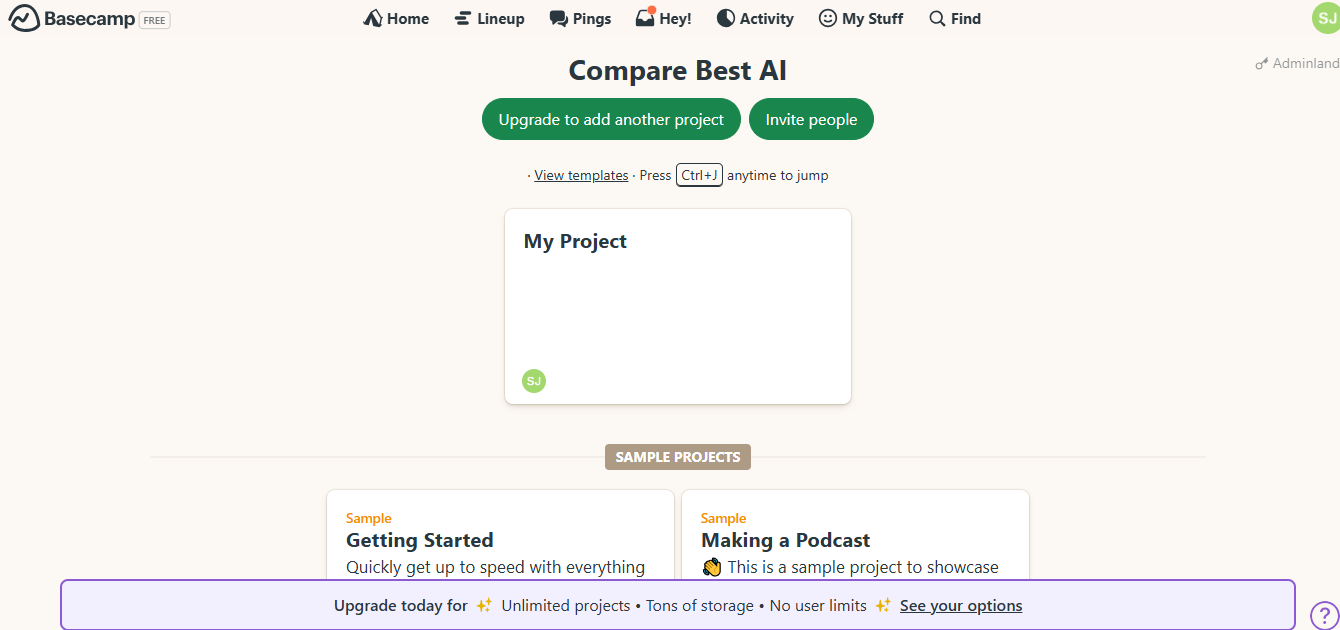
Screenshot
Score breakdown
Overall score
Scores are editorial assessments by the Compare Best AI team on a 0–10 scale.
Expert review
CBAI Editorial Team
Compare Best AI · Editorial Team
## Overview
How we tested
Days tested
7 days
Tasks evaluated
- ·Stand up a client project with message board, to‑dos, and Card Table
- ·Run a week of status via Automatic Check‑ins and Hill Charts
- ·Invite external client users and restrict visibility via Client mode
- ·Create tasks and reports via API/CLI and validate agent skill actions
Method
Compared against Asana and monday.com using identical inputs
Reviewer
CBAI Editorial Team
Plans & pricing
Free
Individuals testing Basecamp for personal use
- 1 project, 1 GB storage
- Up to 5 users
- Project templates; multiple tools per project
- Time tracking
- Bring your own AI agents; ChatGPT/Claude connectors (coming soon)
- Annual upgrades only from Free
Freelancer
Solo pros with a few concurrent clients
- Up to 3 active projects
- 5 GB storage
- Up to 20 users; no per‑user fees
- Time tracking; templates; multiple tools per project
- 24/7/365 support
- Bring your own AI agents; ChatGPT/Claude connectors (coming soon)
- Billed annually
Studio
Small teams wanting unlimited people
- Up to 10 active projects
- 25 GB storage
- Unlimited users; unlimited tools per project
- Time tracking; templates
- 24/7/365 support
- Bring your own AI agents; ChatGPT/Claude connectors (coming soon)
- Billed annually
Pro
Growing teams standardizing on Basecamp
- Up to 25 active projects
- 100 GB storage
- Unlimited users; unlimited tools per project
- Time tracking; templates
- 24/7/365 support; enhanced admin
- Bring your own AI agents; ChatGPT/Claude connectors (coming soon)
- Billed annually
Unlimited
Organizations needing unlimited projects and users
- Unlimited projects; 1 TB storage
- Unlimited users; unlimited tools per project
- Time tracking; templates; enhanced admin
- Priority 24/7/365 support; personalized onboarding
- Bring your own AI agents; ChatGPT/Claude connectors (coming soon)
- Annual billing + ACH/wire/check options
- 45‑day free trial; +5 TB storage add‑on $100/mo
Pricing may vary by region. Always verify on the vendor's website.
Feature comparison
| Feature | Basecamp | Asana | monday.com |
|---|---|---|---|
| Pricing | |||
| Flat per‑account pricing (no per‑seat) | |||
| Communication | |||
| Built‑in team chat (rooms/DM) | |||
| Boards | |||
| Kanban boards | |||
| Planning | |||
| Gantt charts | |||
| Security | |||
| SSO/SAML | |||
| Access | |||
| Unlimited free guests | |||
| Time | |||
| Native time tracking | |||
| Developers | |||
| Public API & SDKs | |||
Is it right for you?
Good fit for
Agencies
Flat pricing with unlimited users (Studio+ tiers) makes it easy to invite clients and contractors without per‑seat math.
Bootstrapped SMBs
All core tools in one place reduce app sprawl and ongoing subscription costs.
Cross‑functional teams
Message boards, chat, to‑dos, calendars, docs/files, and kanban unify planning and discussion.
Nonprofits/Classrooms
Discounts and classroom‑use eligibility lower costs while keeping collaboration simple.
Less suited for
Enterprises needing SSO/SOC 2
No SSO/SAML support and no SOC audit; identity and compliance needs may require other tools.
Heavy Gantt/dependency PMOs
No native Gantt; Basecamp favors simple timelines and Hill Charts over critical‑path planning.
Month‑to‑month buyers
Public paid plans indicate annual billing; no clear monthly billing option on pricing page.
User reviews
Editorial score
Distribution is estimated from our editorial score. Verified user reviews coming soon.
Use cases
Typical ways teams rely on this tool — from everyday tasks to specialized workflows.
- Client project hubs
- Agency production tracking
- Internal team communication
- Lightweight task management
- Simple kanban workflows
- Async status reporting
Integrations
Reported connectors
Apps and services commonly connected out of the box or via official connectors.
- Zapier
- Unito
- Harvest
Privacy & compliance
Security & data practices
Highlights we track from the vendor's documentation. Always confirm current terms, subprocessors, and regional policies on their official site.
- GDPR DPA and SCCs
- PCI SAQ A
- No SOC 2 audit
Details
Category
Price
- Free
- Freelancer $25/mo (annual only)
- Studio $59/mo (annual only)
- Pro $99/mo (annual only)
- Unlimited $299/mo (annual only)
Free version
Best for
- Client‑service agencies coordinating many stakeholders
- Cross‑functional SMB teams replacing Slack + docs + PM
- Nonprofits and classrooms needing simple collaboration
- Founders who want flat, predictable software costs.
Frequently asked questions
Basecamp
Niche / Other
Ready to get started?
Visit the Basecamp website to explore plans and start your free trial.
Was this page helpful?
Compare Best AI may earn a commission when you click links on this page. This does not influence our editorial scores or recommendations. Advertiser disclosure