

Bonsai
by Bonsai Technologies Inc.
All‑in‑one CRM, projects, invoicing, and payments.
Score
Score
Our verdict
Bonsai’s 2026 refresh shifts from “freelancer tool” to a credible all‑in‑one for agencies and consultancies. Pricing is now per seat and straightforward: Basic $15, Essentials $25, Premium $39, Elite $59 (or $9/$19/$29/$49 per user if billed annually). Premium is the sweet spot, adding workload, Gantt, insights, and broader integrations without jumping to Elite’s 3‑seat minimum. Feature gating is sensible: Essentials unlocks proposals, payments, forms, scheduling, and a client portal; Premium layers advanced reporting and customization; Elite adds permissions, timesheet locking, Xero, and data import. Payment fees are transparent and competitive for card and ACH, with clear FX and platform fees when using third‑party processors. The new public REST API is a welcome addition for teams that want to integrate CRMs, time, and invoicing into internal systems. Downsides: it’s not full accounting—serious books still need QuickBooks or Xero—and procurement/POs are absent. Overall, Bonsai offers strong value for services businesses consolidating operations.
Overview
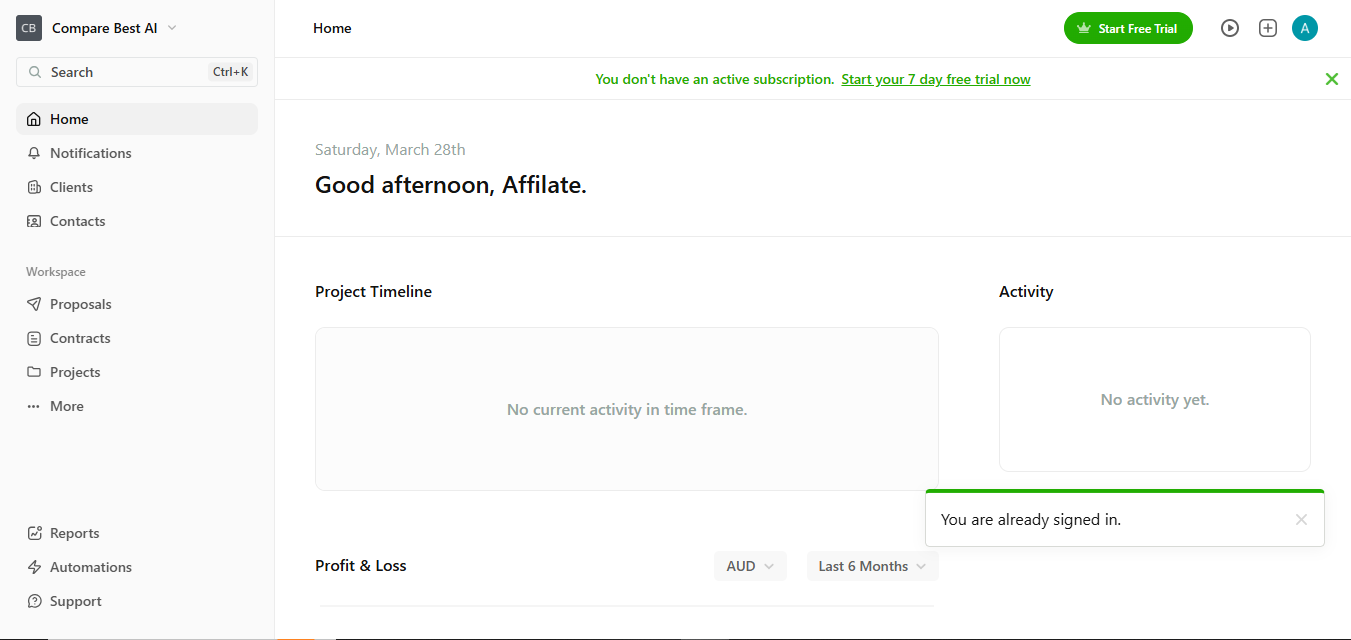
Screenshot
Score breakdown
Overall score
Scores are editorial assessments by the Compare Best AI team on a 0–10 scale.
Expert review
CBAI Editorial Team
Compare Best AI · Editorial Team
## Overview
How we tested
Days tested
7 days
Tasks evaluated
- ·Create proposal → contract → invoice workflow
- ·Track time and convert to invoice with retainers
- ·Build project with Gantt, workload, and budget
- ·Sync accounting via QuickBooks and export reports
Method
Compared against HoneyBook and Dubsado using identical inputs
Reviewer
CBAI Editorial Team
Plans & pricing
Basic
Solo users tracking time and simple tasks
- Time tracking
- Task management
- Unlimited projects and clients
- CRM and service library
- iOS & Android app
- Annual price: $9/user/mo billed yearly
Essentials
Freelancers needing end‑to‑end client management
- Everything in Basic
- Invoices & payments
- Proposals & contracts
- All templates, forms & questionnaires
- Scheduling and client portal
- Expense & income tracking
- Annual price: $19/user/mo billed yearly
Premium
Teams needing reporting and advanced project tools
- Everything in Essentials
- Project insights; workload management; Gantt view
- Deals pipeline; custom fields & properties
- Client tasks & messaging
- Profit & productivity reports
- Remove Bonsai branding
- Integrations (QuickBooks, Zapier, Calendly, Google)
- Annual price: $29/user/mo billed yearly
Elite
Growing teams needing controls and onboarding
- Everything in Premium
- Custom permissions; timesheet locking
- Add markup to expenses
- Xero integration; custom data import
- 3 users minimum
- Annual price: $49/user/mo billed yearly
Pricing may vary by region. Always verify on the vendor's website.
Feature comparison
| Feature | Bonsai | HoneyBook | Dubsado |
|---|---|---|---|
| Docs & Sales | |||
| Proposals & contracts with e‑sign | |||
| Client Experience | |||
| Client portal | |||
| Scheduling | |||
| Built‑in scheduler | |||
| Projects | |||
| Gantt chart view | |||
| Resourcing | |||
| Workload/resource planning | |||
| Accounting | |||
| Xero integration | |||
| Core Ops | |||
| Time tracking | |||
| Calendar | |||
| Google Calendar integration | |||
Is it right for you?
Good fit for
Agencies (5–50 seats)
Consolidates pipeline, resourcing, time, and billing with workflow automation and profitability reporting.
Consultancies
Create proposals and contracts, schedule calls, and convert accepted work into projects and invoices seamlessly.
Freelance teams
Per‑seat pricing and role controls make it easy to add collaborators without extra tools.
Operations leads
Gantt, workload, and insights centralize delivery and utilization metrics in one dashboard.
Less suited for
Heavy accounting
Lacks full double‑entry accounting and bank reconciliation—use QuickBooks/Xero for advanced bookkeeping.
Complex procurement
No purchase orders or vendor management modules; focus is client‑service workflows.
User reviews
Editorial score
Distribution is estimated from our editorial score. Verified user reviews coming soon.
Use cases
Typical ways teams rely on this tool — from everyday tasks to specialized workflows.
- Agency project and budget tracking
- Client proposals and e‑sign contracts
- Time tracking and timesheet approvals
- Subscription and retainer invoicing
- Bookkeeping with income/expense tracking
- Client portal, forms, and scheduling
Integrations
Reported connectors
Apps and services commonly connected out of the box or via official connectors.
- QuickBooks Online
- Zapier
- Xero
Details
Category
Price
- Basic $15/mo ($9/mo billed yearly)
- Essentials $25/mo ($19/mo billed yearly)
- Premium $39/mo ($29/mo billed yearly)
- Elite $59/mo ($49/mo billed yearly).
Free version
Best for
- Standardizing proposals, contracts, and invoicing
- Centralizing projects, time, and profitability reporting
- Replacing point tools with one workflow
- Scaling teams with roles and permissions.
Frequently asked questions
Bonsai
Finance & Trading
Ready to get started?
Visit the Bonsai website to explore plans and pricing.
Was this page helpful?
Compare Best AI may earn a commission when you click links on this page. This does not influence our editorial scores or recommendations. Advertiser disclosure