

Bookmap
by Bookmap Ltd.
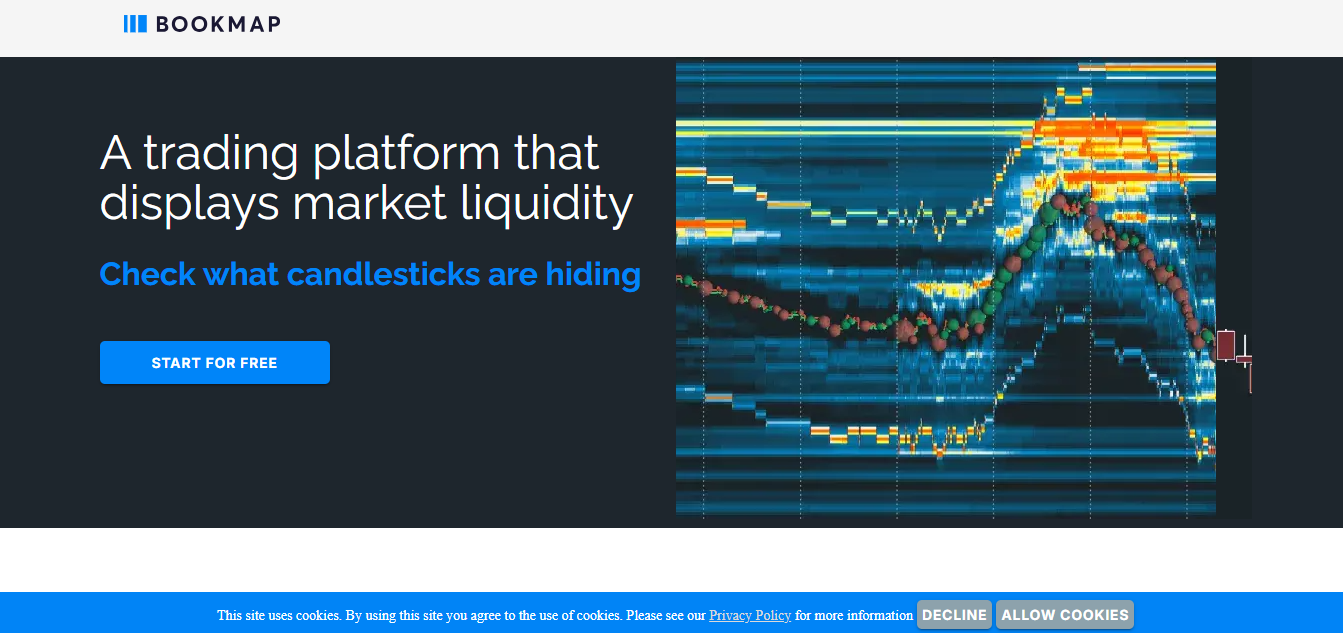
Order flow heatmap and DOM for serious traders.
Score
Score
Our verdict
Bookmap remains a top pick for traders who need to see the market’s true intent rather than just price bars. Its hallmark is the liquidity heatmap that records and replays full order book evolution, paired with a robust DOM. In 2026, the lineup is clear: Digital (free) for crypto and delayed data, Digital+ for affordable crypto trading with replay, Global for serious order‑flow analysis across futures and stocks, and Global+ for one‑click chart/DOM execution and pro add‑ons like Footprint and DOM Pro. Pricing is transparent and the yearly discounts are meaningful, though real‑time futures/stocks data is extra. The Java/Python APIs are well‑documented for custom add‑ons. Downsides: you’ll likely need separate paid data feeds, and new users face a learning curve. Still, if your edge depends on reading depth, absorption, and sweeps in real time—and reviewing them tick‑by‑tick—Bookmap delivers strong value, especially on Global+.
Overview
Screenshot
Score breakdown
Overall score
Scores are editorial assessments by the Compare Best AI team on a 0–10 scale.
Expert review
CBAI Editorial Team
Compare Best AI · Editorial Team
## Overview
How we tested
Days tested
7 days
Tasks evaluated
- ·Set up Digital+, Global, and Global+ workspaces
- ·Replayed volatile sessions to evaluate heatmap clarity
- ·Configured DOM Pro, Footprint, and Multibook
- ·Connected dxFeed and Rithmic for depth verification
Method
Compared against Sierra Chart and Quantower using identical inputs
Reviewer
CBAI Editorial Team
Plans & pricing
Digital (Free)
Crypto and delayed data exploration
- Real‑time crypto; delayed US stocks & futures
- Max 1 symbol viewable
- Crypto backfill ~1 hour
- No chart/DOM trading
- Market data for stocks/futures not included
Digital Plus
New order‑flow users on crypto
- Everything in Digital
- Max 3 symbols; Record & Replay
- One‑click crypto trading
- Multibook, Price Levels, Cross BBO
- Crypto backfill ~3 hours
Global
Order‑flow analysis across futures/stocks
- Everything in Digital+
- Max 10 symbols
- Connect via BookmapData, dxFeed, Rithmic
- Real‑time simulated trading
- Crypto backfill ~24 hours
- Real‑time futures/stocks data sold separately
Global+
Active traders needing execution tools
- Everything in Global
- Max 20 symbols
- Trade from chart/DOM (one‑click)
- Includes pro add‑ons: DOM Pro, Execution Pro, Footprint, Multibrackets, Multibook Customizer
- Crypto backfill up to 7 days
Global Lifetime
One‑time purchase of Global features
- Perpetual Global license (one‑time)
- Same feature set as Global
- Data fees not included
Global+ Lifetime
One‑time purchase of Global+ features
- Perpetual Global+ license (one‑time)
- Same feature set as Global+
- Data fees not included
Pricing may vary by region. Always verify on the vendor's website.
Feature comparison
| Feature | Bookmap | Sierra Chart | Quantower |
|---|---|---|---|
| Visualization | |||
| Order book heatmap (depth visualization) | |||
| Order Flow | |||
| Footprint/Numbers Bars support | |||
| Execution | |||
| Trade from chart/DOM | |||
| Coverage | |||
| Stocks, futures, and crypto supported | |||
| Backtesting | |||
| Tick‑level replay/backtest | |||
| Extensibility | |||
| Public API/SDK for custom add‑ons | |||
| Licensing | |||
| Lifetime license option | |||
Is it right for you?
Good fit for
Futures scalpers
Heatmap and DOM reveal liquidity shifts and absorption for precise intraday entries.
Equity day traders
Integrates with dxFeed/Nasdaq TotalView for full‑depth insight on US stocks.
Crypto traders
Real‑time exchange connections, liquidation indicators, and Multibook across venues.
System improvers
Record & Replay lets you review sessions tick‑by‑tick and refine execution.
Less suited for
Casual investors
Depth‑of‑market tooling and data fees are overkill for infrequent trades.
Budget setups needing bundled data
Platform pricing excludes real‑time futures/stocks data; feeds add recurring cost.
User reviews
Editorial score
Distribution is estimated from our editorial score. Verified user reviews coming soon.
Use cases
Typical ways teams rely on this tool — from everyday tasks to specialized workflows.
- Futures scalping with heatmap and DOM
- Equity open drive liquidity analysis
- Crypto liquidation sweeps tracking
- Replay sessions for trade review
- Tape reading with CVD and volume tools
- Multi-exchange depth via Multibook
Integrations
Reported connectors
Apps and services commonly connected out of the box or via official connectors.
- Rithmic
- dxFeed
- TradeStation
Details
Category
Price
- Free
- Digital Plus $19/mo ($16/mo billed yearly)
- Global $49/mo ($39/mo billed yearly)
- Global+ $99/mo ($79/mo billed yearly)
- Global Lifetime $990 (one-time)
- Global+ Lifetime $1,990 (one-time)
Free version
Best for
- Intraday futures scalping with full‑depth order book
- Equity day trading with Nasdaq TotalView depth
- Crypto order‑flow analysis and liquidation tracking
- Post‑trade review with tick‑level Record & Replay.
Frequently asked questions
Bookmap
Finance & Trading
Ready to get started?
Visit the Bookmap website to explore plans and start your free trial.
Was this page helpful?
Compare Best AI may earn a commission when you click links on this page. This does not influence our editorial scores or recommendations. Advertiser disclosure