

OpusClip
by Opus Clip Inc.
AI-powered tool that turns long videos into viral short clips.
Score
Score
Our verdict
Opus Clip uses AI to automatically identify the most engaging moments from long videos and create short, vertical clips with captions optimized for TikTok, Instagram Reels, and YouTube Shorts. Best for podcasters, YouTubers, and marketers repurposing content. The main caveat is AI clip selection isn't always accurate, and heavy editing is still needed for polished results.
Overview
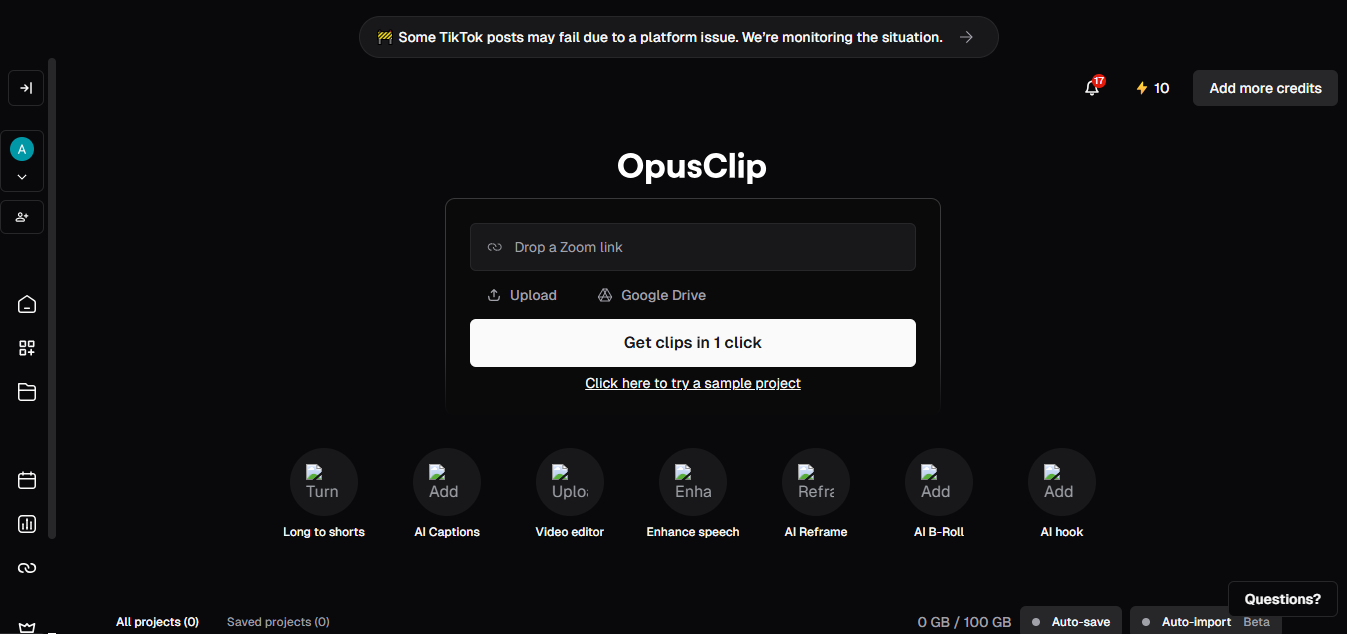
Screenshot
Score breakdown
Overall score
Scores are editorial assessments by the Compare Best AI team on a 0–10 scale.
Expert review
CBAI Editorial Team
Compare Best AI · Editorial Team
Opus Clip solves the content repurposing bottleneck — taking a 1-hour podcast, webinar, or YouTube video and automatically generating dozens of short clips optimized for social media. The AI identifies compelling moments based on speech patterns, engagement cues, and content relevance.
How we tested
Days tested
14 days
Tasks evaluated
- ·AI clip quality from podcast
- ·Caption accuracy
- ·Virality score correlation
- ·Social media posting
- ·Brand consistency
- ·Processing speed
Method
Side-by-side with Pictory and manual clipping on identical source videos
Reviewer
CBAI Editorial Team
Plans & pricing
Free
Trying AI clipping
- AI clipping
- Processing speed: Regular
- Video import: Local video (up to 10GB per video)
- Auto video import: not included
- AI copilot: select clipping timeframe & clip length
- Reprompt clipping: not included
- Custom clip length: 0-1m, 1-3m, 3-5m, 5-10m, 10-15m
- Virality score: not included
- Storage: not included (media expires after 3 days)
- Auto hook
- AI captions
- Animated caption templates (with watermark)
- Multi-language transcription
- Upload custom font: not included
- Speaker-based caption colors: not included
- Auto censor curse words: not included
- Auto emoji and keyword highlights
- AI reframe aspect ratios: 9:16 only
- Moving object tracking: not included
- Genre-specific reframing model: not included
- Dynamic layout switch
- Screenshare/gameplay layout
- Custom reframing: not included
- Text & timeline-based editing: not included
- AI image & stock B-Roll: not included
- AI video B-Roll (Agent Opus): not included
- AI Voice-over: not included
- Speech enhancement: not included
- Speech cleanup: not included
- Transition effects: not included
- Upload media assets: not included
- Add music: not included
- Add text overlay: not included
- AI video upscaling: not included
- Video dubbing: not included
- AI sound effects: not included
- Brand template: 1
- Intro/outro cards: not included
- Watermark-free export: not included
- Export as MP4: 3-day limit; up to 1080p
- Export in bulk: not included
- Export to Premiere/DaVinci: not included
- Shareable links to projects
- Post to social media: not included
- Social media scheduler: not included
- Team workspace: not included
- Member seats: not included
- Email OTP login
- SOC II Type 2 compliant
- Customer support: Discord + AI chat
- Video Editing API / Scheduler API / MCP / CMS / Zapier: not included
Starter
Creators posting regularly
- Everything unlocked vs Free as listed on opus.pro/pricing
- Processing speed: Faster than Free and Trial
- Local video import up to 10GB
- Auto video import from verified YouTube account
- AI copilot: timeframe, clip length, reprompt clipping
- Custom clip length: 0-1m through 10-15m
- Virality score
- Auto hook
- AI captions + animated templates (no watermark on templates)
- Multi-language transcription
- Auto emoji and keyword highlights
- AI reframe 9:16
- Genre-specific reframing model
- Dynamic layout switch
- Screenshare/gameplay layout
- Custom reframing
- Text & timeline-based editing
- AI image B-Roll (3 clips/month)
- Stock B-Roll (3 clips/month)
- AI Voice-over: 20 per day
- Speech cleanup (pause & filler removal)
- Add text overlay
- AI video upscaling
- Brand template: 1
- Watermark-free video export
- Export as MP4: 30-day limit; highest resolution available
- Shareable links to projects
- Post to social media
- Clip title & description & hashtag generator
- Media storage expires after 29 days
- Email OTP login
- SOC II Type 2 compliant
- Customer support: Discord + AI chat
- AI video B-Roll (Agent Opus): not included
- Speech enhancement: not included
- Bad takes removal: not included
- Video dubbing: not included
- AI sound effects: not included
- Social media scheduler: not included
- Team workspace: not included
- APIs/MCP/Zapier: not included
Pro
Serious creators needing full editing stack
- Processing speed: Faster than Starter
- Local video up to 30GB + public mp4 URL
- Auto video import from verified YouTube
- AI clipping + Topics search + Prompt to clip + Reprompt
- Custom clip length: 0-1m through 10-15m
- Virality score
- Storage: 100GB fixed
- Auto hook
- AI captions + animated templates
- Multi-language transcription
- Upload custom font: up to 2 fonts
- Auto censor curse words: default list
- Auto emoji and keyword highlights
- Aspect ratios: 9:16, 1:1, 16:9
- Moving object tracking
- Genre-specific reframing model
- Dynamic layout switch
- Screenshare/gameplay layout
- Custom reframing
- Text & timeline-based editing
- AI image B-Roll: 50 clips/day
- Stock B-Roll: Unlimited
- AI video B-Roll (Agent Opus)
- AI Voice-over: 20 per day
- Speech enhancement: 10 times/day
- Speech cleanup (pause & filler removal)
- Speech cleanup (bad takes removal)
- Transition effects
- Upload media assets
- Add music
- Add text overlay
- AI video upscaling
- Video dubbing
- AI sound effects
- Brand templates: up to 4
- Intro/outro cards
- Brand vocabulary
- Custom media & asset library
- Rename clips and projects
- Watermark-free export
- Export MP4: no limit, highest resolution available
- Export in bulk
- Export to Adobe Premiere Pro & DaVinci Resolve
- Shareable links to projects
- Post to social media
- Social media scheduler
- Post to multiple profiles per social platform
- Clip title & description & hashtag generator
- Team workspace
- Member seats: 2 users/pack, up to 4 users
- Media storage: 100GB fixed
- Auto-save projects
- Collections
- Clip Analytics
- Email OTP login
- SOC II Type 2 compliant
- Support: Intercom live chat + Discord + AI chat
- Video Editing API
- Scheduler API
- MCP connector
- Zapier integration: up to 300 credits/mo
- 4K schedule/download: not included
- SSO/SLM: not included
- CMS integration: not included
Business
Teams needing SSO, unlimited seats, priority support
- Dedicated enterprise queue; fastest processing
- Local video up to 30GB + public mp4 URL
- Auto import: verified YouTube, CMS, or other cloud servers
- Full AI clipping suite including Topics search and Prompt to clip
- Virality score
- Storage: Customized / Unlimited media storage
- All Pro AI captions/reframe/editing features
- Upload custom font
- Speaker-based caption colors
- Auto censor: custom censored words list
- Aspect ratios 9:16, 1:1, 16:9
- Moving object tracking + genre-specific reframing + custom reframing
- AI image B-Roll 50/day; Stock B-Roll Unlimited; Agent Opus video B-Roll
- AI Voice-over 20/day; Speech enhancement 10/day
- Full speech cleanup, transitions, music, overlays, dubbing, sound effects, upscaling
- Brand template: custom solution
- Intro/outro cards
- Custom media & asset library: Unlimited
- Watermark-free export; MP4 no limit; bulk export; Premiere/DaVinci
- Social posting + scheduler + multi-profile + title/hashtag generator
- 4K schedule and download
- Team workspace; Unlimited member seats
- Unlimited media storage
- Auto-save projects; Collections; Sub-teams; Member permissions
- Clip Analytics + Real-time trend analysis
- Email OTP + SSO + Software License Management (SLM)
- SOC II Type 2 compliant
- MSA
- Priority support with dedicated Slack; Intercom; AI chat
- Custom onboarding
- Invoice and ACH Payment
- Video Editing API; Scheduler API; MCP; CMS integration; Zapier
Pricing may vary by region. Always verify on the vendor's website.
Feature comparison
| Feature | OpusClip | Pictory | Descript |
|---|---|---|---|
| Repurposing | |||
| AI clip detection | |||
| Virality scoring | |||
| Auto speaker focus | |||
| Pricing | |||
| Free tier | |||
Is it right for you?
Good fit for
Podcasters
Turn hour-long episodes into dozens of social clips with auto-captions and vertical formatting.
YouTubers
Repurpose long YouTube videos into Shorts, Reels, and TikTok clips automatically.
Marketing teams
Scale social content by extracting highlights from webinars, interviews, and presentations.
Less suited for
Original short-form creation
Opus Clip repurposes existing content; use CapCut or InVideo for creating videos from scratch.
Professional editing
Generated clips often need refinement; Descript or Premiere Pro handle polished editing.
Non-video content
Opus Clip works with video only; InVideo and Lumen5 handle text-to-video creation.
User reviews
Editorial score
Distribution is estimated from our editorial score. Verified user reviews coming soon.
Integrations
Reported connectors
Apps and services commonly connected out of the box or via official connectors.
- YouTube (URL import)
- Zoom recordings
- Google Drive
- TikTok
- YouTube Shorts
Details
Category
Price
- Free $0
- Starter $15/mo
- Pro $29/mo
- Business custom
Free version
Best for
- Repurposing podcasts and webinars into social media short clips
- Automated viral moment identification and AI captioning
- Content creators managing multi-platform short-form video distribution
Frequently asked questions
OpusClip
Content & Design
Ready to get started?
Visit the OpusClip website to explore plans and start your free trial.
Was this page helpful?
Compare Best AI may earn a commission when you click links on this page. This does not influence our editorial scores or recommendations. Advertiser disclosure