

Plann (AI)
by Plann
AI-powered social planning and scheduling.
Score
Score
Our verdict
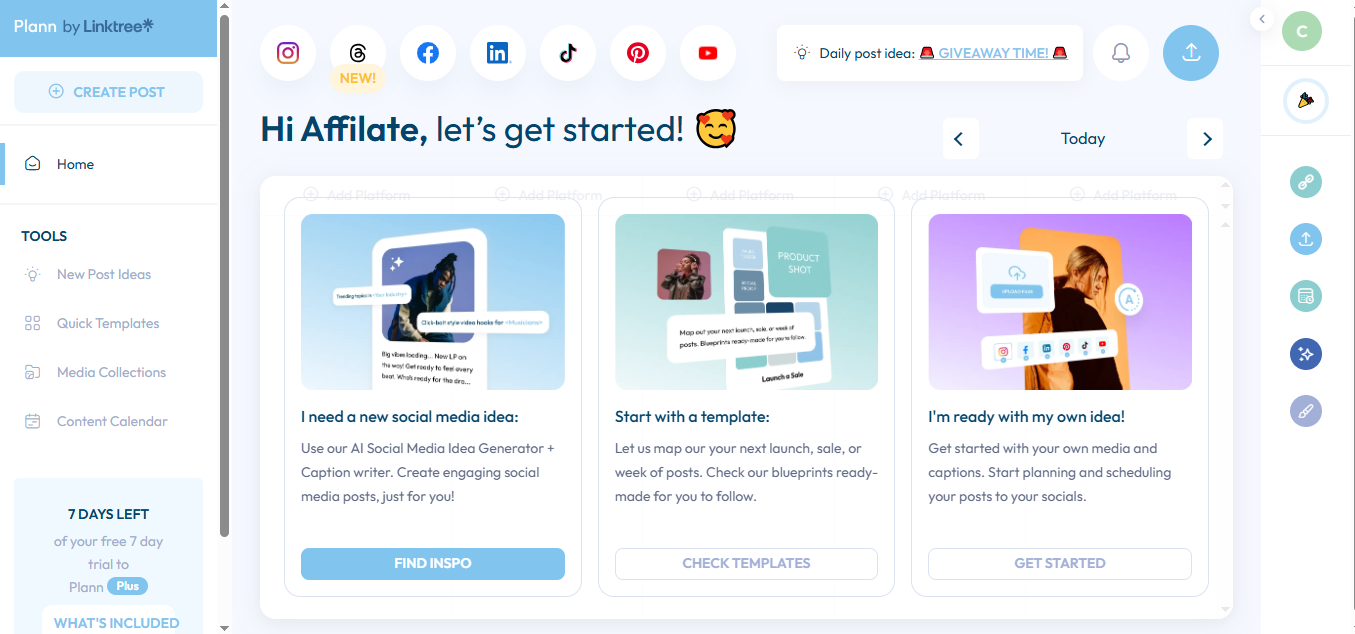
Plann (AI) blends a visual Instagram grid with a capable AI Social Suite and straightforward cross-platform scheduling. It caters to solo creators and small teams that value aesthetic planning, rapid caption ideation, and a clean content calendar. The Free Forever tier is genuinely useful for Instagram-only workflows and includes 30 AI credits, but serious multi-network publishing starts at Power User. Build is the clear step-up for collaboration with two users across two brands, while Grow adds the kind of analytics social managers need to prove impact. Downsides: there’s no public API, enterprise governance is light, and the caps on brands/users top out quickly for agencies. Still, with transparent pricing and a tight focus on creator-friendly planning, Plann is a solid, affordable choice if your priority is Instagram-led content distributed across today’s major platforms.
Overview
Screenshot
Score breakdown
Overall score
Scores are editorial assessments by the Compare Best AI team on a 0–10 scale.
Expert review
CBAI Editorial Team
Compare Best AI · Editorial Team
## Overview
How we tested
Days tested
7 days
Tasks evaluated
- ·Plan an Instagram grid and draft AI captions
- ·Schedule a week of cross-platform posts
- ·Set up a two-user approval workflow
- ·Review analytics to refine posting cadence
Method
Compared against Buffer and Later using identical inputs
Reviewer
CBAI Editorial Team
Plans & pricing
Power User
- 2 months free
- Best value for solopreneurs.
- Unlimited scheduling across all platforms.
- 1 brand, one of each:
- per month, paid annually
- START FOR FREE
- Strategy builder incl. hashtag suggestions
- Full AI Social Suite with content + caption generator
Build
- 2 months free
- Great for small teams.
- Collaboration tools to manage multiple accounts, users + content at scale.
- 2 brands, one of each:
- per month, paid annually
- START FOR FREE
- Team chat, approval flows and shareable links
- Multi-platform, brand & user access
Grow
- 2 months free
- Best for expanding teams.
- Advanced communication + integrations for multi-user + brands with complex strategies.
- 5 brands, one of each:
- per month, paid annually
- START FOR FREE
- Manage even more brands & accounts
- Team chat, approval flows and shareable links
Pricing may vary by region. Always verify on the vendor's website.
Feature comparison
| Feature | Plann (AI) | Buffer | Later |
|---|---|---|---|
| Scheduling | |||
| Multi-platform scheduling | |||
| Visual Instagram grid planner | |||
| AI | |||
| AI captions/strategy generation | |||
| Calendar | |||
| Content calendar view | |||
| Collaboration | |||
| Team approvals/workflows | |||
| Analytics | |||
| Advanced analytics/insights | |||
| Mobile | |||
| iOS/Android companion apps | |||
Is it right for you?
Good fit for
Solo creators
Plan a cohesive Instagram grid and generate captions with AI, then auto-publish across channels from one place.
Small businesses
Consolidates content calendar, scheduling, and basic analytics without enterprise complexity or cost.
Small social teams
Build plan adds collaboration and approvals for two users working across multiple brands.
Data-curious marketers
Grow plan’s advanced insights help validate content strategy and posting cadence.
Less suited for
Enterprises with strict IT controls
Lacks enterprise hallmarks like SSO/SCIM and granular admin governance.
Developer-led workflows
No public API for custom integrations or automated pipelines.
Large agencies
Grow caps at 5 brands and 4 users; may be too tight for big rosters.
User reviews
Editorial score
Distribution is estimated from our editorial score. Verified user reviews coming soon.
Use cases
Typical ways teams rely on this tool — from everyday tasks to specialized workflows.
- Instagram grid planning
- Cross-platform scheduling
- AI social captions
- Team approvals
- Content calendar
Integrations
Reported connectors
Apps and services commonly connected out of the box or via official connectors.
- TikTok
Details
Category
Price
- Power User $12.50/mo
- Build $25/mo
- Grow $62.50/mo
Free version
Best for
- Plan Instagram grids and AI captions
- Schedule across Instagram, TikTok, LinkedIn, Pinterest, YouTube Shorts
- Collaborate and approve posts (Build+)
- Track performance with advanced analytics (Grow).
Frequently asked questions
Plann (AI)
Marketing
Ready to get started?
Visit the Plann (AI) website to explore plans and start your free trial.
Was this page helpful?
Compare Best AI may earn a commission when you click links on this page. This does not influence our editorial scores or recommendations. Advertiser disclosure