
Promo.com
by Promo.com (formerly Slidely)
AI video copilot with stock and scheduling.
Score
Score
Our verdict
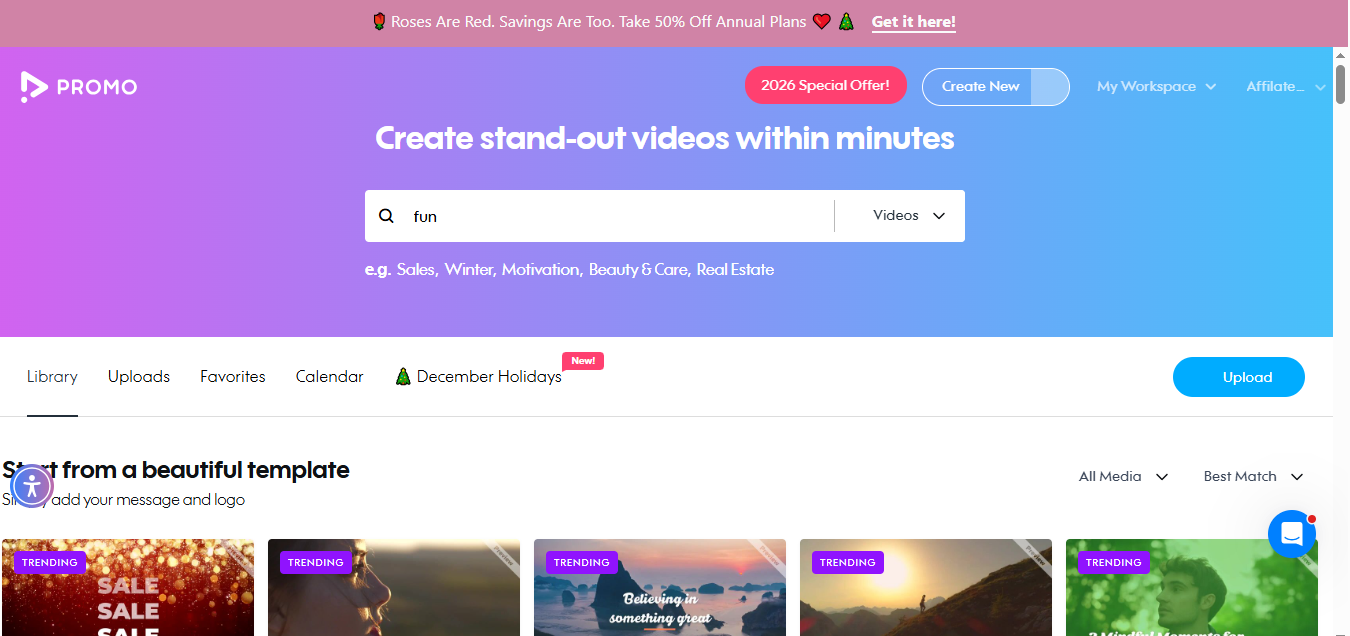
PromoAI by Promo.com has evolved into an AI‑first video copilot aimed at marketers who need consistent, on‑brand social content. The pitch is strong: feed a website, Amazon product, or Airbnb listing, then refine via chat‑based AI; schedule directly to Facebook, Instagram, YouTube, TikTok, and X. The Getty Images/iStock library (275M+ assets) is a standout versus many template‑only tools. Pricing, however, hinges on PromoAI video credits and premium stock clip allowances. The Standard plan (A$179/mo or A$89/mo billed yearly) is the true starting point for publishing AI‑generated videos; Basic cannot download PromoAI outputs at all, which limits its value to drafting. Pro adds white‑label and resell rights for agencies but is pricey unless you need 300 AI videos and 3,000 premium clips monthly. Hard caps remain: 5‑minute max and 1080p export. There’s no public API. Overall, a capable, marketer‑friendly system with clear limits and fair value if you consistently publish AI video sets each month.
Overview
Screenshot
Score breakdown
Overall score
Scores are editorial assessments by the Compare Best AI team on a 0–10 scale.
Expert review
CBAI Editorial Team
Compare Best AI · Editorial Team
## Overview
How we tested
Days tested
7 days
Tasks evaluated
- ·Generate a multi‑video set from a product URL
- ·Refine with chat‑based AI editing and add brand kit
- ·Schedule posts to Facebook/Instagram/YouTube/TikTok/X
- ·Export MP4 and GIF; test premium clip allowances
Method
Compared against Canva and InVideo using identical inputs
Reviewer
CBAI Editorial Team
Plans & pricing
Basic
- Month / User
- Select Plan
Standard
- Month / User
- Select Plan
Pro
- Month / User
- Select Plan
Free
- videos and photos
- 140K free videos and 1.4M free photos available for your projects
- Fully licensed music
- Select from thousands of licensed music tracks customized to fit your video perfectly
- 200 music tracks
- 1,000 music tracks
- 2,000 music tracks
- 2,000 music tracks
Pricing may vary by region. Always verify on the vendor's website.
Feature comparison
| Feature | Promo.com | Canva | InVideo |
|---|---|---|---|
| AI generation | |||
| One‑click multi‑video from URL/Amazon/Airbnb | |||
| Content library | |||
| 275M+ Getty Images & iStock assets | |||
| Editorial | |||
| Editorial/news/sports/celebrity footage access | |||
| Branding | |||
| Multi‑brand kits (logos, fonts, colors, watermark) | |||
| Distribution | |||
| Direct scheduling to FB/IG/YouTube/TikTok/X | |||
| Monetization | |||
| White‑label sharing and resell rights | |||
| Technical | |||
| Max export 1080p, up to 5 minutes | |||
| Developer | |||
| Public API available | |||
Is it right for you?
Good fit for
SMB marketers
Quickly generate and schedule monthly social videos from a site or product URL with brand‑consistent outputs.
Agencies & resellers
Pro plan’s white‑label sharing and resell rights simplify client delivery and revenue packaging.
E‑commerce sellers
Turn Amazon product links into ready‑to‑publish product videos and social cuts.
Real estate/hosts
Auto‑create listing videos from Airbnb URLs with vertical, square and wide formats.
Less suited for
4K/UHD workflows
All tiers cap exports at 1080p and 5‑minute length.
Developer integrations
No published public API for custom automation or headless use.
Commercial use of editorial footage
Editorial clips are for informational/educational/entertainment use only, not promotional ads.
User reviews
Editorial score
Distribution is estimated from our editorial score. Verified user reviews coming soon.
Use cases
Typical ways teams rely on this tool — from everyday tasks to specialized workflows.
- Generate videos from website or product links
- Plan and schedule monthly social content
- Create brand‑consistent ads and promos
- Leverage Getty/iStock footage legally
- White‑label video delivery for clients
Integrations
Reported connectors
Apps and services commonly connected out of the box or via official connectors.
- YouTube (incl. whitelisting)
- TikTok
- X (Twitter)
- Google Drive
- Dropbox
- HubSpot
- Wistia
- Shopify
Details
Category
Price
- Basic $29/mo
- Standard $59/mo
- Pro $199/mo
- Free Custom
Free version
Best for
- Generate monthly social videos from product pages
- Always-on social scheduling and publishing
- Agencies needing white‑label and resell rights
- SMBs leveraging Getty/iStock content legally
Frequently asked questions
Promo.com
Content & Design
Ready to get started?
Visit the Promo.com website to explore plans and start your free trial.
Was this page helpful?
Compare Best AI may earn a commission when you click links on this page. This does not influence our editorial scores or recommendations. Advertiser disclosure
Alternatives to Promo.com
Tools similar to Promo.com that we have reviewed.

Wave.video (AI)
6.8/10AI video maker for social media with stock library and templates.

Pictory AI
7.0/10Turn scripts and URLs into polished videos with AI.

AI AD Maker
8.0/10AI Ad Maker for video ads from URLs
Boolv
7.0/10Turn scripts and product links into videos fast.

AI Video by Media.io
7.0/10Multi‑model AI video generation in your browser.

ReelMagic
8.0/10AI-driven video creation for social media virality.