
Quip
by Salesforce
Docs, sheets, and chat—Salesforce is retiring Quip.
Score
Score
Our verdict
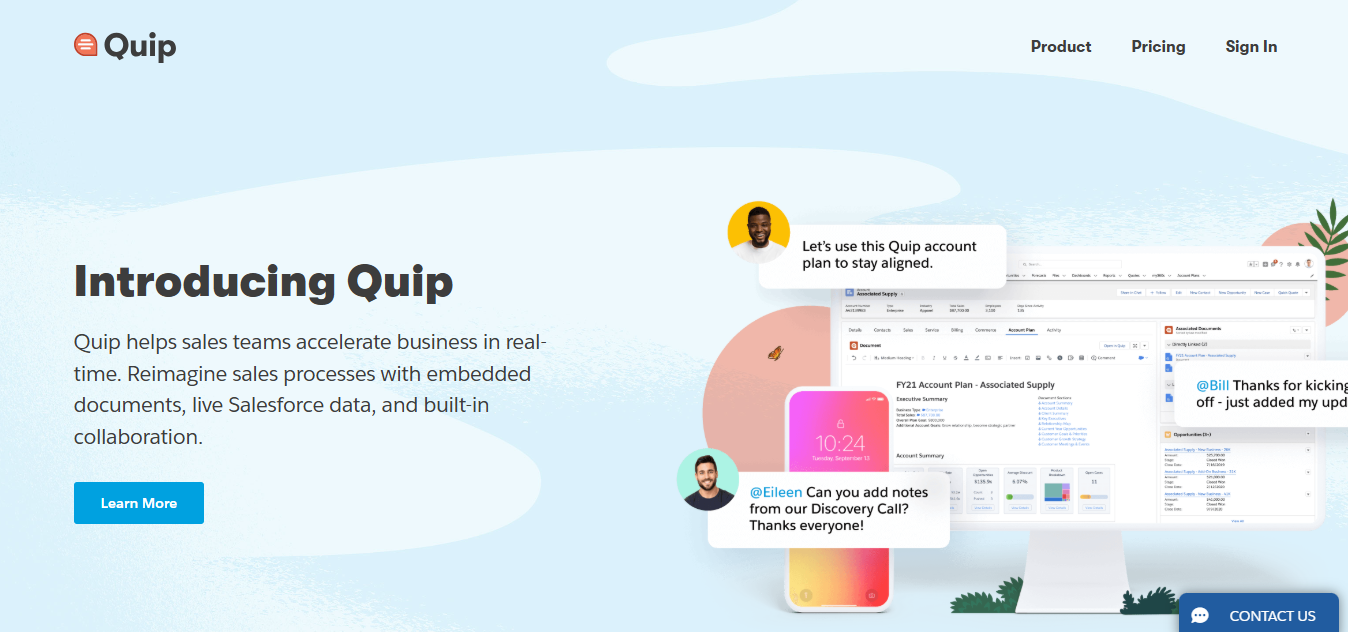
Quip remains a capable collaboration suite that blends documents, spreadsheets, and built-in chat, with Live Apps for interactivity. Plus adds IT essentials like SSO and an enterprise API, and Advanced uniquely embeds live Quip documents and Salesforce data directly inside Salesforce records via the Lightning Document Component. However, Salesforce has announced end of life for all Quip products, with no renewals allowed after March 1, 2027 and a staged wind-down after expiry. Pricing is straightforward but not cheap for Salesforce-centric use cases: the required Advanced plan is $100/user/month billed annually, while Plus is $25 and Starter is $10 annually ($12 monthly). There’s no free plan and no AI features. For existing customers, Quip can sustain workflows during the transition, but new long-term deployments should look to Slack/Slack Canvas, Agentforce Sales, or alternatives like Google Workspace or Notion.
Overview
Screenshot
Score breakdown
Overall score
Scores are editorial assessments by the Compare Best AI team on a 0–10 scale.
Expert review
CBAI Editorial Team
Compare Best AI · Editorial Team
## Overview
How we tested
Days tested
7 days
Tasks evaluated
- ·Co-author long-form docs and team spreadsheets with comments
- ·Evaluate inline chat and group discussions in documents
- ·Validate SSO setup via Okta (Plus edition requirement)
- ·Test Lightning Document Component editing inside Salesforce (Advanced)
Method
Compared against Notion and Google Docs using identical collaboration tasks and Salesforce-centric workflows where applicable
Reviewer
CBAI Editorial Team
Plans & pricing
Starter
- cannot be purchased or combined with Quip for Salesforce.
- Quip Plus
- Secure productivity platform for large and complex teams.
- / user / month,
- billed annually
- Contact Sales
- All Starter features, plus
- Single sign-on
Enterprise
- API and customization
- Custom Live Apps
- Quip Advanced
- Accelerate sales and grow revenue with real-time collaboration inside Salesforce.
- / user / month,
- billed annually
- Contact Sales
- All Plus features, plus
Pricing may vary by region. Always verify on the vendor's website.
Feature comparison
| Feature | Quip | Notion | Google Docs |
|---|---|---|---|
| Collaboration | |||
| Real-time co-editing | |||
| Messaging | |||
| Built-in 1:1 and group chat | |||
| Security/IT | |||
| SSO/SAML (Plus and above) | |||
| Extensibility | |||
| Enterprise API & custom extensions (Plus+) | |||
| Salesforce-native | |||
| Lightning Document Component (edit in Salesforce) [Advanced] | |||
| Salesforce data | |||
| Spreadsheets bound to live Salesforce data [Advanced] | |||
Is it right for you?
Good fit for
Existing Quip + Salesforce teams
Advanced lets teams keep editing Quip docs directly inside Salesforce records while planning a migration.
IT admins needing SSO
Plus supports SSO/SAML with major identity providers to maintain access control during wind‑down.
Document-heavy teams
Unlimited docs/spreadsheets with inline comments and chat can sustain ongoing collaboration until contract end.
Less suited for
New long-term deployments
Salesforce is retiring Quip; subscriptions cannot be renewed after March 1, 2027.
AI-assisted writing or summarization
Quip offers no generative AI features; Salesforce points users to Agentforce and Slack.
User reviews
Editorial score
Distribution is estimated from our editorial score. Verified user reviews coming soon.
Use cases
Typical ways teams rely on this tool — from everyday tasks to specialized workflows.
- Team document collaboration
- Inline chat and comments
- SSO and admin controls (Plus)
- Salesforce-embedded docs (Advanced)
Integrations
Reported connectors
Apps and services commonly connected out of the box or via official connectors.
- Salesforce
- Okta
- OneLogin
Privacy & compliance
Security & data practices
Highlights we track from the vendor's documentation. Always confirm current terms, subprocessors, and regional policies on their official site.
- GDPR-ready
- SSO/SAML (Plus and Advanced)
Details
Category
Price
- Starter $25/mo
- Enterprise $100/mo
Free version
Best for
- Maintain collaborative docs and sheets until contract end
- Advanced users editing live docs inside Salesforce during wind‑down
- SSO/API use on Plus while preparing migration
- Exporting and converting content to Slack Canvas or other tools.
Frequently asked questions
Quip
Productivity & Collaboration
Ready to get started?
Visit the Quip website to explore plans and pricing.
Was this page helpful?
Compare Best AI may earn a commission when you click links on this page. This does not influence our editorial scores or recommendations. Advertiser disclosure