
Trello (AI)
by Atlassian
Visual project management with AI-powered Kanban boards.
Score
Score
Our verdict
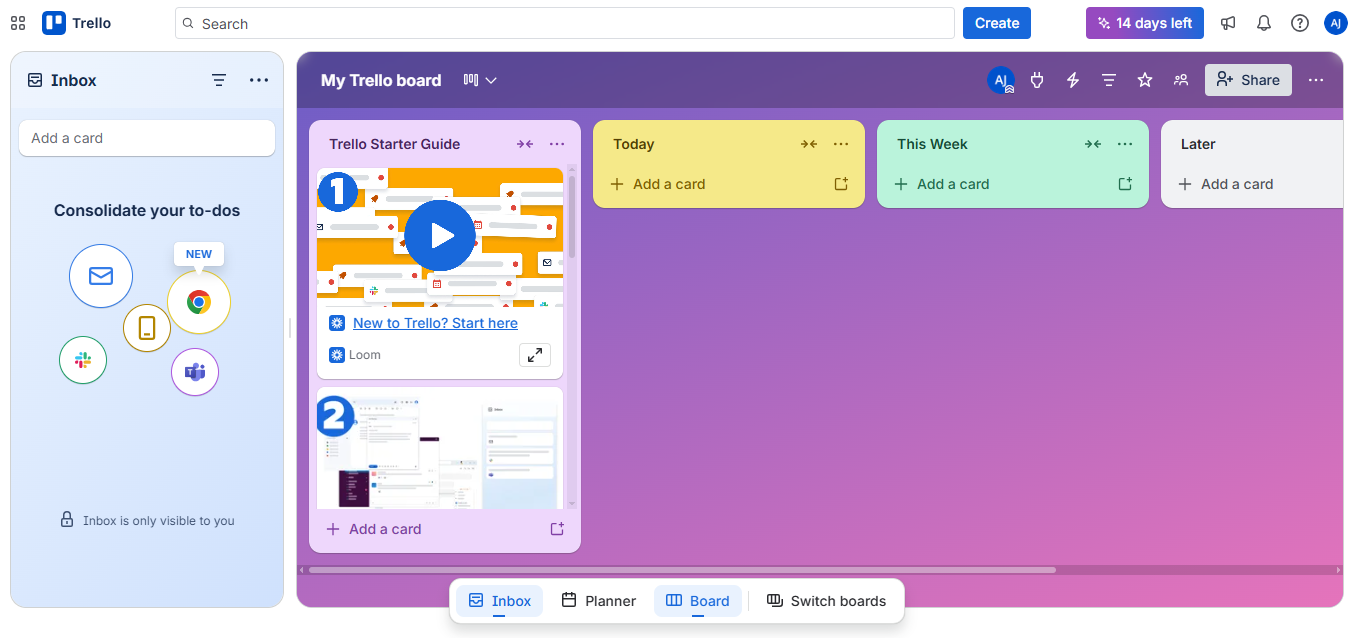
Trello is the most intuitive Kanban-based project management tool, now with AI features powered by Atlassian Intelligence for card suggestions, auto-completion, and smart sorting. It excels for small teams and individuals who want simple visual task management without complexity. The main caveat is limited project management depth compared to Asana, ClickUp, or Jira.
Overview
Screenshot
Score breakdown
Overall score
Scores are editorial assessments by the Compare Best AI team on a 0–10 scale.
Expert review
CBAI Editorial Team
Compare Best AI · Editorial Team
Trello remains the gold standard for Kanban simplicity. Its drag-and-drop card system is immediately understandable — even people who've never used project management software can be productive within minutes. Atlassian Intelligence AI now helps generate card descriptions, suggest due dates, summarize boards, and auto-sort tasks by priority.
How we tested
Days tested
14 days
Tasks evaluated
- ·Board setup and workflow
- ·AI features evaluation
- ·Butler automation testing
- ·Power-Ups integration
- ·Mobile app experience
- ·Team collaboration
Method
Side-by-side with Asana and ClickUp on identical team workflows
Reviewer
CBAI Editorial Team
Plans & pricing
Free
Up to 10 collaborators
- Free for up to 10 collaborators per Workspace
- Unlimited cards
- Up to 10 boards per Workspace
- Quickly capture to-dos from email, Slack, and Teams
- Inbox
- Unlimited Power-Ups per board
- Unlimited storage (10MB/file)
- 250 Workspace command runs per month
- Custom backgrounds & stickers
- Unlimited activity log
- Assignee and due dates
- iOS and Android mobile apps
- 2-factor authentication
Standard
Unlimited boards
- $6 billed monthly
- AI features
- Unlimited boards
- Card mirroring
- More automation
Premium
Views + AI
- $12.50 billed monthly
- Everything in Standard, plus
- AI
- Views: Calendar, Timeline, Table, Dashboard, and Map
- Workspace views: Table and Calendar
- Unlimited Workspace command runs
- Admin and security features
- Workspace-level templates
- Collections
- Observers
- Simple data export
Enterprise
Enterprise security
- $210.00 annual price per user
- Everything in Premium, plus
- Unlimited Workspaces
- Organization-wide permissions
- Organization-visible boards
- Public board management
- Multi-board guests
- Attachment permissions
- Power-Up administration
- Free SSO and user provisioning with Atlassian Guard
- 24/7 Enterprise Admin support
Pricing may vary by region. Always verify on the vendor's website.
Feature comparison
| Feature | Trello (AI) | Asana | ClickUp |
|---|---|---|---|
| Simplicity | |||
| Ease of use | |||
| Features | |||
| Kanban boards | |||
| Gantt/Timeline view | |||
| Built-in docs | |||
| AI | |||
| AI task suggestions | |||
| Pricing | |||
| Free tier (unlimited cards) | |||
| Under $6/user/month plan | |||
Is it right for you?
Good fit for
Small teams
Simplest project management tool available; teams are productive within minutes, not days.
Freelancers
Generous free plan with unlimited cards handles personal and client task management effectively.
Content teams
Kanban boards are perfect for editorial calendars, tracking content through stages from draft to published.
Personal productivity
Use as a personal task manager with checklists, due dates, and labels across boards.
Less suited for
Complex project management
Asana and ClickUp offer Gantt charts, dependencies, portfolios, and reporting that Trello lacks.
Software development teams
Jira provides dedicated dev features like sprints, bug tracking, and CI/CD integration.
Large organizations
Limited hierarchy and reporting make Trello unsuitable for managing complex, cross-departmental projects.
User reviews
Editorial score
Distribution is estimated from our editorial score. Verified user reviews coming soon.
Use cases
Typical ways teams rely on this tool — from everyday tasks to specialized workflows.
- Task Management
- Kanban Workflows
- Project Tracking
- Content Calendar
- Bug Tracking
- Personal Productivity
- Team Collaboration
Integrations
Reported connectors
Apps and services commonly connected out of the box or via official connectors.
- Slack
- Google Drive
- Dropbox
- Jira
- Confluence
- GitHub
- Salesforce
- Zapier
- Make
- Microsoft Teams
- Google Calendar
- Outlook
Privacy & compliance
Security & data practices
Highlights we track from the vendor's documentation. Always confirm current terms, subprocessors, and regional policies on their official site.
- SOC 2
- GDPR-ready
- SSO/SAML
Details
Category
Price
- Free $0
- Standard $5/user/mo billed annually ($6 monthly)
- Premium $10/user/mo billed annually ($12.50 monthly)
- Enterprise $17.50/user/mo billed annually ($210/user/yr)
Free version
Best for
- Kanban task boards
- Lightweight team planning
- Process checklists and workflows
Frequently asked questions
Trello (AI)
Productivity & Collaboration
Ready to get started?
Visit the Trello (AI) website to explore plans and start your free trial.
Was this page helpful?
Compare Best AI may earn a commission when you click links on this page. This does not influence our editorial scores or recommendations. Advertiser disclosure