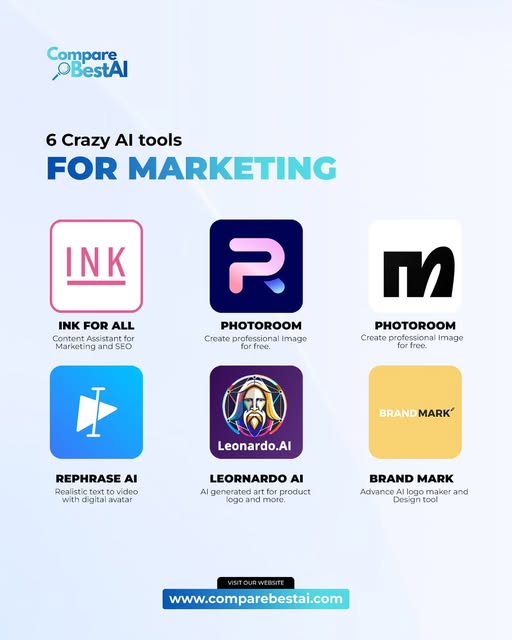

Answer First: The best 6 crazy AI tools worth trying in 2026 are Gamma, Photoroom, HeyGen, Leonardo AI, Brandmark, and Adobe Firefly. Gamma can turn ideas into polished presentations and webpages, Photoroom transforms ordinary product photos, HeyGen creates and translates avatar videos, Leonardo AI generates and edits images and video, Brandmark builds complete visual identities, and Adobe Firefly combines image, video, audio and design generation in one creative AI workspace.
AI tools become interesting when they do more than produce another block of text.
The six tools in this guide can replace genuinely time-consuming parts of creative work—from designing a pitch deck and shooting product photography to filming presenters, creating campaign visuals and building an initial brand identity.
We selected tools that are currently active, have clearly documented capabilities, solve a distinct practical problem, and are usable without building your own AI system.
Best 6 Crazy AI Tools: Quick Comparison
| Tool | Best for | Standout capability | Main limitation |
|---|---|---|---|
| Gamma | Presentations and documents | Turns ideas or source material into designed presentations, docs and webpages | AI drafts still need human editing |
| Photoroom | eCommerce visuals | Changes product photos and backgrounds with natural-language instructions | Primarily image/product focused |
| HeyGen | AI presenter videos | Digital avatars plus multilingual video translation | Synthetic video still needs brand and quality review |
| Leonardo AI | Visual creation | Image and video generation, editing and upscaling | Large number of models/settings can overwhelm beginners |
| Brandmark | Brand identity | Generates logos and a broader brand kit rapidly | More specialized than a full creative suite |
| Adobe Firefly | Multimodal creative production | Images, video, audio, vectors and editing in one AI studio | Usage limits depend on Adobe plan/credits |
If your main priority is visual creation, browse more Content & Design AI tools.
1. Gamma — Turn an Idea Into a Presentation, Document or Website
Gamma is one of the clearest examples of AI replacing the tedious “blank-page-to-first-draft” stage of presentation work.
Instead of manually creating a PowerPoint slide by slide, Gamma can generate a structured presentation from a topic.
It can also turn existing information into a visual document or webpage.
Gamma currently provides three core creation paths:
- Generate — start from a prompt or topic;
- Paste — paste existing text and let Gamma structure and design it;
- Import — transform existing files, presentations, documents or webpages.
Gamma now supports presentations, visual documents, social content and hosted websites, and can export presentations to formats including PowerPoint and PDF.
Why Gamma feels different
The interesting part is not simply that it writes slide copy.
Gamma combines structure + copy + layout + visual presentation.
That makes it useful when you have the information but do not want to spend an hour choosing slide layouts, resizing text and arranging graphics.
Best use cases
Gamma is especially useful for:
- pitch decks;
- marketing presentations;
- proposals;
- training materials;
- reports;
- lead magnets;
- client presentations;
- simple webpages.
For a closer look, see the Gamma AI tool profile.
Where Gamma still needs humans
Do not treat an AI-generated deck as a finished business document.
You still need to verify facts, tighten messaging, remove generic wording and ensure the visual hierarchy fits your audience.
Best for: people who know what they want to communicate but do not want to spend hours designing it.
2. Photoroom — Turn Basic Product Photos Into Campaign Assets
Photoroom is particularly impressive for eCommerce because it focuses on one expensive, repetitive job:
making ordinary product images look professionally prepared.
Its current toolset includes automatic background removal, AI-generated backgrounds, retouching, product staging and text-guided image editing.
With Edit with AI, you can type instructions such as changing a background, removing an object or adjusting part of the image instead of manually masking and retouching it.
Why Photoroom is useful
Imagine you have 100 product images shot against inconsistent backgrounds.
Traditionally, cleaning those files might require:
- background masking;
- retouching;
- color correction;
- resizing;
- creating lifestyle variations.
Photoroom automates much of that workflow.
Its Background Remover is available across platforms, while AI Backgrounds can generate new environments from prompts or predefined styles.
Best use cases
Use Photoroom for:
- eCommerce product photos;
- marketplace listings;
- ad creatives;
- catalogs;
- social commerce;
- product mockups;
- lifestyle imagery.
Main limitation
Photoroom is excellent when the product image is the center of the workflow.
It is not the same thing as a broad generative design suite such as Adobe Firefly or Leonardo AI.
Best for: eCommerce sellers and marketers who repeatedly create product imagery.
3. HeyGen — Create Presenter Videos Without Re-Filming Yourself
The old version of this article recommended Rephrase.ai.
For 2026, HeyGen is a much stronger current recommendation.
HeyGen can create reusable AI avatars from recordings, generate script-based videos and translate existing videos while preserving voice characteristics and matching lip movements.
Its current platform supports video translation across 175+ languages and dialects.
Why HeyGen feels “crazy”
You can record yourself once and then use an avatar to deliver new scripts without returning to the camera for every video.
For global campaigns, an existing video can also be localized into many languages without filming separate versions for every market.
HeyGen's current Avatar V technology is designed to maintain the same identity, expressions and movement style across generated scenes.
Best use cases
HeyGen works particularly well for:
- training videos;
- multilingual marketing;
- product demonstrations;
- sales enablement;
- social content;
- onboarding;
- educational videos;
- personalized video workflows.
Read the HeyGen AI video generator profile for more detail.
You can also compare it with other AI text-to-video tools.
Main limitation
AI presenters can save production time, but they do not automatically make a video persuasive.
Scripts, pacing, visuals and human review still matter.
Organizations should also have clear policies around avatar consent, disclosure and brand use.
Best for: teams that repeatedly need presenter-led or multilingual video.
4. Leonardo AI — Generate, Edit and Animate Visual Ideas
Leonardo AI has expanded well beyond simple text-to-image generation.
Its current creative platform combines:
- image generation;
- image editing;
- upscaling;
- video generation;
- video editing;
- multiple generative models.
That makes Leonardo particularly useful when a creative project moves through several stages.
You might generate the initial concept, refine the composition, edit individual elements, upscale the result and then animate it without leaving the same general ecosystem.
Why Leonardo stands out
Many AI generators give you an output and then force you to take it elsewhere for refinement.
Leonardo focuses heavily on maintaining creative control throughout the workflow.
Its video generator can create motion from text or images, while its image tools support generation, refinement and scaling.
Best use cases
Leonardo works well for:
- advertising concepts;
- product visualizations;
- game art;
- character concepts;
- storyboards;
- social graphics;
- campaign imagery;
- AI video experiments.
See CompareBestAI's Leonardo AI profile.
If image generation is your main priority, compare it with our top AI image generators.
Main limitation
Creative control brings complexity.
Users who only want to type one sentence and receive a finished result may find Leonardo's range of models, settings and tools more complicated than simpler AI image apps.
Best for: creators who want more control than a basic prompt-and-download generator.
5. Brandmark — Build a Brand Identity From a Few Inputs
Brandmark solves a narrower problem than most tools on this list, but it solves it quickly.
The platform uses generative AI and design templates to create logos and then expand them into a broader brand system.
Current Brandmark assets can include:
- logo files;
- brand guidelines;
- business cards;
- social media designs;
- presentation templates;
- animated assets;
- mockups;
- one-page websites.
Why Brandmark is useful
The interesting part is the jump from “I need a logo” to “I need enough visual assets to launch.”
For an early-stage project, waiting days for multiple rounds of logo concepts may not make sense.
Brandmark can create an initial visual direction quickly and provide the files needed to test that direction across real assets.
Current pricing model
Unlike many subscription-based AI products, Brandmark currently advertises one-time packages.
Its published pricing includes Basic at $35 one-time, Designer at $95 one-time and Enterprise at $195 one-time.
Best use cases
Brandmark makes sense for:
- startups;
- side projects;
- MVP launches;
- freelancers;
- small local businesses;
- temporary campaign brands.
Main limitation
AI-generated branding should not automatically replace strategic brand development.
Established businesses that need trademark research, positioning, deep identity systems or highly distinctive visual language will still benefit from professional brand strategy and design.
Best for: getting from no identity to a usable first brand system quickly.
6. Adobe Firefly — One AI Workspace for Images, Video, Audio and Design
Adobe Firefly is the strongest replacement for the duplicate Photoroom entry in the original article.
Firefly has evolved into a much broader creative AI environment.
Adobe's current feature set includes:
- image generation;
- image editing;
- video generation;
- video editing;
- image-to-video;
- vector creation;
- speech generation;
- music generation;
- sound effects;
- audio translation;
- AI dubbing.
Why Firefly feels different in 2026
The surprising part is no longer any single generative feature.
It is how many creative workflows now live inside one environment.
Adobe describes Firefly as an all-in-one creative AI studio and has continued adding agentic and production-oriented workflows, including product-video creation, storyboard-to-video workflows and automated first-cut editing.
Best use cases
Firefly is useful for:
- advertising concepts;
- campaign variations;
- social content;
- product visuals;
- video ideation;
- storyboards;
- voiceovers;
- sound design;
- image editing;
- creative production.
See the Adobe Firefly tool profile.
Main limitation
Firefly's breadth also means users need to understand which generation model or workflow fits a specific job.
Plan allowances and generative-credit requirements can also differ between features, so always check the current Adobe plan before estimating production costs.
Best for: creative teams that want several generative media workflows in one ecosystem.
Which Crazy AI Tool Should You Choose?
The best choice depends on the bottleneck you are trying to remove.
Choose Gamma if...
You spend too much time turning ideas or documents into presentations.
Choose Photoroom if...
Your business depends on producing large numbers of product images.
Choose HeyGen if...
You repeatedly film presenter-led videos or need multilingual versions.
Choose Leonardo AI if...
You want strong creative control over AI images and generated video.
Choose Brandmark if...
You need a quick first visual identity for a new business or project.
Choose Adobe Firefly if...
You work across images, video, audio and other creative assets and want a broader multimodal toolkit.
For more workflow-oriented options, explore our hidden AI productivity tools for 2026.
What Changed From the Original List?
The previous version included INK for All, Photoroom, Rephrase AI, Leonardo AI, Brandmark and Photoroom again.
Three changes were necessary.
INK was removed
The former INK domain currently presents SmythOS, not the SEO-writing product described in the old article.
Rephrase.ai was removed
Adobe acquired Rephrase.ai in 2023, and it is no longer a suitable standalone 2026 recommendation.
The duplicate Photoroom entry was removed
A six-tool roundup should contain six distinct products.
We replaced those slots with Gamma, HeyGen and Adobe Firefly.
How We Selected These 6 AI Tools
We used four practical criteria.
Current availability: The product needs to be active and supported in 2026.
Distinct use case: Every tool should solve a different meaningful workflow problem.
Documented capabilities: Feature claims should be supported by current vendor documentation rather than vague third-party statistics.
Practical value: The tool should materially reduce manual work or unlock a workflow that would otherwise require specialized software or production skills.
We intentionally did not rank these products using unsupported claims such as “300% higher engagement” or “50% more productivity.”
The right measure depends on your workflow.
For example, saving 30 minutes on every product image can be extremely valuable for an eCommerce team but irrelevant to someone creating presentations.
Frequently Asked Questions About Crazy AI Tools
What are the best 6 crazy AI tools in 2026?
Our six current picks are Gamma, Photoroom, HeyGen, Leonardo AI, Brandmark and Adobe Firefly. They cover presentations, product photography, avatar video, generative visuals, branding and multimodal creative production.
Which AI tool is best for marketers?
There is no single best option. Gamma is useful for presentations and proposals, Photoroom for eCommerce assets, HeyGen for video localization, and Firefly or Leonardo AI for campaign visuals.
Which AI tool is best for AI video?
HeyGen is particularly strong for avatar-led and translated presenter videos. Leonardo AI and Adobe Firefly are better suited to generative scenes, animation and broader creative video experimentation.
Which tool is best for product images?
Photoroom is specifically designed around product-image workflows, including background removal, AI backgrounds, retouching and product staging.
Are these AI tools free?
Several provide free access or free ways to start, including Gamma, HeyGen, Leonardo and Adobe Firefly. Individual feature limits and paid-plan requirements vary, so verify the current vendor pricing before choosing a production workflow.
Is Rephrase AI still a good tool to recommend?
Not as a standalone 2026 recommendation. Adobe acquired Rephrase.ai in 2023, so current users looking for avatar-video creation should evaluate active alternatives such as HeyGen.
Final Verdict
The best “crazy” AI tools are not necessarily the ones producing the strangest demos.
They are the ones that make you look at a previously tedious workflow and think:
“I used to spend hours doing that manually.”
For presentations, start with Gamma.
For eCommerce product imagery, try Photoroom.
For avatar and multilingual video, evaluate HeyGen.
For flexible AI image and video creation, explore Leonardo AI.
For fast startup branding, Brandmark remains useful.
For a broader creative AI studio spanning images, video, audio and design, Adobe Firefly is the most versatile choice in this list.

