
Murf AI is a good choice for business voiceovers, especially e-learning, training videos, and presentations. It offers 200+ voices in 35+ languages, a timeline editor that syncs voice to slides and video, and commercial rights on paid plans starting at $19 a month (billed yearly). It's less ideal if you need cheap voice cloning or ultra-expressive storytelling, where ElevenLabs usually leads.
Murf AI is best for corporate training, explainer videos, and slide-based content. Its free plan lets you test voices but doesn't allow downloads or commercial use. Choose ElevenLabs instead if voice cloning, audiobooks, or emotional narration matter most.
What Is Murf AI?
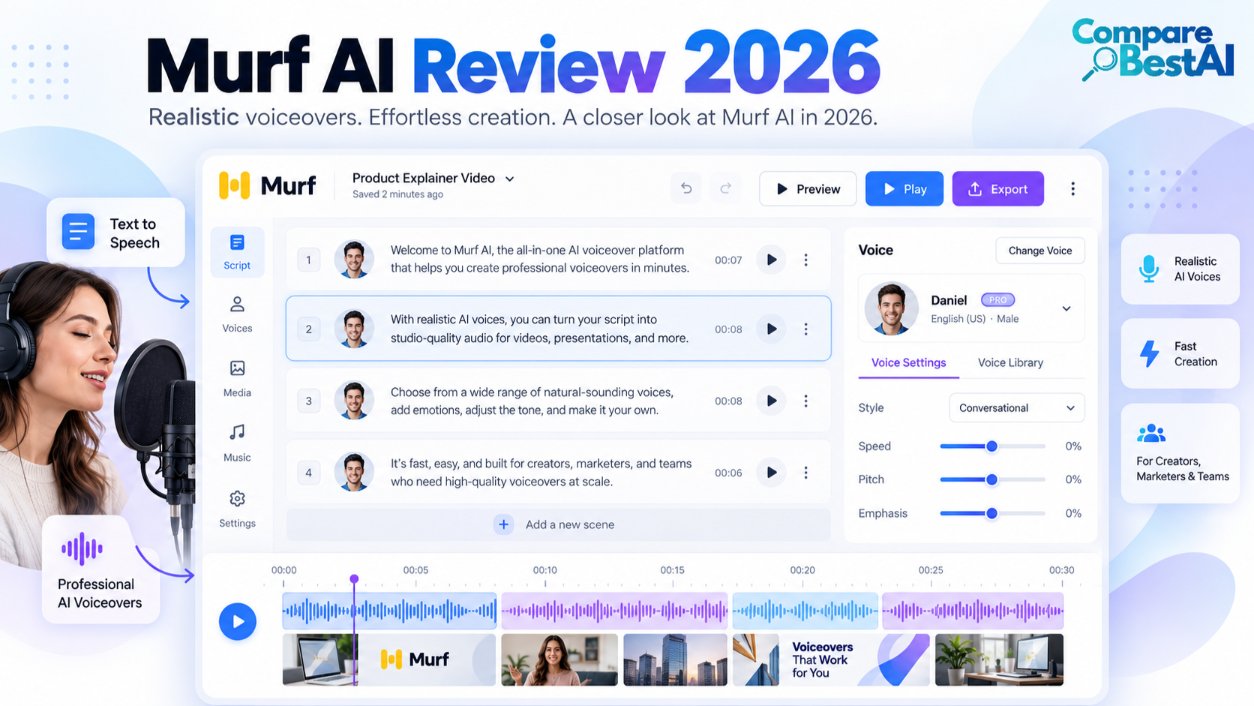
Murf AI is a text-to-speech platform that turns written scripts into studio-style voiceovers. Murf is headquartered in San Francisco and also offers a voice changer, AI dubbing, voice cloning, and a developer API. Its integrations include Canva, Google Slides, PowerPoint, and Adobe Captivate.
In this Murf AI review, you'll learn:
- What Murf AI costs per month and what the free plan really includes
- How natural Murf AI voices sound for training, YouTube, and podcasts
- Whether you can use Murf AI voiceovers commercially
- How Murf AI compares with ElevenLabs
Murf AI Pricing in 2026: What Does Each Plan Cost?
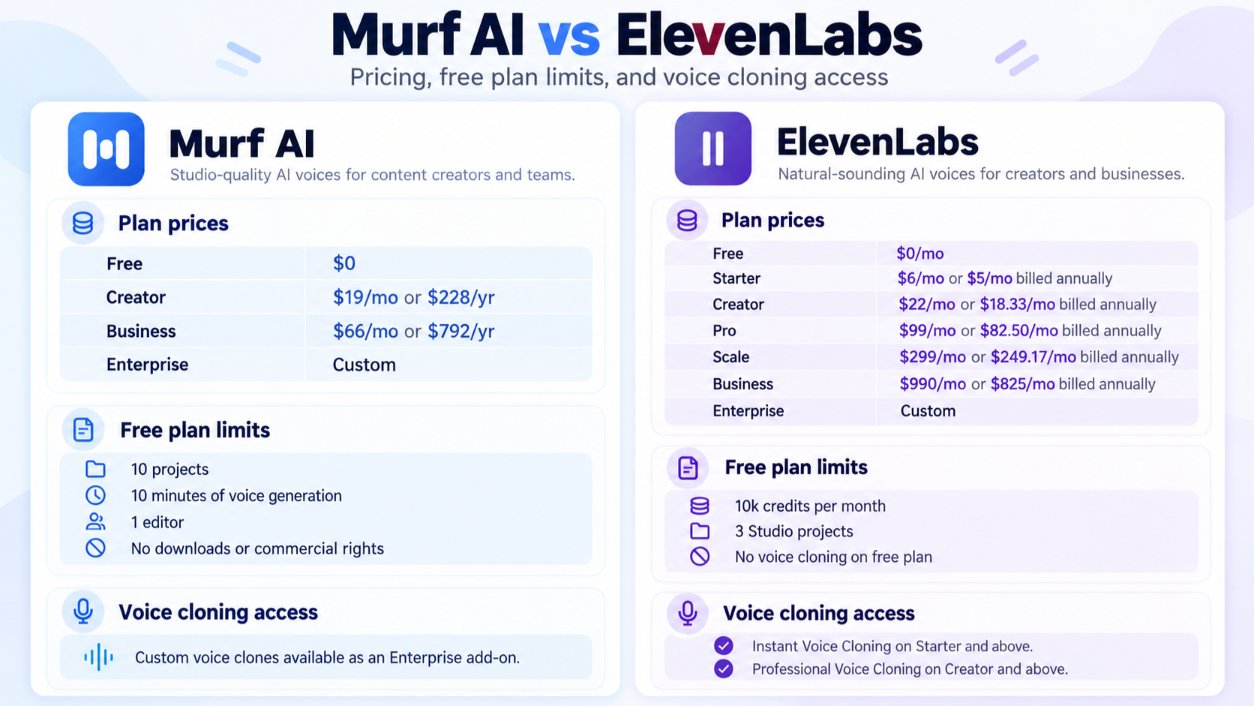
Murf AI costs $0 on the Free plan, $29 a month on Creator ($19 a month billed yearly), and $99 a month on Business ($66 a month billed yearly). Enterprise uses custom pricing.
Plan | Monthly billing | Yearly billing (per month) | Voice generation | Commercial rights |
|---|---|---|---|---|
Free | $0 | $0 | 10 minutes | No |
Creator | $29 | $19 ($228/year) | 24 hours per year | Yes |
Business | $99 | $66 ($792/year) | 96 hours per year | Yes |
Enterprise | Custom | Custom | Unlimited | Yes |
On yearly billing, Creator works out to about $0.16 per minute of generated voice ($228 for 1,440 minutes). That's competitive for teams that produce a steady flow of training or marketing content.
Feature access also changes by plan. Advanced controls like emphasis and Murf's "Say It My Way" feature, plus the Google Slides and PowerPoint add-ons, sit on Business and above. Voice cloning is limited to Enterprise.
Is Murf AI Free?
Yes, Murf AI has a free plan, but it's for testing only. You get 10 minutes of voice generation, and you can't download audio or use it commercially. Think of it as a demo: enough to compare voices and test the editor before you pay.
Is Murf AI Free in Canva?
You can add Murf's app inside Canva, but voiceovers made there use your Murf voice generation minutes. Each voiceover block is capped at 1,000 characters, and Canva allows up to 50 audio blocks per project. Free users are limited by the same 10-minute allowance, so Canva isn't a way to get unlimited free voiceovers.
Murf AI Voices: How Natural Do They Sound?
Murf AI voices sound clear and professional, and they work best for calm, informative delivery like training modules, product walkthroughs, and corporate explainers. Murf offers 200+ voices across 35+ languages, with a range of accents, ages, and speaking styles.
Murf's newer Gen2 model is built for controllable voiceovers. Murf reports 99.38% pronunciation accuracy for Gen2, though that's a vendor figure rather than an independent benchmark.
Can You Customize Tone and Emotion?
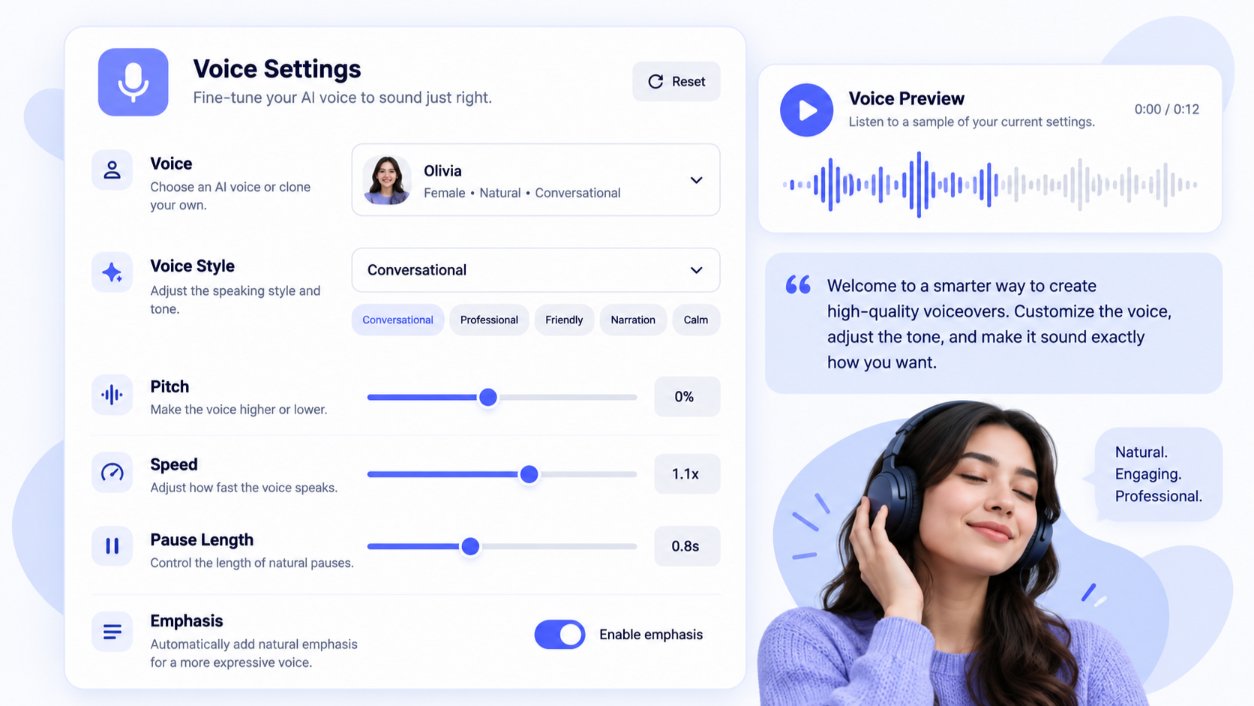
Yes. Murf gives you more hands-on control than many text-to-speech tools:
- Pitch and speed: Available on paid plans
- Pauses: Add breaks between words or sentences to sync with visuals
- Voice styles: Many voices come in several speaking styles, so one voice can sound more upbeat or more formal
- Emphasis and "Say It My Way": Business plan and above, for finer control over delivery
How to Make Murf AI Voices Sound Less Monotone
- Write for the ear. Use short sentences and contractions, the way people actually talk.
- Split long scripts into blocks. Each block can have its own pace and style.
- Add pauses after key points. A half-second break makes narration feel deliberate, not rushed.
- Vary speed slightly. Slow down for definitions and speed up for lists.
- Pick a style that fits. An upbeat style suits a product demo, while a calmer one suits a compliance module.
Can You Clone Your Own Voice With Murf AI?
Yes, but only on the Enterprise plan, which needs a sales conversation. Murf's terms also require explicit written consent from anyone whose voice you upload. If you want to clone your own voice on a small budget, ElevenLabs includes instant voice cloning from its $6 Starter plan.
 Beyond Text to Speech: Murf's Other Tools
Murf is more than a text-to-speech generator. Three extra tools matter most for creators and businesses.
Murf AI Voice Changer
The Murf AI voice changer lets you upload or record your own voice and convert it into one of Murf's AI voices. It accepts common formats like MP3, WAV, MP4, and MOV, and a "Retain Prosody" toggle aims to keep your original pitch and intonation. Files under 3 minutes can be tried without signing up.
Murf AI Video and Audio Translator
Murf's AI dubbing tool translates audio and video into other languages and exports dubbed videos as MP4. Murf says it supports 40+ languages, and you can edit the translated script without re-recording. New sign-ups get 100 free dubbing minutes, according to Murf's dubbing page.
Editing Voiceovers After Generation
Murf Studio works like a simple timeline editor. You can:
- Change a single word or sentence and regenerate only that block
- Adjust timing so the voice lines up with slides or video clips
- Preview the full project and export it as audio or video
This block-based workflow is a big reason Murf suits e-learning. Fixing a typo doesn't mean re-recording the whole module.
How Long Does It Take to Generate a Voiceover?
Short blocks usually generate in seconds. Most of your time goes into writing the script and fine-tuning pauses, not waiting on the AI.
Can You Use Murf AI Voiceovers Commercially?
Yes, Murf AI voiceovers can be used commercially on paid plans (Creator, Business, and Enterprise). The Free plan does not include commercial rights, and it doesn't allow downloads either.
According to Murf's Terms of Service, users "can use Murf created voices for commercial purposes," with a few clear limits:
- You can't resell Murf's voice library or services
- You can't use Murf voices to train other AI models
- You need explicit written consent before uploading anyone else's voice for cloning
That makes Murf a practical fit for YouTube videos, client explainers, online courses, ads, and podcast intros, as long as you're on a paid plan.
What About Copyright on AI Voiceovers?
Commercial rights from Murf cover your use of the audio. Copyright ownership of AI-generated material is a separate, still-developing question in the US. The U.S. Copyright Office's AI initiative tracks current guidance. Keep your scripts and project files as a record of your own creative input.
Murf AI vs ElevenLabs: Which Should You Choose?
Murf AI is better for training videos, presentations, and slide-based content. ElevenLabs is better for expressive narration, audiobooks, and affordable voice cloning.
Feature | Murf AI | ElevenLabs |
|---|---|---|
Free plan | 10 minutes, no downloads, no commercial use | About 10 minutes a month, no commercial use |
Entry paid plan | $29/mo or $19/mo yearly (Creator) | $6/mo (Starter, about 30 minutes) |
Mid-tier plan | $99/mo or $66/mo yearly (Business) | $22/mo (Creator, about 121 minutes) |
Voice cloning | Enterprise only | Instant cloning from Starter |
Languages | 35+ | 74 |
Standout strength | Timeline editor, slide and Canva integrations | Natural, emotional voices |
For a deeper breakdown, read our full ElevenLabs vs Murf comparison or our ElevenLabs review.
 Murf AI Pros and Cons
Pros
- Clean, professional voices that suit business content
- Block-based editor makes fixes fast
- Integrations with Canva, Google Slides, PowerPoint, and Adobe Captivate
- Commercial rights on every paid plan
- AI dubbing and voice changer in the same platform
Cons
- Free plan doesn't allow downloads
- Voice cloning is Enterprise only
- Advanced emphasis controls need the Business plan
- Fewer languages than ElevenLabs
Who Should Use Murf AI?
Use case | Is Murf a good fit? |
|---|---|
Corporate and employee training | Yes, a strong fit |
E-learning courses | Yes, especially with slide integrations |
Product demo videos | Yes |
YouTube narration | Good, if you want a clean, neutral voice |
Podcast intros and outros | Good |
Audiobooks and long-form fiction | Usually better with ElevenLabs |
Cloning your own voice on a budget | Better with ElevenLabs |
AI Voice Generator vs Professional Voice Actors
AI voiceovers win on speed, cost, and easy edits for training, explainers, and frequent updates. Professional voice actors still win for brand campaigns, character work, and emotional storytelling. A common approach is to use both: AI for internal and high-volume content, humans for flagship ads.
FAQs
What is Murf AI used for?
Murf AI is used to create voiceovers for training videos, e-learning courses, presentations, YouTube videos, ads, and podcasts. It turns typed scripts into natural-sounding speech.
How much does Murf AI cost per month?
Murf AI costs $29 a month for Creator or $99 a month for Business on monthly billing. Yearly billing lowers those to $19 and $66 a month.
Is Murf AI free for commercial use?
No. The free plan doesn't include commercial rights or downloads. You need a paid plan to use Murf voiceovers commercially.
Does Murf AI support multiple languages and accents?
Yes. Murf offers 200+ voices in 35+ languages, with a range of accents, ages, and speaking styles.
Can I use Murf AI voiceovers for YouTube?
Yes, on a paid plan. Creator includes commercial rights, which covers monetized YouTube videos.
Is Murf AI good for beginners?
Yes. You paste a script, pick a voice, and generate audio. The block-based editor is easy to learn without audio editing experience.
Does Murf AI work offline?
No. Murf runs in the browser and needs an internet connection to generate audio. Files you download on a paid plan play offline.
What is Murf AI's rating?
Murf reports a 4.7 out of 5 rating on G2 from 1,000+ reviews. CompareBestAI's editorial score for Murf is 7.5 out of 10, with value for money as its weakest area.
What do Reddit users think of Murf AI?
Forum opinions on Murf vary by use case, so treat them as a starting point. The most reliable test is to run the same script through Murf's and ElevenLabs' free plans and compare the results yourself.
Key Takeaways
- What it is: A text-to-speech platform with 200+ voices in 35+ languages
- Pricing: Free (10 minutes, no downloads), Creator $19/mo yearly, Business $66/mo yearly
- Commercial use: Included on all paid plans, not on Free
- Best for: Training videos, e-learning, presentations, and product demos
- Main weakness: Voice cloning is Enterprise only
- Main alternative: ElevenLabs, for expressive voices and cheap cloning
Final Verdict: Is Murf AI Worth It?
Murf AI is worth it if you create business voiceovers on a regular schedule, especially training, e-learning, and slide-based videos. Its editor, integrations, and commercial rights make it a practical tool for US teams that update content often. If your work leans toward audiobooks, character voices, or cloning your own voice, start with ElevenLabs instead.
At CompareBestAI, we compare AI tools side by side on pricing, features, and real use cases, so you can pick with confidence. Still deciding? See our roundup of the best AI voice generators, or use the CompareBestAI comparison tool to put Murf AI, ElevenLabs, and other voice tools head to head.