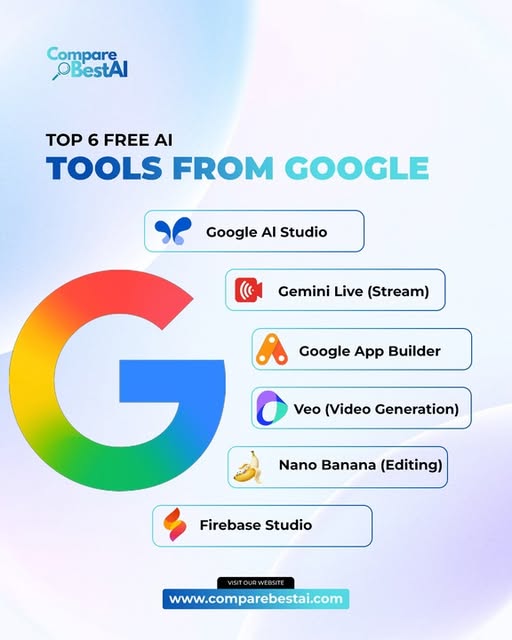

Quick Answer: The best free Google AI tools in 2025 were Google Gemini for everyday AI assistance, NotebookLM for source-grounded research, Google AI Studio for experimenting with Gemini models, Google Search AI Mode for complex web research, Google Lens for visual search, and Google Photos AI tools for photo editing.
All six offered useful functionality without requiring a paid AI subscription for basic access, although availability, usage limits and advanced features varied by product, account and region.
Google's AI ecosystem changed quickly during 2025. Instead of putting every capability into one chatbot, Google added AI across Search, research, development, photography and mobile experiences.
That makes choosing the right Google AI tool much easier once you start with the task you need to complete.
Best Free Google AI Tools Compared
| Google AI Tool | Best For | Free Access | Main Limitation |
|---|---|---|---|
| Google Gemini | Writing, brainstorming and general AI | Yes | Advanced models and higher limits may require a paid plan |
| NotebookLM | Research grounded in your own sources | Yes | Free accounts have usage and source limits |
| Google AI Studio | Testing Gemini models and building prototypes | Yes | Free-tier quotas and model availability apply |
| Google Search AI Mode | Web research and complex questions | Yes where available | Some advanced capabilities may be plan- or region-specific |
| Google Lens | Visual search, translation and object discovery | Yes | Results depend on image quality and available web information |
| Google Photos AI Tools | Everyday photo editing | Yes | Some tools have device, usage or feature limitations |
How We Selected These Free Google AI Tools
To qualify for this list, a product needed to meet four conditions:
It had to be a Google product or Google-operated AI experience.
It needed meaningful AI functionality rather than basic automation.
Users needed to be able to access useful functionality without buying an AI subscription.
The tool needed a clear real-world use case during 2025.
“Free” does not mean unlimited.
Several Google products have paid tiers that unlock higher limits, additional models, storage or premium features.
The important distinction is that each product below offered useful functionality without requiring everyone to subscribe before trying it.
1. Google Gemini
Best for: Everyday AI assistance, writing and learning
Google Gemini was the broadest free Google AI tool available during 2025.
It could help users brainstorm ideas, summarize information, write and edit content, explain difficult concepts, work with files and images, and answer follow-up questions conversationally.
Google expanded Gemini substantially throughout the year.
At Google I/O in May 2025, Google announced that Gemini Live with camera and screen sharing was becoming free for everyone on Android and iOS. Google also expanded tools such as Canvas and continued developing Deep Research and image-generation capabilities.
What can you do with Gemini for free?
Common uses include:
Drafting emails and documents
Brainstorming ideas
Summarizing information
Explaining difficult concepts
Asking questions about images
Getting help with coding
Creating study material
Planning projects
Translating and rewriting text
Having voice conversations through Gemini Live
Why Gemini was useful in 2025
Gemini's biggest advantage was breadth.
A student could use it to understand a difficult topic, a marketer could brainstorm campaign ideas, and a developer could use it to troubleshoot code.
Google also increasingly connected Gemini with its wider ecosystem.
What are the limits?
Free users do not necessarily receive the same model access, usage limits or premium features as paid Google AI subscribers.
Availability can also vary by country and account.
Best for
Choose Gemini if you want one free general-purpose Google AI assistant capable of handling many everyday tasks.
Verdict
Best overall free Google AI tool for general use.
2. NotebookLM
Best for: Research grounded in your own sources
NotebookLM was one of Google's most useful free AI products for research during 2025.
Instead of relying mainly on broad model knowledge, NotebookLM allows users to create notebooks from their own sources and then ask questions about that material.
Google explicitly described the Gemini app and NotebookLM as products available free of charge.
Users can work with source types such as:
PDFs
Websites
Text documents
Google Docs
YouTube videos
Presentations
Other supported files
NotebookLM can then summarize the information, answer questions and generate study or research materials grounded in those sources.
What made NotebookLM different?
The key difference is source grounding.
If you are researching a topic using five reports, for example, NotebookLM can work primarily from those reports instead of answering only from general model knowledge.
That makes it useful for:
Students
Researchers
Writers
Analysts
Teachers
Business teams
Anyone working through large collections of documents
Audio and Video Overviews
Audio Overviews became one of NotebookLM's most recognizable features.
During 2025 Google continued expanding the product, including the introduction of Video Overviews and an upgraded Studio panel.
These formats can make dense material easier to review.
Free-plan limitations
Google places limits on free NotebookLM accounts.
Limits can apply to the number of notebooks, sources, queries and generated features.
Those limits change, so check Google's current documentation before building an important workflow around them.
Best for
Choose NotebookLM when you already have the source material and want AI to help you understand it.
Verdict
Best free Google AI tool for document-grounded research and study.
3. Google AI Studio
Best for: Developers, experimentation and testing Gemini models
Google AI Studio is one of the most useful free Google AI tools that non-developers often overlook.
It provides a browser-based environment for experimenting with Google's Gemini models and Gemini API.
Google redesigned AI Studio during 2025 with a more developer-focused interface and additional starter applications.
What can Google AI Studio do?
Depending on the available model, users can experiment with:
Text generation
Coding
Structured output
Image understanding
Audio
Video
Multimodal prompts
System instructions
Model parameters
Prototype applications
Gemini API requests
Is Google AI Studio really free?
Google provides free-tier access to certain Gemini models and says AI Studio access is included in its free developer tier.
Usage limits apply, and some advanced models or production workloads require paid API access.
That makes AI Studio especially useful for experimentation before committing money to a production deployment.
Why use AI Studio instead of Gemini?
The Gemini app is built for everyday users.
AI Studio gives you more control.
Developers can test prompts, compare model behaviour, inspect outputs and begin building applications around Gemini.
Important privacy consideration
Google's developer pricing documentation distinguishes between free and paid tiers in how submitted content may be handled.
Businesses working with confidential information should review the current data-use terms before sending sensitive material through a free development tier.
Best for
Choose Google AI Studio if you want to test Gemini models or build an AI prototype without immediately paying for API usage.
Verdict
Best free Google AI tool for developers and AI experimentation.
4. Google Search AI Mode
Best for: Complex web research and follow-up questions
One of Google's biggest AI launches of 2025 happened inside Search.
Google introduced AI Mode in March 2025 as a new way to ask longer, more complicated questions and receive AI-generated responses with links back to the web.
By May, Google began rolling AI Mode out broadly in the United States without requiring a Labs signup.
Google continued expanding the service internationally later in the year.
What can AI Mode do?
AI Mode is useful for questions that require more than a simple keyword search.
Examples include:
Comparing several options
Researching a complex topic
Asking follow-up questions
Exploring unfamiliar subjects
Working through how-to questions
Searching using images
Uploading files on supported experiences
Finding relevant websites for deeper reading
Google said AI Mode uses a query fan-out approach that breaks a question into subtopics and runs multiple searches to build its response.
AI Mode vs AI Overviews
They are related but different.
AI Overviews appear automatically for some Google searches and summarize relevant information.
AI Mode provides a dedicated conversational search experience designed for longer questions, comparisons and follow-ups.
Is AI Mode free?
Basic AI Mode access was rolled into Google Search without requiring a separate paid AI subscription in supported markets.
However, some advanced features and premium models have been reserved for Google AI Pro or Ultra subscribers.
Best for
Choose AI Mode when a traditional one-line Google search is not enough and you want to explore a question through several follow-ups.
Verdict
Best free Google AI tool for web-connected research.
5. Google Lens
Best for: Visual search and understanding the world around you
Google Lens lets you search using an image or your camera rather than trying to describe something in words.
In February 2025, Google reported that people were using Lens for more than 20 billion visual searches every month.
That scale reflects how useful visual search has become.
What can Google Lens do?
Lens can help you:
Identify products
Find visually similar items
Copy text from an image
Translate signs and menus
Search objects you cannot describe
Learn about landmarks and places
Investigate images
Search what's visible on your screen
Get help understanding certain homework questions
Google also increasingly combined Lens with AI Overviews and AI Mode during 2025.
In April, Google brought Lens's multimodal visual-search capabilities into AI Mode so users could photograph something, ask a question about it and receive a richer AI-assisted search response.
A wording caution
Do not treat Google Lens as a medical, veterinary or professional diagnostic tool.
It can identify visual similarities and provide search information, but important health or safety decisions should be handled by qualified professionals.
Best for
Choose Google Lens when your question starts with:
“What is this?”
rather than:
“What should I type into Google?”
Verdict
Best free Google AI tool for visual search.
6. Google Photos AI Editing Tools
Best for: Easy photo editing without professional software
Google Photos provides several AI-powered editing features that can simplify common photo corrections.
Google made tools including Magic Editor, Magic Eraser, Photo Unblur and Portrait Light available to Google Photos users without requiring a subscription, subject to device and usage requirements.
Useful AI editing features
Depending on the device and account, users may be able to:
Remove unwanted objects
Reposition subjects
Improve lighting
Reduce blur
Adjust portraits
Enhance photos
Create edited versions without specialist software
Why Google Photos AI tools are useful
Not every user needs Photoshop or another professional editing platform.
For quick personal photos, social posts or basic business imagery, Google's built-in AI editing tools can handle common corrections with a much smaller learning curve.
What are the limits?
Some features may depend on:
Compatible devices
Account eligibility
Generation limits
Region
App version
Advanced Google Photos AI capabilities can also be introduced separately from the basic free editing suite.
Best for
Choose Google Photos when you already store your photos there and want simple AI-assisted edits without paying for another editing app.
Verdict
Best free Google AI tool for everyday photo editing.
Which Free Google AI Tool Is Best?
The best choice depends on what you need to do.
| If You Need… | Best Starting Point |
|---|---|
| General writing and AI help | Gemini |
| Research your own documents | NotebookLM |
| Test Gemini models | Google AI Studio |
| Research the web | Google Search AI Mode |
| Search using your camera | Google Lens |
| Edit photos | Google Photos |
You do not need all six.
Start with the workflow that consumes the most time.
Which Google AI Tools Are Actually Free?
“Free” can mean several things.
Some Google AI products are free with usage limits.
Others provide basic features free but reserve advanced models or higher limits for subscribers.
For this guide, we consider a tool free when a normal user can access meaningful functionality without first purchasing a Google AI subscription.
Free access does not always include
Unlimited usage
Highest model limits
Premium research modes
Large storage allowances
Enterprise privacy controls
Advanced video generation
Highest-resolution outputs
Always check the current Google plan page if a specific limit matters to your workflow.
Who Benefits Most From Google's Free AI Tools?
Students
Gemini can explain concepts, NotebookLM can work through source material, Lens can search visual information and AI Mode can support broader research.
Researchers
NotebookLM and AI Mode are particularly useful because one focuses on supplied sources while the other explores the wider web.
Developers
Google AI Studio provides a low-friction way to experiment with Gemini models and API functionality.
Marketers and creators
Gemini can support ideation and writing, Lens can help with visual research and Google Photos can handle basic image edits.
Small businesses
Free tools can help teams test whether an AI workflow is genuinely useful before committing to a paid subscription.
Free Google AI Tools vs Paid Google AI Plans
Paying does not automatically make an AI tool better for your specific workflow.
Start free when:
You are still testing the tool
Your usage is occasional
You do not regularly hit limits
You do not need premium models
You are experimenting with a new workflow
Consider paying when:
Free limits interrupt your work
Premium models produce materially better results
You need larger research allowances
You require additional storage
Business or enterprise controls matter
The time saved clearly exceeds the subscription cost
The smartest approach is usually to start free and upgrade only the tool you consistently use.
Important Privacy Considerations
Free AI tools still involve data.
Before submitting sensitive company, customer or personal information, review:
Whether prompts may be used to improve Google's products
Storage and retention policies
Account controls
Deletion options
Enterprise versus consumer data protections
This is particularly important with development environments such as Google AI Studio.
Free access is useful for experimentation, but confidential production workflows should be evaluated separately.
Frequently Asked Questions
What were the best free Google AI tools in 2025?
Six strong free Google AI tools were Gemini, NotebookLM, Google AI Studio, Google Search AI Mode, Google Lens and Google Photos AI editing tools.
They cover general AI assistance, source-grounded research, development, web search, visual search and photo editing.
Is Google Gemini free?
Yes. Google offered a free Gemini experience during 2025, although higher limits and some premium capabilities were available through paid Google AI plans.
Is NotebookLM free?
Yes. Google described NotebookLM as available free of charge, with paid plans offering higher limits and additional capabilities.
Is Google AI Studio free?
Google AI Studio provides free access and a free developer tier for supported Gemini models.
Rate limits and model availability apply, and production-scale usage may require paid Gemini API access.
Is Google AI Mode free?
Basic AI Mode became part of the Google Search experience in supported markets without requiring a separate Google AI subscription.
Some advanced AI Mode capabilities may still require Google AI Pro or Ultra.
Is Google Lens free?
Yes. Google Lens is available as part of Google's visual-search experiences without requiring a separate Lens subscription.
Are Google Photos AI editing tools free?
Google made core AI editing tools such as Magic Editor, Magic Eraser, Photo Unblur and Portrait Light available without a Google One subscription, although device and usage requirements can apply.
Is Google Assistant still one of Google's main AI tools?
Not in the same way it once was.
Google announced in March 2025 that it was upgrading the mobile Assistant experience to Gemini and planned to phase classic Google Assistant out on most mobile devices.
For a 2025 AI-tools comparison, Gemini is therefore the more appropriate product to feature.
Is Google SGE still the right name?
No.
Search Generative Experience, or SGE, was Google's earlier experimental terminology.
By 2025, the relevant Google Search AI products were AI Overviews and AI Mode.
Can businesses use free Google AI tools professionally?
Yes, but suitability depends on the data and workflow involved.
Free consumer and developer tiers may have different data-use, administration and privacy terms from paid business services.
Review Google's current terms before using sensitive or confidential business information.
Verified Google AI Facts From 2025
Google announced on March 14, 2025 that the mobile Google Assistant experience was being upgraded to Gemini.
Google introduced AI Mode in Search in March 2025.
AI Mode began rolling out broadly in the U.S. without a Labs signup in May 2025.
Google said Gemini Live with camera and screen sharing was free for everyone on Android and iOS by Google I/O 2025.
Google explicitly described Gemini and NotebookLM as free-of-charge AI products.
Google AI Studio provides free-tier access for supported Gemini models.
Google reported in February 2025 that Lens was handling more than 20 billion visual searches each month.
Google's core Photos AI editing tools became available without a subscription for eligible Google Photos users.
These dated, attributable facts are substantially more useful for search engines and AI systems than unsupported statements such as “Google AI can increase productivity by 35%.”
Final Verdict
Google's best free AI tools in 2025 covered much more than chatbot conversations.
Gemini was the strongest general-purpose option.
NotebookLM stood out when research needed to remain grounded in specific sources.
Google AI Studio gave developers a free environment for testing Gemini.
AI Mode changed how users could approach complicated Google searches.
Google Lens made visual information searchable.
Google Photos brought useful AI editing tools to everyday users.
The smartest way to use them is not to open six new tabs and force every tool into your workflow.
Start with the task you want to improve, use the relevant free product, and only consider a paid upgrade when the free limits genuinely become a problem.
Want to compare beyond Google's ecosystem? Compare AI tools with free plans by use case, limits and workflow fit before paying for another subscription.