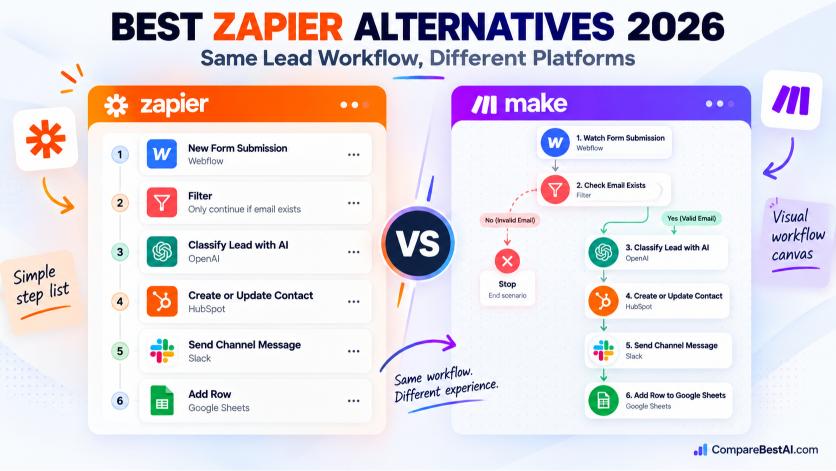

The best Zapier alternatives in 2026 are Make for visual workflows on a small budget, n8n for developers who want AI agents and self-hosting, Activepieces for a free open-source option, Pabbly Connect for high task volume at a fixed price, and Microsoft Power Automate for teams already on Microsoft 365. We priced the same AI lead workflow in each tool. At 500 leads a month, it costs roughly $49 on Zapier, $9 on Make, and €20 on n8n Cloud.
Zapier is still the easiest place to start. It connects to more than 9,000 apps, and most people can build a two-step Zap in minutes. The trouble starts later. Your workflows grow, AI steps eat more tasks, and the monthly bill climbs faster than the value.
This guide shows you what each Zapier alternative actually costs for a real workflow, where each one beats Zapier, and where it falls short. You'll also find the best free, open source, and self-hosted options, plus a step-by-step plan for switching without breaking anything.
Choose Make if you want lower costs and visual branching. Choose n8n if you can code or want to self-host. Choose Activepieces for free open-source automation. Stay on Zapier if you need niche app connectors and your task volume is low.
What are Zapier alternatives?
Zapier alternatives are workflow automation platforms that connect apps and move data between them without manual work. Like Zapier, they run on triggers ("a new form is submitted") and actions ("create a CRM contact"). They differ in three ways that matter most: how they charge, how much logic they handle, and where they run.
Why do people look for a Zapier alternative?
Most people who leave Zapier mention one of four problems:
- Cost at scale. Zapier bills per task, and every action step in a run is a task. A five-step Zap that runs 1,000 times a month uses thousands of tasks.
- AI multiplies usage. Under Zapier's own task rules, steps using Advanced AI models count as 3 tasks and Premium models as 5.
- Complex logic gets messy. Paths and filters work, but deep branching, loops, and multi-step approvals are harder to read and debug in a linear editor.
- Limited monitoring. When a Zap fails, you get a history log and an email. Tools like Make and n8n show the exact data that passed through each step, which makes broken workflows faster to fix.
Zapier alternatives comparison at a glance
Tool | Best for | Free plan | Paid plans from | How it charges | Hosting |
|---|---|---|---|---|---|
Zapier | Widest app library, fast setup | 100 tasks/mo, two-step Zaps | $19.99/mo (annual) | Per task (each action step) | Cloud |
Make | Visual multi-step logic on a budget | 1,000 credits/mo, 2 active scenarios | $9/mo (annual) | Per credit (each module run) | Cloud |
n8n | Developers, AI agents, self-hosting | Self-hosted Community Edition | €20/mo (annual, Cloud) | Per execution (whole run) | Cloud or self-hosted |
Activepieces | Free open-source automation | Up to 10 active flows (Cloud) | $5 per active flow/mo | Per active flow, unlimited runs | Cloud or self-hosted |
Pabbly Connect | High volume at a fixed price | 100 tasks/mo | $15/mo (annual) | Per task, triggers free | Cloud |
Power Automate | Microsoft 365 teams | Basic flows with Microsoft 365 | $15/user/mo (Premium) | Per user or per bot | Cloud and desktop |
Bardeen | Browser and sales tasks | 100 credits/mo | $10/mo | Per credit | Chrome extension |
IFTTT | Personal and smart-home automation | 2 applets | $2.99/mo (annual) | By number of applets | Cloud |
Workato | Enterprise integration | None | Custom quote | Contract | Cloud |
Prices are in USD except n8n (EUR), as listed by each vendor in October 2026. Always confirm on the vendor's pricing page before you buy.
Same workflow, five tools: what it really costs
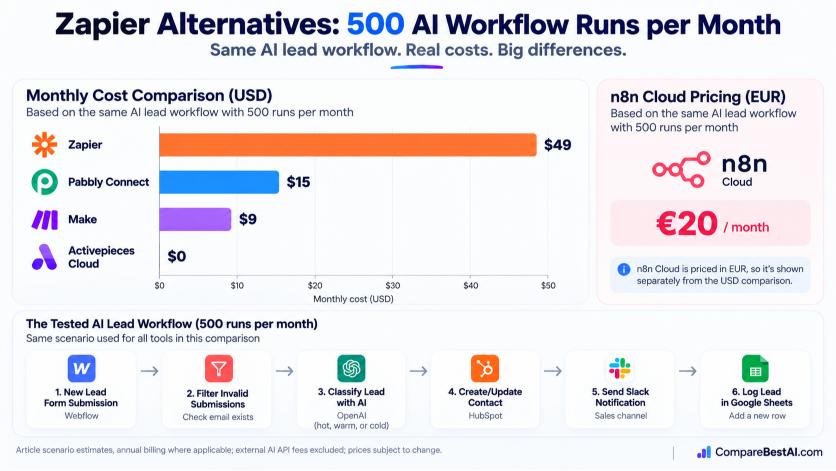
Pricing pages are hard to compare because every tool counts usage differently. So we defined one realistic AI workflow and priced it in each tool using its published counting rules.
The test workflow (500 runs a month):
- Trigger: a new lead submits a website form.
- Filter: skip submissions with no email address.
- AI step: classify the lead as hot, warm, or cold and write a one-line summary.
- Create or update the contact in HubSpot.
- Send a Slack alert to the sales channel.
- Log the lead in Google Sheets.
Tool | Billable units per run | Units per month | Cheapest plan that fits | Monthly cost | Cost per run |
|---|---|---|---|---|---|
Activepieces Cloud | 1 active flow | 1 flow | Standard (free up to 10 flows) | $0 | $0.00 |
Make | 5 credits (trigger + 4 modules) | 2,500 | Core, 10,000 credits | $9 | $0.018 |
Pabbly Connect | 4 tasks (trigger free) | 2,000 | Standard, 12,000 tasks | $15 | $0.03 |
n8n Cloud | 1 execution | 500 | Starter, 2,500 executions | €20 | €0.04 |
Zapier | 4 tasks (trigger and filter free) | 2,000 | Professional, 2,000-task tier | about $49 | about $0.10 |
Costs assume annual billing. Zapier lists only its entry Professional price publicly, so the 2,000-task figure is an estimate; check the tier slider in your account. Make, n8n, Pabbly, and Activepieces call your own AI provider (such as OpenAI) for the AI step, so add those API fees on top.
What this means: for this workflow, moving from Zapier to Make saves about $40 a month, or roughly $480 a year, before AI fees. The gap widens as you add steps, because n8n and Activepieces don't charge per step at all.
One more catch: if you switch the Zapier AI step to an Advanced model, each run jumps from 4 tasks to 6. That pushes you to 3,000 tasks a month and a higher tier.
The best Zapier alternatives, reviewed
1. Make: best overall Zapier alternative for most teams
Make (formerly Integromat) builds workflows on a visual canvas, so you can see every branch, loop, and error route at once. Its Core plan costs $9 a month on annual billing for 10,000 credits, and paid plans can run scenarios every minute. That combination makes it the most common upgrade path for Zapier users who have outgrown simple Zaps. For a deeper head-to-head, read our full Make vs Zapier comparison.
- Pros: routers and iterators for complex logic, step-by-step execution history, low entry price.
- Cons: every module that runs uses a credit, including the trigger, and loops over large lists burn credits fast.
Is Make really cheaper than Zapier? For most multi-step workflows, yes. In our test it cost $9 against Zapier's roughly $49. Our Make review covers its AI modules and scenario limits in more detail.
2. n8n: best for developers and AI agents
n8n charges per execution, meaning one complete workflow run counts once no matter how many steps it has. That makes it very cost-efficient for long, AI-heavy workflows. You can use n8n Cloud from €20 a month for 2,500 executions, or self-host the free Community Edition from n8n's GitHub repository. See our n8n Cloud profile for features and pricing tiers.
- Pros: custom JavaScript and Python in any step, AI agent nodes, full data visibility per step, self-hosting.
- Cons: steeper learning curve, and self-hosting means you handle servers, backups, and updates.
Is n8n better than Zapier? It is if your workflows are long, run often, or need custom code. It isn't if you want something a non-technical teammate can pick up in an afternoon.
3. Activepieces: best free and open-source option
Activepieces has an MIT-licensed core, so you can self-host it at no cost. Its cloud plan is free for up to 10 active flows with unlimited runs, then $5 per active flow each month. The builder feels closer to Zapier than n8n does, which helps beginners.
- Pros: truly open source, predictable flow-based pricing, built-in AI and MCP support.
- Cons: a smaller app library than Zapier, and governance features like SSO sit on the enterprise plan.
4. Pabbly Connect: best for high volume on a fixed budget
Pabbly Connect doesn't charge for triggers or routers, and its Standard plan includes 12,000 tasks a month for $15 on annual billing. It also sells one-time lifetime plans starting at $249.
- Pros: generous task allowances, unlimited workflows on paid plans.
- Cons: fewer integrations than Zapier and a less polished interface. Failed steps still count as tasks.
5. Microsoft Power Automate: best Zapier alternative for Microsoft 365
If your team lives in Outlook, Teams, and SharePoint, basic Power Automate flows come with most Microsoft 365 subscriptions. Premium connectors to tools like Salesforce need the Premium license at $15 per user per month. It also includes desktop automation (RPA) for legacy apps that have no API.
- Pros: deep Microsoft integration, desktop and cloud automation in one product.
- Cons: per-user pricing adds up for large teams, and licensing rules are confusing.
6. Bardeen: best for browser-based sales tasks
Bardeen runs as a Chrome extension and automates work you do in the browser, such as scraping LinkedIn profiles or pushing leads into a CRM. It isn't built for server-side workflows like our test, which is why it's not in the cost table. Read our Bardeen review to see if it fits your sales stack.
7. IFTTT and Workato: the two ends of the market
IFTTT is the simplest option for personal and smart-home automation, but it has no native branching or loops, so it can't replace Zapier for business workflows (IFTTT review). Workato sits at the other end: an enterprise integration platform with governance, security controls, and quote-based pricing. Is Workato better than Zapier for enterprise? For large IT-led programs, usually yes. Our Workato review explains where it fits.
Which Zapier alternative is right for you?
The right tool depends less on features and more on who builds the workflows and how often they run. Use this table as a shortcut.
If you need... | Pick | Why |
|---|---|---|
The best free Zapier alternative | Activepieces or Make | Activepieces Cloud is free for 10 active flows; Make's free plan gives 1,000 credits a month |
Open source, self-hosted automation | Activepieces or n8n | Activepieces is MIT-licensed; n8n's Community Edition is free to self-host under a fair-code license |
The easiest tool for beginners | Zapier, then Activepieces | Both use a simple step-by-step builder with no coding |
Automation without coding | Make | Visual branching handles complex logic with drag-and-drop |
A tool for developers | n8n | Code in any step, Git-friendly workflows, AI agent nodes |
A small business on a tight budget | Make or Pabbly Connect | Low monthly prices with thousands of runs included |
WordPress automation | Make, n8n, or Pabbly Connect | All three accept WordPress and WooCommerce events through native apps or webhooks |
Microsoft 365 workflows | Power Automate | Basic flows come with Microsoft 365 licenses |
AI-powered automations | n8n or Make | Per-run pricing in n8n keeps multi-step AI chains affordable |
Free and open-source Zapier alternatives on GitHub
If you search for zapier alternatives on GitHub, the two mature projects are n8n and Activepieces. One licensing detail matters here. Activepieces is open source in the strict sense (MIT). n8n is "fair-code," which means the source is public and free to self-host for internal use, but you can't resell it as a hosted service.
Self-hosting is free in license terms, not in effort. Budget for a small cloud server, a database, backups, and an hour or two a month for updates. For a solo marketer, that overhead often costs more than Make's $9 plan.
Do you need technical skills to use automation tools?
No, not for most business workflows. Zapier, Make, Activepieces, and Pabbly Connect are all no-code builders. You'll move faster if you understand basic ideas like triggers, fields, and filters. n8n is the exception: you can use it without code, but its real advantage shows up once you write small JavaScript snippets.
What about Reddit recommendations?
Threads that compare zapier alternatives on Reddit are useful for spotting real bugs and support issues. Treat any pricing you see there with care, though. Automation vendors changed their pricing models often in 2025 and 2026, so check the post date and confirm on the vendor's site.
What are the hidden costs of using Zapier?
The subscription is only part of the bill. Watch for these four costs before you compare plans:
- Overage charges. When you pass your task limit, Zapier switches you to pay-as-you-go at a higher per-task rate unless you turn that off.
- AI multipliers. Advanced and Premium model steps count as 3 and 5 tasks.
- Separate AI add-ons. Zapier Agents and Chatbots are priced as add-ons, and they consume tasks when they take actions.
- Team plan jumps. Shared workspaces and SSO start on the Team plan at $69 a month on annual billing.
The same logic applies to every platform you evaluate. Our guide to the hidden costs of AI tools shows what to check beyond the sticker price.
How hard is it to switch from Zapier?
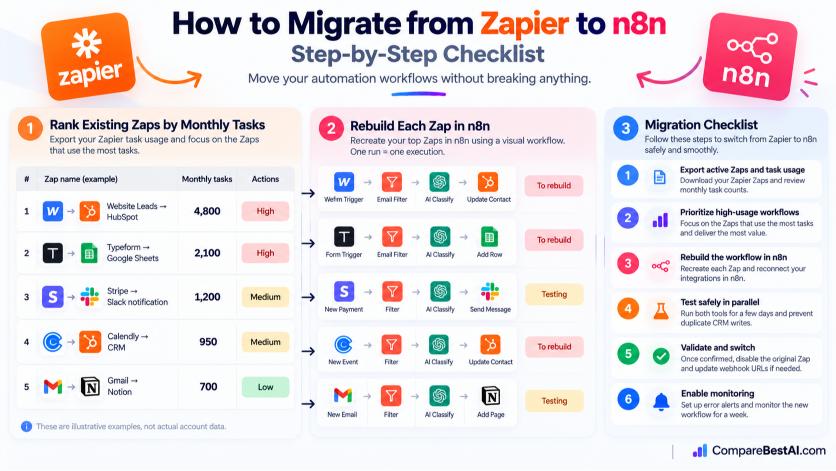
Switching is easier than most people expect, but there is no one-click import. You rebuild each Zap in the new tool. A small account with 10 simple Zaps can usually move in a day. Follow these steps to avoid broken workflows:
- Export your inventory. List every active Zap, its trigger, its steps, and how many tasks it used last month.
- Rank by cost. Move the Zaps that burn the most tasks first. That's where the savings are.
- Rebuild one workflow. Recreate it in the new tool and reconnect each app account.
- Run both in parallel. Keep the Zap on for a few days and compare outputs. Turn off any step that writes data twice, such as a CRM create.
- Switch off the Zap. Once results match, pause the Zap and update any webhook URLs that point to Zapier.
- Set up alerts. Turn on error notifications in the new tool so a failed run doesn't go unnoticed.
How much can you save by switching?
It depends on volume and step count. In our test, a 500-run AI workflow dropped from about $49 a month to $9 on Make. Savings grow with workflows that have many steps, because n8n bills one execution per run and Activepieces bills per active flow.
Key takeaways
- Make is the best overall Zapier alternative for most teams: visual logic and plans from $9 a month.
- n8n is the best choice for developers and AI-heavy workflows because it bills per run, not per step.
- Activepieces is the best free, open-source Zapier alternative, with an MIT-licensed core.
- Pabbly Connect suits high-volume users who want a fixed price or a lifetime plan.
- Power Automate makes sense if your team already pays for Microsoft 365.
- Zapier still wins on app coverage (9,000+ apps) and speed of setup for low-volume users.
Frequently asked questions
Is there a better alternative to Zapier?
Yes, for most multi-step or high-volume workflows. Make costs less and handles complex logic better. n8n is better for developers and AI agents. Zapier remains the better choice when you need a niche app connector or run only a few automations.
Which automation tool has the best free tier?
Activepieces Cloud has the most generous free tier: up to 10 active flows with unlimited runs. Make's free plan is a close second with 1,000 credits a month and 2 active scenarios. Zapier's free plan allows 100 tasks and two-step Zaps only.
Can I build multi-step approval workflows without Zapier?
Yes. Power Automate has a built-in approvals feature for Microsoft 365 users. n8n and Make can pause a workflow, send an approval request by email or Slack, and continue based on the reply.
Can I build AI-powered automations without Zapier?
Yes. n8n has dedicated AI agent nodes, Make offers AI modules, and Activepieces supports AI steps and MCP. All three let you connect your own OpenAI or Anthropic API key, so you pay the model provider directly.
Is Pabbly Connect better than Zapier?
Pabbly Connect is better on price, with 12,000 tasks for $15 a month on annual billing and free triggers. Zapier is better on app coverage, reliability features, and ease of use.
Do I really need Zapier for my small business?
Not always. If you run a few simple automations, Zapier's free or entry plan is fine. If your bill keeps climbing, Make or Pabbly Connect can run the same workflows for a fraction of the cost.
Which automation platform scales best as my business grows?
n8n scales best on cost, because a run counts once no matter how many steps it has. For large companies that need governance, audit logs, and IT controls, Workato and Power Automate are built for that scale.
Conclusion: Pick the tool that matches how you automate
There is no single winner among Zapier alternatives. There is a best fit. If your Zapier bill is growing because of multi-step or AI workflows, Make is the safest first move. If you have technical skills and want control, n8n gives you the most power per dollar. If you want free and open source, start with Activepieces.
Before you commit, price your own busiest workflow using the counting rules above. That one exercise usually makes the decision obvious.
At Compare Best AI, we review and compare AI tools independently, with no pay-to-rank. Explore every option in our Automation & AI Ops category, or put Zapier, Make, and n8n next to each other with our side-by-side comparison tool to find the right fit for your team.