
Is a Descript Subscription Worth It?
Yes, a Descript subscription is worth it if you create podcasts, YouTube videos, interviews, tutorials, webinars, short-form clips, or business content regularly. Descript is especially valuable because it combines transcription, text-based video editing, screen recording, AI voice tools, filler word removal, Studio Sound, captions, and AI-powered editing features in one platform.
For casual users, the free plan is enough to test the tool. For creators, marketers, podcasters, and agencies, a paid Descript subscription can save hours every week by replacing multiple tools in one workflow. Descript’s official pricing page shows a free plan, paid plans starting from $16/month when billed annually, and higher-tier plans for creators, teams, and enterprises.
What Is Descript?
Descript is an AI-powered audio and video editing platform built for creators, podcasters, marketers, educators, and teams. Instead of editing video only through a traditional timeline, Descript lets users edit content by editing the transcript text.
That means deleting a sentence from the transcript can remove that part from the audio or video. This makes editing much easier for beginners, while still offering advanced features for professionals.
Descript includes tools for:
- Podcast editing
- Video editing
- Transcription
- Screen recording
- AI voice cloning
- Captions
- Filler word removal
- Studio Sound
- Clip creation
- Team collaboration
This is why many creators search for a Descript subscription worth it, especially when comparing it with tools like Adobe Premiere Pro, CapCut, VEED, Riverside, and traditional podcast editing software.
Descript Pricing Official 2026
Descript pricing official 2026 includes a free plan and paid options for podcasters, video creators, marketers, and business teams. Paid plans provide higher media limits, more AI credits, watermark-free exports, Studio Sound, screen recording, voice tools, and collaboration features. The best choice depends on monthly editing volume, export quality, AI usage, and team size.
Descript Pricing Plans and Features for 2026
When comparing descript pricing official 2026, review the included media hours, AI credit limits, export resolution, voice-cloning access, and collaboration capabilities.
Is Descript Pricing Worth It in 2026?
Beginners can start with the free plan, while frequent creators may benefit from Hobbyist, Creator, or Business. Overall, descript pricing official 2026 offers flexible options for transcript-based audio and video production.
Descript Pricing Overview: Free vs Paid Plans
Descript offers a free plan and several paid subscription options. The official Descript pricing page lists a Free plan at $0, a Hobbyist plan starting at $16/month when billed annually, a Business plan at $50/month when billed annually, and an Enterprise option with custom pricing.
Here is a simplified pricing breakdown:
| Plan | Best For | Key Value |
|---|---|---|
| Free | Beginners testing Descript | Basic editing and limited AI usage |
| Hobbyist | Individual creators | More media hours and watermark-free 1080p exports |
| Creator / Pro-style users | Serious content creators | More AI usage, better exports, advanced tools |
| Business | Teams and agencies | Collaboration, brand tools, larger usage limits |
| Enterprise | Large companies | Security, custom controls, custom usage |
Descript’s free plan currently includes limited monthly media usage, AI credits, and 720p watermark-free export, while the Hobbyist plan expands usage and unlocks 1080p watermark-free export with broader access to AI editing tools.
Ready to test Descript for your own workflow? Start with Descript and see how much editing time you can save: Try Now
Descript Pricing Official 2026
Descript pricing official 2026 includes a free plan and paid options for podcasters, video creators, marketers, and business teams. Paid tiers provide higher media limits, more AI credits, watermark-free exports, Studio Sound, screen recording, voice tools, and collaboration features. The best plan depends on monthly editing volume, export quality, team size, and AI usage.
Descript Pricing Plans and Features for 2026
When comparing descript pricing official 2026, users should review media-hour limits, AI credit allowances, export resolution, voice-cloning access, and team functionality.
Is Descript Pricing Worth It in 2026?
Beginners can start with the free plan, while regular creators may gain better value from Hobbyist or Creator. Overall, descript pricing official 2026 offers flexible options for transcript-based audio and video production.
Is the Descript Free Plan Enough?
The Descript free plan is useful if you want to test the platform before paying. It is good for small experiments, short clips, and learning the workflow.
However, the free plan may feel limited if you create content regularly. If you edit long podcasts, YouTube videos, client videos, webinars, or multiple clips every month, the limits can become a problem quickly.
The free plan is best for:
- Testing Descript before upgrading
- Editing short personal clips
- Trying transcription and text-based editing
- Exploring AI editing features
- Learning the interface
The free plan is not ideal for:
- Weekly YouTube publishing
- Full podcast production
- Client work
- Team collaboration
- Heavy AI editing
- High-resolution exports
So, if your question is is Descript worth it 2026, the answer depends on your content volume. If you publish consistently, a paid plan is much more practical.
Why a Descript Subscription Can Be Worth It
1. Text-Based Editing Saves Time
The biggest reason Descript is worth it is its text-based editing workflow. Instead of cutting audio or video manually, you can edit the transcript like a document.
For podcasters, this is a huge time-saver. For video creators, it makes rough cuts much faster. For marketers, it allows teams to edit content without needing advanced video editing skills.
This is especially useful for:
- Interviews
- Podcasts
- Talking-head videos
- Course videos
- Webinars
- Tutorials
- Client testimonials
2. It Combines Multiple Tools
A Descript subscription may replace several tools in your workflow. Many creators use separate software for transcription, captions, audio cleanup, video editing, screen recording, and clip generation. Descript brings many of these features together.
That means you may save money by not paying for multiple platforms.
3. AI Tools Help Speed Up Production
Descript includes AI-powered tools such as Studio Sound, filler word removal, AI speech, clips, and editing assistance. G2 notes that Descript plans unlock watermark-free exports, Studio Sound, Underlord, and collaboration features depending on the subscription level.
These features are useful for creators who want faster output without hiring a full editing team.
4. Great for Podcasts and Interviews
Descript is one of the strongest tools for podcast editing. You can transcribe, edit, clean audio, remove mistakes, and export clips from one workspace.
For podcast creators, this can reduce the time between recording and publishing.
5. Useful for Social Media Repurposing
If you create long-form content, Descript helps turn it into short clips. This is valuable for TikTok, Instagram Reels, YouTube Shorts, LinkedIn videos, and Facebook content.
For content creators and marketing teams, this is where Descript can become a real ROI tool.
Descript Subscription Pros and Cons
| Pros | Cons |
|---|---|
| Easy text-based editing | Free plan is limited |
| Great for podcasts and videos | Advanced users may still need Premiere Pro |
| AI tools save time | Pricing can grow for teams |
| Built-in transcription | Learning curve for new users |
| Useful for captions and clips | Not ideal for complex cinematic editing |
| Good for creators and marketers | AI limits depend on plan |
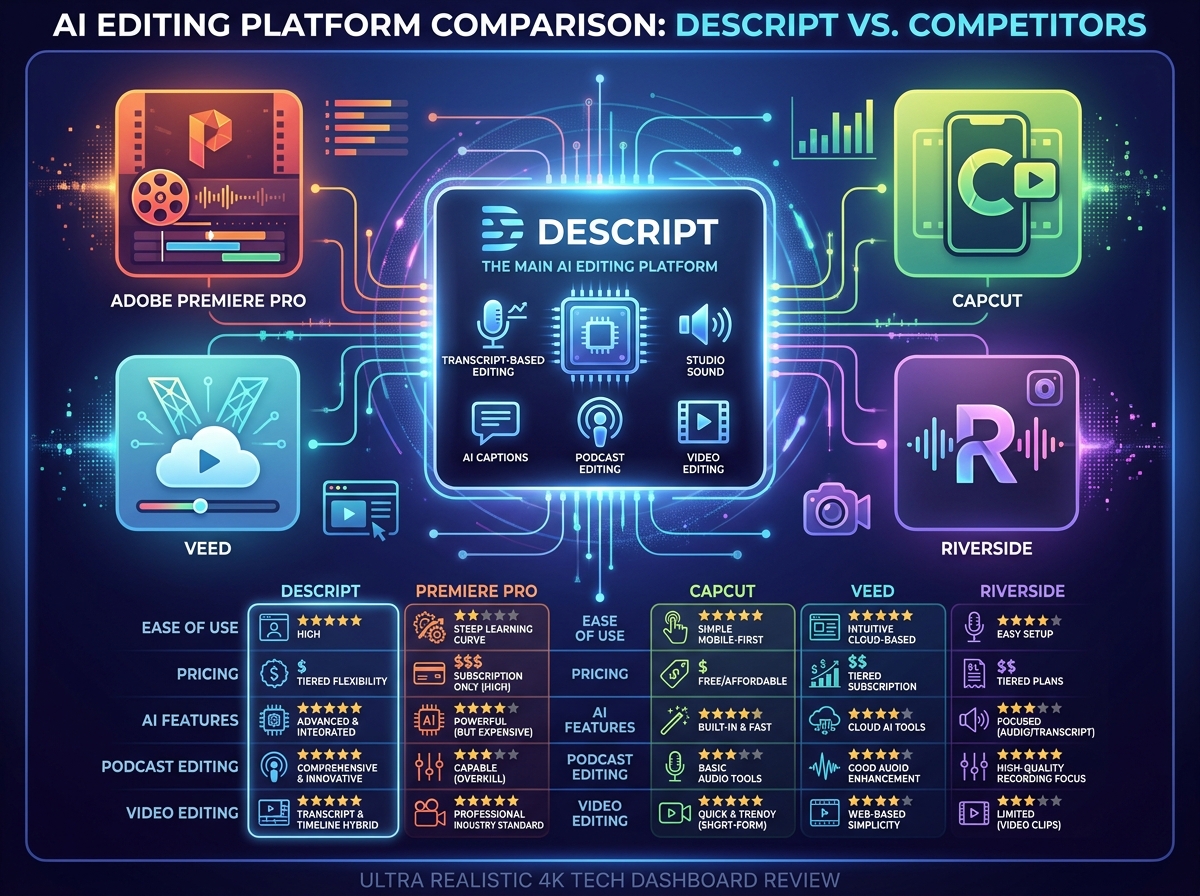
Descript vs Competitors: Which Tool Is Better?
| Tool | Best For | Strength | Weakness |
|---|---|---|---|
| Descript | Podcasts, talking-head videos, clips | Text-based editing and AI workflow | Not best for advanced cinematic editing |
| Adobe Premiere Pro | Professional video editors | Deep editing control | Steeper learning curve |
| CapCut | Short-form creators | Easy social video editing | Less advanced for podcast workflows |
| VEED | Browser-based video editing | Simple online editing | Less powerful for long-form editing |
| Riverside | Remote recording | High-quality recording | Editing workflow may need other tools |
If you need professional cinematic editing, Adobe Premiere Pro may be better. If you mainly make short social videos, CapCut may be enough. But if you create podcasts, interviews, webinars, business videos, or content that needs transcription-based editing, Descript is one of the most practical choices.
Want a faster way to edit podcasts, videos, and clips? Try Descript and compare the workflow for yourself: Explore Now
Who Should Buy a Descript Subscription?
A Descript subscription is best for:
Podcasters
Descript helps with transcription, editing, filler word removal, Studio Sound, and publishing-ready exports.
YouTubers
It works well for talking-head videos, tutorials, interviews, and repurposing long videos into short clips.
Marketers
Marketing teams can use Descript to create ads, demos, social clips, product explainers, and customer stories.
Coaches and Course Creators
Descript makes it easier to edit lessons, clean audio, add captions, and produce training videos.
Agencies
Agencies can use Descript to speed up client content production and manage repeat editing tasks.
Business Teams
Business teams can use Descript for internal training, sales videos, webinars, and communication content.
Which Descript Plan Should You Choose?
If you are still asking whether a Descript subscription is worth it, the simplest answer is this:
Choose the free plan if you only want to test Descript. Choose a paid plan if content creation is part of your business, marketing, podcasting, or client workflow.
Best Plan by User Type
| User Type | Recommended Plan | Why |
|---|---|---|
| Beginner | Free Plan | Good for testing the platform |
| Solo Creator | Hobbyist / Creator-level plan | Better exports and more monthly usage |
| Podcaster | Paid Plan | Saves time with transcript editing and audio cleanup |
| Marketing Team | Business Plan | Better for collaboration and brand workflows |
| Agency | Business or Enterprise | Better for team usage and client production |
Is Descript Worth It for Podcast Editing?
Yes, Descript is worth it for podcast editing because it simplifies the entire production workflow. You can record, transcribe, edit, clean audio, remove filler words, and prepare clips from the same platform.
Traditional podcast editing can take hours. Descript can reduce that time by making the editing process more visual and text-based.
For podcasters who publish weekly, a paid subscription can easily justify the cost.
Is Descript Worth It for Video Editing?
Descript is worth it for video editing if your videos are speech-based. It works especially well for:
- YouTube talking-head videos
- Tutorials
- Educational videos
- Interviews
- Product explainers
- Webinars
- Social clips
However, if you need complex color grading, advanced visual effects, cinematic editing, or high-end motion graphics, Descript may not fully replace tools like Adobe Premiere Pro or DaVinci Resolve.
Is Descript Worth It for Beginners?
Yes, Descript is beginner-friendly. The interface is easier than traditional editing software because users can edit media by editing text.
Beginners do not need to understand complex timelines, waveforms, or professional editing panels to get started. This makes Descript a strong choice for new creators who want professional-looking content without a hard learning curve.
Final Verdict: Is Descript Subscription Worth It?
A Descript subscription is worth it for creators, podcasters, marketers, agencies, and businesses that produce audio or video content regularly. It saves time, simplifies editing, and combines several tools into one platform.
The free plan is useful for testing, but the paid plans offer far more practical value for serious content creation. If your workflow includes podcasts, interviews, tutorials, social clips, or business videos, Descript is a smart investment.
For casual users, the free plan may be enough. For serious creators, the subscription is worth considering.
If you create content regularly, Descript can simplify your editing stack. Start exploring Descript here: https://get.descript.com/af2l6bj3ain3
Yes, for most beginners. Descript's free plan (60 minutes/month) lets you test text-based editing risk-free, and the $16/month Hobbyist plan covers casual podcasters and YouTubers. The $24/month Creator plan is the sweet spot once you're publishing regularly. Beginners doing under 1 hour of content monthly should stick with free first.
2. Can Descript really edit videos without video experience?Yes. Descript edits video by editing the transcript — delete a sentence and the clip disappears with it. Beginners typically produce a publishable video within 30 minutes of opening the app. No timeline scrubbing, no keyframes. If you can edit a Google Doc, you can edit a video in Descript.3. How much does a Descript subscription cost?
Descript offers a free plan and paid plans. Its official pricing page lists paid plans starting at $16 per month when billed annually, with higher plans for creators, teams, and enterprises.
3. What's the cheapest way to edit podcasts and videos with Descript?Start with Descript's free plan (60 min/month, 720p exports) to learn the workflow. If you outgrow it, the $16/month Hobbyist plan is the cheapest paid tier with watermark-free exports. Always pick annual billing — it saves 33–35% vs monthly. The Creator plan at $24/month annual is cheaper than Adobe Premiere ($23/mo) with more AI features.
4. Is Descript better than Adobe Premiere Pro?
Descript is better for transcript-based editing, podcasts, interviews, and talking-head videos. Adobe Premiere Pro is better for advanced cinematic editing, color grading, and complex video production.
5. Who should use Descript?Descript is best for podcasters, YouTubers, marketers, educators, coaches, agencies, and business teams that create audio or video content regularly.
6. What does the Descript Pricing Official 2026 include?
Descript pricing official 2026 includes a free plan and paid tiers with different media-hour limits, AI credits, export quality, Studio Sound access, voice tools, screen recording, and team collaboration features.
7. Which descriptive pricing official 2026 plan is best?
The best descriptive pricing official 2026 plan depends on editing volume, AI usage, export requirements, and team size. Beginners can start free, while frequent creators may benefit from Hobbyist, Creator, or Business.