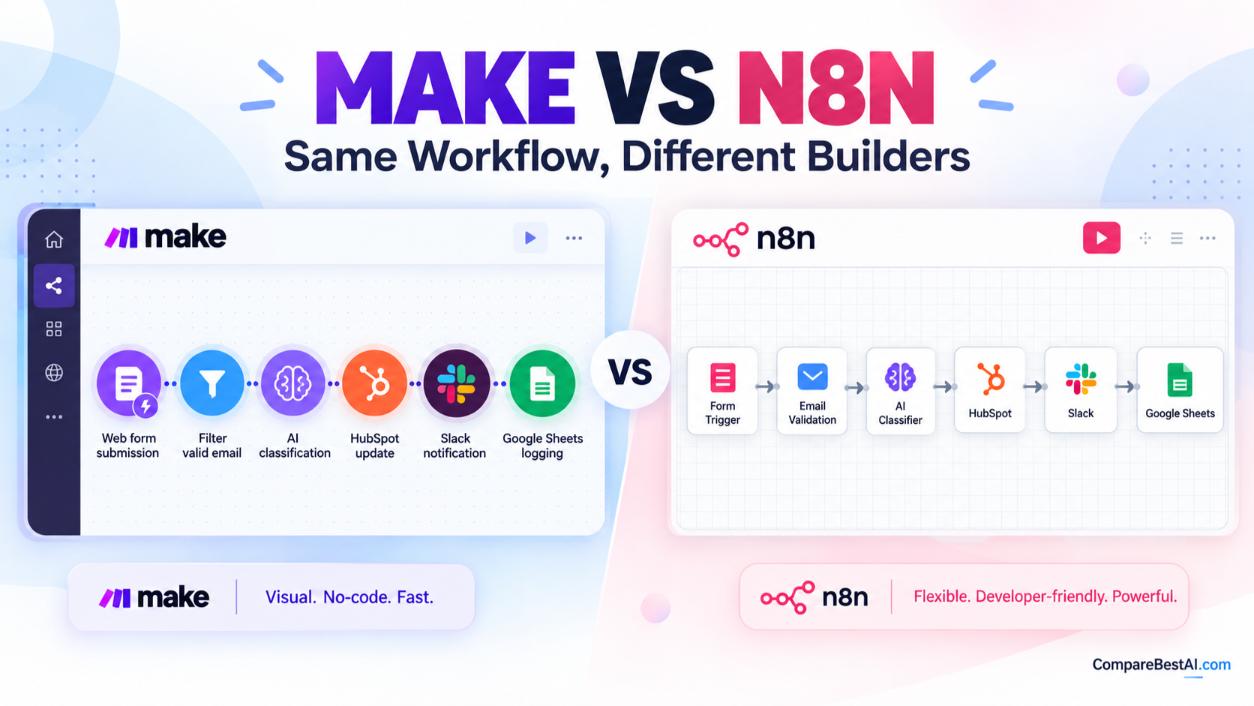

Choose Make if you want a visual, no-code builder that a non-technical team can learn quickly and your workflows are simple to mid-sized. Choose n8n if you need complex logic, AI agents, custom code, or the option to self-host. The biggest practical difference is billing: Make charges for every module action, while n8n charges once per full workflow run. For long, multi-step workflows, that gap usually makes n8n the cheaper choice.
This guide compares Make vs n8n on the same workflow, so you can see real monthly cost, ease of use, AI features, and self-hosting trade-offs before you commit. We also show where Zapier fits for readers weighing all three.
Make vs n8n at a Glance (2026)
Factor | Make | n8n |
|---|---|---|
Best for | Non-technical teams, marketing and ops automations | Technical teams, AI agents, complex or high-volume workflows |
Builder style | Visual drag-and-drop "scenarios" | Node-based canvas with optional JavaScript and Python |
Coding needed | No | Not for basics; helpful for advanced work |
Self-hosting | No (cloud only) | Yes, free Community Edition |
Billing unit | Credits (one per module action) | Executions (one per full workflow run) |
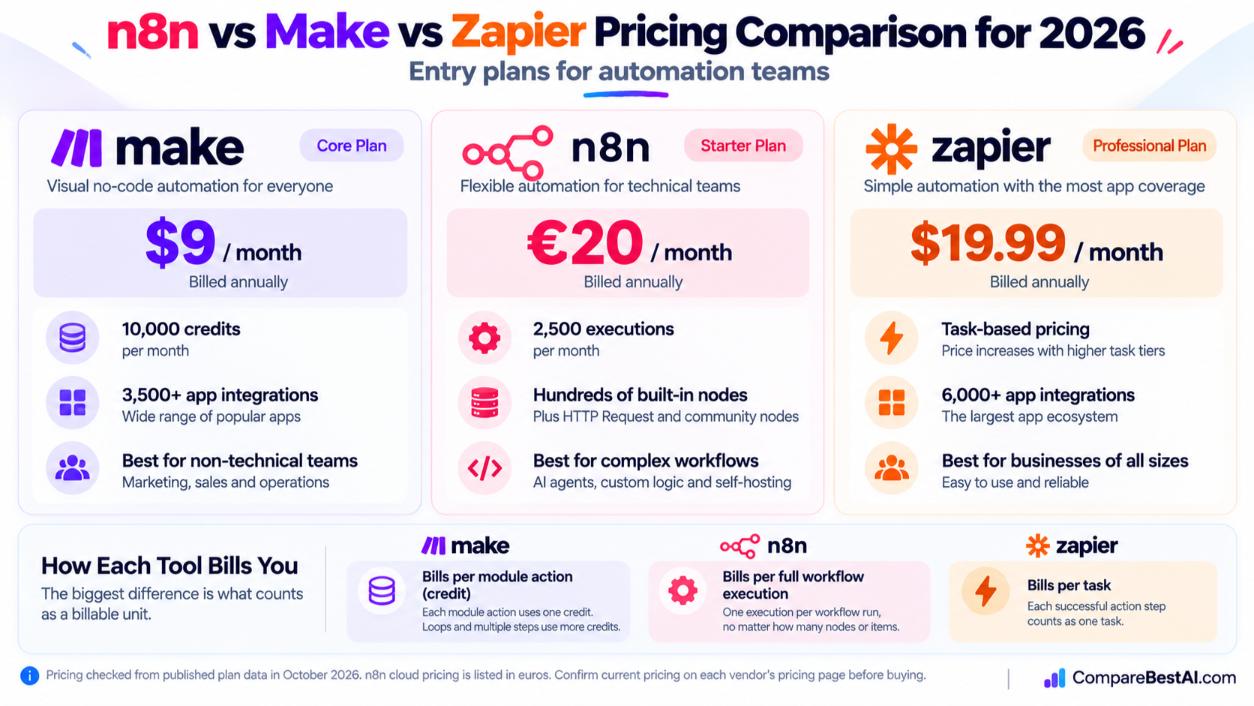
Entry paid plan | Core: $9/month billed annually for 10,000 credits | Starter: €20/month billed annually for 2,500 executions |
Free option | Free plan, up to 1,000 credits/month | Free self-hosted Community Edition |
App integrations | 3,500+ apps | Hundreds of built-in nodes, plus HTTP Request and community nodes |
AI tools | Make AI Agents, Maia assistant | AI Agent node, LangChain nodes, MCP support, vector stores |
Pricing checked October 2026 from published plan data. n8n lists its Cloud prices in euros, so US card charges vary slightly with the exchange rate. Confirm current figures on each vendor's pricing page before you buy.
What Is Make, and What Is n8n?
Make (formerly Integromat) is a cloud-based, no-code automation platform. You build "scenarios" by connecting app modules on a visual canvas, and data flows between them as bubbles you can inspect at each step. Our in-depth Make review for 2026 covers its interface and plan limits in more detail.
n8n is a workflow automation platform from Berlin that you can run in n8n's cloud or on your own server. Its code is available under a "fair-code" license, which is why the self-hosted Community Edition is free. You can compare its listing on our n8n tool profile.
Both tools connect apps, move data, and run AI steps. They differ in who they are built for: Make favors visual simplicity, while n8n favors control and flexibility.
Make vs n8n Pricing: What the Same Workflow Really Costs
This is where most buyers make the wrong call, because the two price tags are not measuring the same thing.
How Make Counts Credits
Make bills one credit for each module action, such as adding a Google Sheets row or fetching a Gmail message. Loops multiply this: if a scenario processes 20 items, every module after the iterator runs 20 times. Paid plans in October 2026 start at Core ($10.59 monthly or $9 billed annually), Pro ($16 annually) and Teams ($29 annually), each listed at the 10,000-credit tier. More credits cost more.
How n8n Counts Executions
n8n counts one execution per full workflow run, no matter how many nodes or items it processes. Starter covers 2,500 executions a month (€24 monthly or €20 billed annually), and Pro covers 10,000 (€60 monthly or €50 billed annually).
Same Workflow, Two Different Bills
Here is a simple illustration using each tool's published billing rules. These are estimates, not quotes.
Scenario | Make usage | n8n usage | Cheaper option |
|---|---|---|---|
A. Lead capture: form submission, 5 steps, 1,500 runs/month | About 7,500 credits, fits Core ($9/month annually) | 1,500 executions, fits Starter (€20/month annually) | Make |
B. Order sync: 3 setup steps, then 10 steps for each of 20 line items, 1,000 runs/month | About 200+ credits per run, roughly 200,000+ credits/month | 1,000 executions, still fits Starter | n8n, by a wide margin |
The takeaway: Make is often cheaper for short, simple workflows. n8n gets cheaper as workflows grow longer or loop over many items.
Two costs apply to both tools. AI model usage (OpenAI, Anthropic, Google) is typically billed separately by the model provider, and self-hosting n8n adds server costs, often estimated at around $5 to $15 a month for a small VPS, plus your time for updates and backups. Our guide to the hidden costs of AI tools beyond the subscription explains how to budget for these.
Where Zapier Fits: n8n vs Make vs Zapier Pricing
Zapier Professional starts at $19.99 a month billed annually ($29.99 monthly), and the price rises with your task tier. Zapier charges a task for each successful action step, though triggers and some built-in tools such as Filters and Formatter do not count. For most multi-step workflows, Zapier is the most expensive of the three. Compare details on our Make vs Zapier comparison.
Make vs n8n for Beginners: Which Is Easier?
Make is easier for beginners. Its visual editor, prebuilt templates, and clear data previews let a non-developer build a working scenario on day one. You rarely touch code.
Can beginners use n8n without coding? Yes, for basic workflows. You can drag nodes, connect apps, and use templates without writing code. The learning curve rises when you work with JSON data, expressions, and branching logic. That is where n8n's power lives, and it rewards people comfortable with technical concepts.
A practical way to decide in one week:
- Pick one real task you repeat weekly, such as sending new form leads to your CRM.
- Build it in Make's free plan.
- Build the same task in n8n Cloud or a self-hosted test instance.
- Compare build time, how easily you fixed errors, and the projected monthly cost from the pricing section above.
n8n vs Make for AI Agents and AI Workflows
Both platforms now build AI agents, but at different depths.
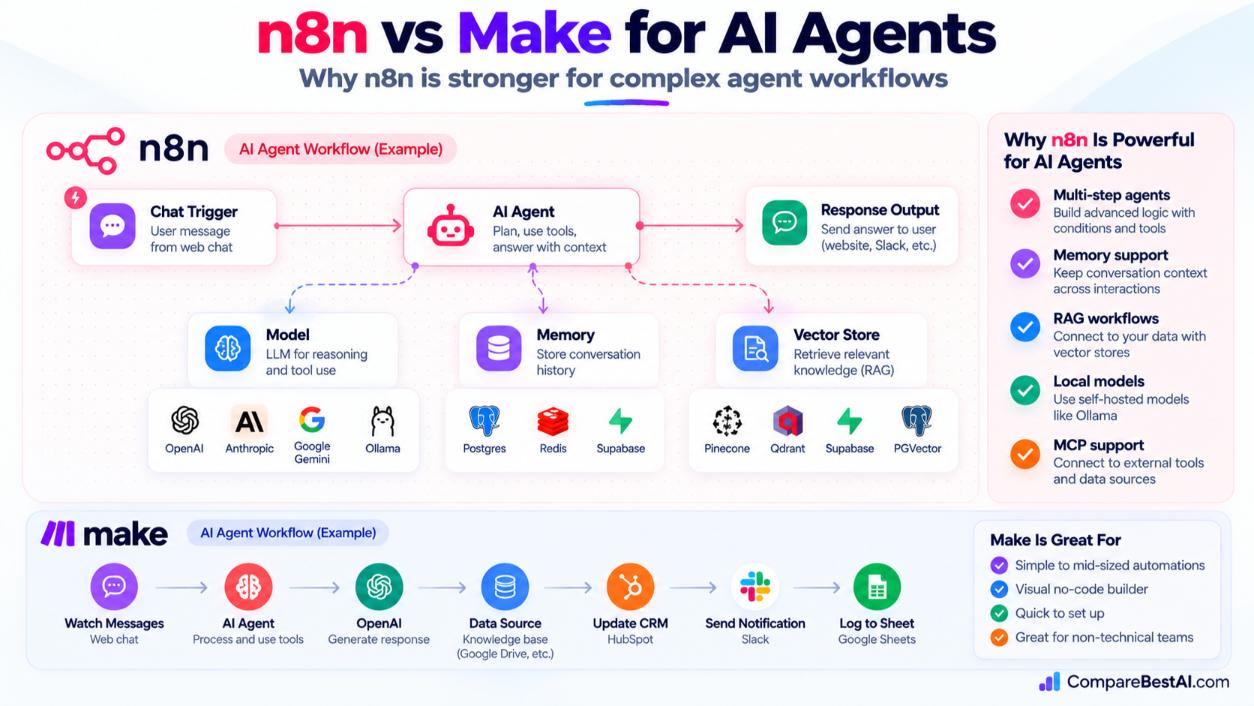
Make offers Make AI Agents and Maia, Make's conversational AI assistant, which builds and debugs scenarios from plain-language requests. On paid plans, Maia usage draws from your Make credits. This suits teams that want AI help without learning agent architecture.
n8n offers an AI Agent node built on LangChain components. It connects to models from OpenAI, Anthropic, Google Gemini, and local models through Ollama. It also supports vector stores such as Pinecone, Qdrant, Supabase, and PGVector for retrieval-augmented generation (RAG), and the Model Context Protocol (MCP) for connecting agents to external tools.
Verdict for n8n vs Make AI agents: Make is faster for simple AI steps, such as summarizing an email or classifying a ticket. n8n is the stronger choice for multi-step agents, memory, RAG, and running local models when data privacy matters.
Make vs n8n Self-Hosted: Do You Need Your Own Server?
Make is cloud only. You cannot self-host it.
n8n gives you a choice:
- n8n Cloud: n8n manages hosting, updates, and uptime. This is the closest match to Make's experience.
- Self-hosted Community Edition: free, with no execution limit set by n8n. You handle the server, database, security, backups, and upgrades.
- Self-hosted Business or Enterprise: paid license keys unlock features such as SSO, Git version control, and environments.
Self-host n8n when you have technical support, run high volumes, or need data to stay on your own infrastructure. Use n8n Cloud vs Make when nobody on your team wants to maintain a server; in that case, the decision comes down to builder style and pricing model.
Integrations: Make vs n8n vs Zapier
- Zapier: the largest catalog, at 9,000+ connected apps.
- Make: 3,500+ apps.
- n8n: hundreds of built-in nodes, plus community nodes. Its HTTP Request node connects to almost any app with an API, as explained in n8n's integrations documentation.
If you rely on niche apps and never want to touch an API, Zapier or Make will cover more ground out of the box. Developers who live in code may also want to compare Boost Productivity with These 8 Game-Changing AI Tools. If your workflows need human approval steps, Relay is a newer option worth testing.
Make vs n8n: Pros and Cons
Make pros
- Easiest visual builder of the two
- Large app library and templates
- Low entry price for simple workflows
Make cons
- Costs climb quickly with loops and long scenarios
- No self-hosting
- Less control over custom code and advanced AI
n8n pros
- Per-execution billing that suits complex workflows
- Free self-hosting option
- Deep AI agent, code, and API flexibility
n8n cons
- Steeper learning curve
- Smaller native integration catalog
- Self-hosting requires ongoing maintenance
Make vs n8n: Which Is Better for You?
- Choose Make if you run a small business or marketing team, want results fast, and your workflows have fewer than 10 steps.
- Choose n8n if you build AI agents, process large data volumes, need custom code, or want to self-host.
- Choose Zapier if app coverage and simplicity matter more than cost.
- Already know Make? Learning n8n is worth it. The concepts transfer, and n8n adds code, API, and AI agent skills that are useful for client and in-house automation work.
Key Takeaways
- Make is easier for beginners; n8n is more powerful for technical users.
- Make bills per module action; n8n bills per full workflow run.
- For long or looping workflows, n8n usually costs far less.
- n8n can be self-hosted for free; Make cannot be self-hosted.
- n8n has deeper AI agent tools; Make offers simpler AI with its Maia assistant.
Frequently Asked Questions
Is n8n worth learning in 2026?
Yes. n8n combines no-code building with code, AI agents, and self-hosting, which makes it a valuable skill for automation, operations, and AI workflow roles.
Why is n8n cheaper than Make and Zapier?
n8n charges per workflow execution rather than per step or task. A 20-step workflow costs the same as a 2-step one, and the self-hosted Community Edition is free.
Is n8n better than Make for complex workflows?
Generally, yes. n8n handles branching, loops, custom JavaScript or Python, and large data sets with more control and lower cost at scale.
Does Make have better AI features than n8n?
Make has easier AI features, especially Maia for building scenarios through conversation. n8n has deeper AI features, including agent memory, RAG, local models, and MCP support.
n8n vs Make vs Zapier: which should you learn first?
Start with Make if you are new to automation. Move to n8n once you are comfortable with data structures. Learn Zapier if your clients or employer already use it.
Can you charge clients for n8n automation work?
Yes. Freelancers and agencies commonly charge for building and maintaining n8n workflows. If you plan to resell hosted access to n8n itself, review n8n's license terms first.
Final Verdict: Pick the Tool That Fits Your Workflow, Not the Hype
The Make vs n8n decision comes down to who builds and what you build. Make wins on simplicity and quick setup. n8n wins on flexibility, AI depth, and cost once workflows get complex.
At CompareBestAI, we review and compare AI and automation tools side by side so you can choose with confidence. Explore more options in our AI Tools That Scale in 2026: What Holds Up vs What Breaks, check the Make tool profile, or use the CompareBestAI comparison tool to put Make, n8n, and Zapier side by side before you commit.