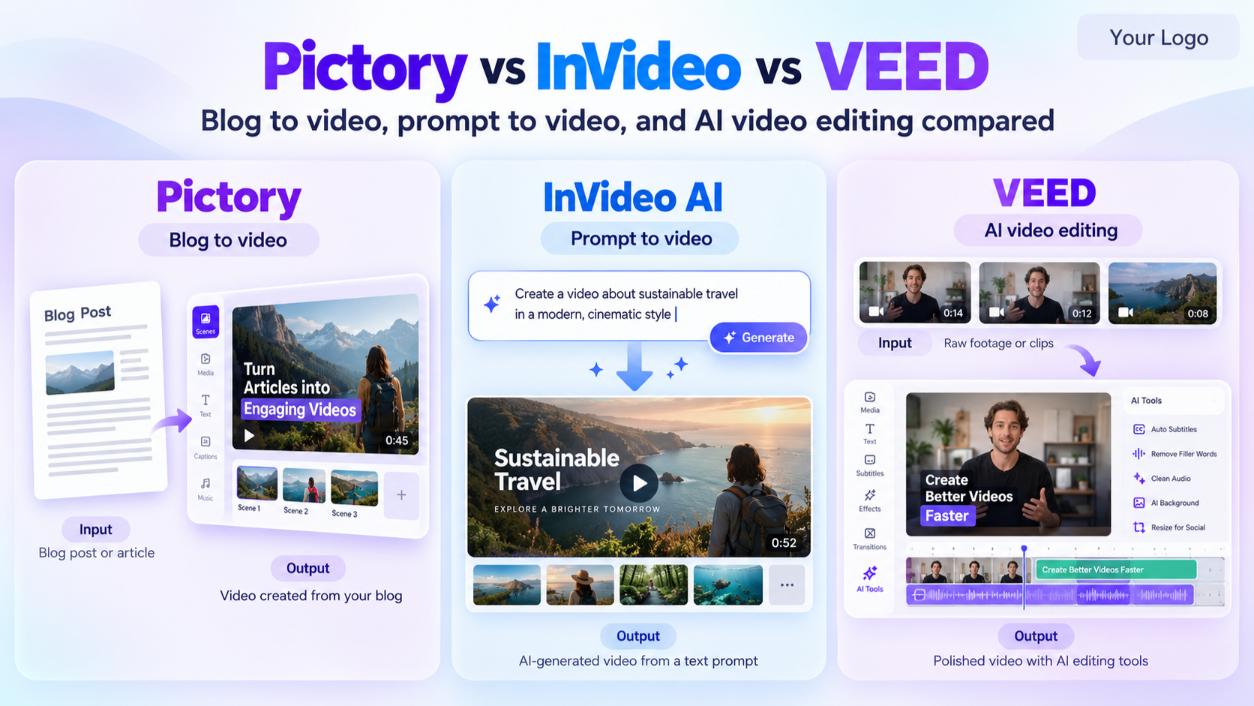

In the Pictory vs InVideo debate, Pictory is better for turning existing scripts, blog posts, and long videos into polished stock-footage videos. InVideo AI is better for generating complete videos from a single prompt, including faceless YouTube videos and generative AI clips. VEED is the best pick if you mostly edit and subtitle your own footage. All three start at $20 to $29 a month.
Pick Pictory for blog-to-video and repurposing existing content. Pick InVideo AI for prompt-to-video and faceless YouTube channels. Pick VEED for editing real footage with automatic subtitles. InVideo and VEED have free plans that export with a watermark, while Pictory offers only a 14-day trial that blocks downloads.
What Are Pictory, InVideo, and VEED?
- Pictory (see our Pictory profile) is an AI video maker that converts scripts, URLs, and long videos into short branded videos using stock footage, captions, and AI voiceovers.
- InVideo AI (see our InVideo profile) is a prompt-based video generator. You describe the video you want, and its AI agent writes the script, picks visuals, adds a voiceover, and edits it together. Higher plans add generative AI video.
- VEED (see our VEED profile) is a browser-based video editor with AI tools for subtitles, translation, and quick edits on footage you already have.
In this comparison, you'll learn:
- How Pictory, InVideo, and VEED compare on features, inputs, and output
- What each tool really costs in 2026, including credits and watermark rules
- Which tool is better for YouTube, short-form content, and blog repurposing
- How to fix the pacing and quality problems common in AI-made videos
Pictory vs InVideo vs VEED: Side-by-Side Comparison
The biggest difference is the starting point. Pictory starts from content you already have, InVideo AI starts from a text prompt, and VEED starts from footage you upload.
Feature | Pictory | InVideo AI | VEED |
|---|---|---|---|
Main input | Script, URL, blog post, or long video | Text prompt or your own script | Your own video footage |
Best for | Blog-to-video and repurposing | Prompt-to-video and faceless YouTube | Editing and subtitling real footage |
Free option | 14-day trial, 720p, no downloads | Free plan, 5 credits, watermarked | Free plan, 720p, watermarked |
Entry paid plan | Starter: $29/mo ($25 yearly) | Plus: $20/mo ($17 yearly) | Creator: $25/mo per user |
Usage model | Video minutes (200/mo on Starter) | Credits (75/mo on Plus) | AI credits (500/mo on Creator) |
AI voiceovers | Yes | Yes, plus voice clones | Yes |
Generative AI video | No | Yes, uses credits | Some AI generation tools, using credits |
Stock media | Large stock library | iStock licenses included (100 on Plus) | Stock library |
Prices are US list prices from InVideo's official FAQ (updated September 2026) and recent 2026 pricing reports for Pictory and VEED. Confirm current prices on each vendor's site before buying.
Pictory vs InVideo Pricing in 2026
InVideo AI has the lowest entry price at $20 a month, but its credits run out faster on advanced features. Pictory's minute-based plans are easier to predict.
Pictory Pricing: Is $29 a Month Worth It?
Plan | Monthly | Yearly (per month) | Video minutes |
|---|---|---|---|
Starter | $29 | $25 | 200/mo |
Professional | $59 | $35 | 600/mo |
Team (3+ users) | $199 | $119 | 1,800/mo |
Starter is worth it if you publish several videos a month from blog posts or scripts. The 14-day free trial includes 15 minutes, exports at 720p, and blocks downloads until you subscribe, so treat it as a preview only. Our Pictory review covers the workflow in detail.
InVideo AI Pricing: How Much Does It Really Cost?
Plan | Monthly | Yearly (per month) | Credits/mo | Voice clones and avatars |
|---|---|---|---|---|
Plus | $20 | $17 | 75 | 4 |
Max | $100 | $85 | 390 | 16 |
Generative | $200 | $170 | 800 | 40 |
Elite | $1,000 | $900 | 4,250 | 200 |
InVideo's own pricing FAQ recommends Max for most regular publishers and says credits are the main variable in what you pay.
InVideo AI Credits: How Many Videos Can You Make?
It depends on the mode. In one published July 2026 test, a simple 60-second stock-footage video used about 4.8 credits, so the Plus plan's 75 credits could cover roughly 15 videos like that. In InVideo's advanced Pro mode, the same tester's 60-second video used about 72 credits and still didn't finish. Unused credits don't roll over.
Does InVideo AI Include Generative Video?
Yes, generative video is available, but it uses credits fast. In the same test, a single 9-second generative clip cost about 16 credits, so the Plus plan's 75 credits cover well under a minute of generative footage. InVideo's own FAQ positions the $200 Generative plan for producing a full short film each month.
VEED Pricing
VEED Creator costs $25 a month per user, Pro costs $45, and Studio costs $79. Every workspace member counts as a seat, so team costs add up quickly. Free exports are capped at 720p with a watermark.
Hidden Costs to Watch
- Credit depletion: InVideo credits don't roll over, and VEED credits reset at each renewal.
- Trial limits: Pictory's trial won't let you download anything.
- Per-seat billing: VEED and Pictory Team charge per user.
- Voice and avatar limits: InVideo caps voice clones and avatars by plan (4 on Plus, 16 on Max).
Pictory vs InVideo Features: What Each Tool Does Best
Can Pictory Really Turn Scripts Into Videos Automatically?
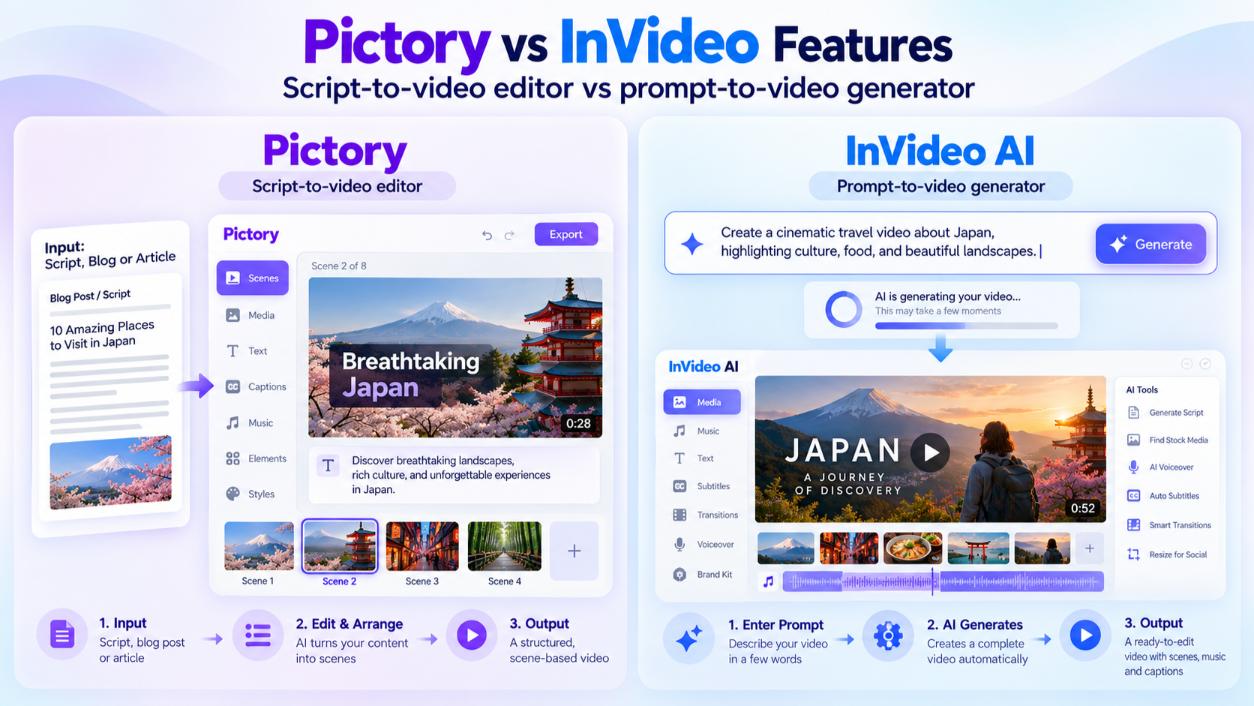
Yes. Paste a script, and Pictory splits it into scenes, matches each scene with stock footage, adds captions, and applies an AI voiceover. You can also paste a blog URL to start from an article. The result is a usable first draft, but you'll usually swap a few stock clips that don't fit the message. On paid plans, script and URL videos can run up to 30 minutes.
Can You Use Your Own Script?
Yes, in both. Pictory is built around your script or article. InVideo AI can write a script from your prompt, or you can paste your own and have the AI build visuals around it. VEED works from your own footage, so the "script" is whatever you recorded.
Best AI Video Generator for Converting Blog Posts to Videos
Pictory is the better choice for blog-to-video. Its URL input pulls text from your article and turns it into scenes, which keeps the video close to your original content. InVideo can do it too if you paste the article as a script, but check that the final script keeps your wording. For more options, see our list of AI text-to-video tools.
Pictory vs InVideo for YouTube
- Faceless YouTube channels: InVideo AI is stronger, because one prompt can produce a full video with script, visuals, and voiceover.
- Repurposing existing YouTube videos: Pictory is stronger, because it can pull highlights from long videos into short clips.
- Editing talking-head videos: VEED is the best of the three.
If you publish AI-generated videos on YouTube, check YouTube's rules for disclosing AI content. Realistic AI-generated scenes need a disclosure label, while basic edits like captions and color adjustments don't.
Short-Form vs Long-Form Videos
For TikTok, Reels, and Shorts, all three tools can export vertical video. Pictory and VEED are more practical for cutting short clips from longer content. For long-form explainers, Pictory's minute-based plans are easier to budget, while InVideo's credit costs grow with length and complexity.

Why AI Videos Look Bad (and How to Fix Them)
Most bad AI videos have the same root causes: a weak script, generic stock footage, and robotic pacing. The tool matters less than how you guide it.
Common Problems With AI-Generated Videos
- Generic visuals: Stock clips that loosely match keywords but not the actual message
- Flat voiceovers: Even pacing with no pauses or emphasis
- Wordy scripts: Blog text that reads fine but sounds long when spoken
- Weak hooks: Openings that take too long to reach the point
- No humor or personality: AI tools rarely add timing or jokes on their own
How to Fix Bad Pacing and Timing
- Rewrite for speech. Cut each sentence to one idea and aim for short lines.
- Lead with the payoff. Put the main takeaway in the first three seconds.
- Shorten scenes. Break long scenes into shorter ones so visuals change more often.
- Add pauses. Insert brief breaks after key points in the voiceover.
- Replace weak clips. Swap any stock footage that doesn't match the line being spoken.
- Add your own media. Screenshots, product shots, or a short clip of a real person make the video feel less generic.
Why Your AI Videos Aren't Getting Clicks
Low clicks usually come from the thumbnail, title, and first few seconds, not the editing tool. Test a clear benefit in the title, use a custom thumbnail instead of a random frame, and make sure the opening line matches what the title promised.
Should You Use Pictory or Just ChatGPT Plus Stock Footage?
You can write a script in ChatGPT and edit stock footage yourself, and it costs less if you already have editing software. But you'll spend much more time finding clips, syncing voiceovers, and adding captions. Pictory and InVideo automate those steps, which matters most if you publish weekly.
Pictory or InVideo: Which Should You Choose?
You want to... | Best pick | Why |
|---|---|---|
Turn blog posts into videos | Pictory | URL-to-video keeps your original content |
Run a faceless YouTube channel | InVideo AI | Full videos from one prompt |
Repurpose long videos into shorts | Pictory | Built-in highlight and clipping tools |
Edit and subtitle your own footage | VEED | A true browser-based editor |
Create generative AI clips | InVideo AI (Generative plan) | Credits cover generative footage |
Keep costs predictable | Pictory | Minute-based plans, not variable credits |
Pictory Pros and Cons
- Pros: Excellent for blog and script repurposing, predictable minutes, large stock library
- Cons: Trial blocks downloads; stock visuals can feel generic without edits
InVideo AI Pros and Cons
- Pros: Lowest entry price, prompt-to-video speed, voice clones and generative video
- Cons: Credits drain quickly in advanced modes and don't roll over
VEED Pros and Cons
- Pros: Strong subtitles and translation, simple browser editing, free plan for testing
- Cons: Not a script-to-video generator; per-seat pricing for teams
Pictory vs InVideo vs Fliki vs Synthesia
If none of these three fit, two alternatives are worth a look:
- Fliki turns text into videos with a strong focus on AI voices. Standard costs $28 a month ($21 yearly).
- Synthesia creates videos with realistic AI presenters for training and corporate content. Starter costs $29 a month. See our guide on whether Synthesia is worth it.
Pictory vs InVideo FAQs
Is Pictory better than InVideo?
Pictory is better for turning existing scripts, blog posts, and long videos into new videos. InVideo AI is better for creating full videos from a prompt, especially faceless YouTube content.
Is InVideo AI worth the money?
InVideo AI is worth it at $20 a month if you make simple stock-footage videos. It's less worth it for heavy generative video, which needs the $200 Generative plan or higher.
Which handles long-form videos better, InVideo or Pictory?
Pictory is easier for long-form videos because its plans are based on video minutes, and paid script or URL videos can run up to 30 minutes. InVideo's credit cost rises with length and complexity.
Does InVideo AI have a free plan?
Yes. The free plan includes 5 credits and watermarked exports, which is enough for about one simple test video.
What is better than InVideo AI for faceless videos?
Fliki is a good alternative for voice-led faceless videos, and Pictory works well if you already have a script.
Which AI video tool is best for short-form content?
Pictory is best for cutting shorts from long videos, InVideo AI is best for creating short videos from scratch, and VEED is best for editing short clips you filmed yourself.
Can AI video tools add humor and timing automatically?
Not reliably. AI tools handle structure and visuals, but humor, timing, and personality still come from your script and edits.
Key Takeaways
- Pictory: Best for blog-to-video and repurposing, from $29 a month ($25 yearly) for 200 video minutes
- InVideo AI: Best for prompt-to-video and faceless YouTube, from $20 a month ($17 yearly) for 75 credits
- VEED: Best for editing and subtitling your own footage, from $25 a month per user
- Free options: InVideo and VEED have watermarked free plans; Pictory has a 14-day trial with no downloads
- Biggest cost risk: InVideo credits drain fast in advanced and generative modes
- Biggest quality fix: A tighter script and better clip choices matter more than the tool
Final Verdict: Pictory vs InVideo vs VEED
There's no single winner in the Pictory vs InVideo comparison, because the tools solve different problems. Choose Pictory if you're turning existing content into video, InVideo AI if you want full videos from a prompt, and VEED if you're editing real footage. Try the free plan or trial first, run one real project through it, and upgrade only when the output saves you real time.
At CompareBestAI, we compare AI video tools side by side on pricing, features, and real use cases, so you can choose with confidence. Still deciding? Use the CompareBestAI comparison tool to put Pictory, InVideo, VEED, and other AI video makers head to head.