
What are the best AI tools with free plans in 2026?
For chat and writing, ChatGPT, Claude, Google Gemini, and Perplexity all have capable free tiers. For images, Leonardo AI and Ideogram lead. For video, Pika and Hailuo AI give real free credits. For productivity, Canva, Notion AI, and Grammarly cover most needs. Most of these need no credit card, and several are free forever, not just a trial. This guide covers 15 genuinely useful free AI tools, grouped by what you actually want to do.
At CompareBestAI, we test the free tiers, not just the marketing. A "free plan" that watermarks everything or caps you at three uses isn't useful, and this list leaves those out. Every tool here gives you something real without paying.
Quick answer: Which AI tool has the best free plan?
Google Gemini and ChatGPT have the most generous free chat tiers. For a no-credit-card start, Claude, Perplexity, Canva, and Leonardo AI all give real free access. The "best" depends on the job: writing, images, video, or productivity each have a different free leader.
What counts as a genuinely free AI tool?
Not every "free plan" is worth your time. Before we get to the list, here's the honest filter we used.
A genuinely useful free AI tool should:
- Be free forever, or give real ongoing free credits, not just a 7-day trial
- Not require a credit card to start (the tools below mostly don't)
- Produce usable output, not watermarked or crippled results
- Have limits you can actually work within for real tasks
The catch to watch for: many tools call themselves "free" but mean "free trial." Others give free access but watermark everything or restrict commercial use. We flag those distinctions as we go, because they're exactly what trips people up.
Short answer: Are there AI tools that are 100% free with no credit card?
Yes. ChatGPT, Claude, Google Gemini, Perplexity, Canva, Leonardo AI, and Ideogram all offer free access with no credit card required. Usage limits apply, but you get real, usable output without paying or entering payment details.
Best free AI tools for chat and writing
These are the AI assistants most people start with, and all four have strong free tiers.
1. ChatGPT (OpenAI)
The free tier gives access to a capable model with generous daily use, image understanding, and web browsing. It's the default free AI assistant for most people, and for good reason. Paid Plus ($20/month) unlocks more, but the free tier handles everyday writing, brainstorming, and research well.
2. Claude (Anthropic)
Claude's free tier is a favourite for longer writing and document work, with a clean interface and strong reasoning. Daily message limits apply, but for drafting, editing, and analysis, the free version is genuinely capable.
3. Google Gemini
Gemini's free tier is one of the most generous, with strong integration across Google's ecosystem (Docs, Gmail, Search). If you live in Google Workspace, it's the natural free pick.
4. Perplexity
Perplexity is the free AI research tool, answering questions with cited sources. The free tier covers most research needs, and it's the best free option when you want answers you can verify.
Short answer: How do the free plans of ChatGPT, Claude, Gemini, and Perplexity compare?
ChatGPT is the best all-rounder, Claude excels at long-form writing, Gemini is most generous and best for Google users, and Perplexity is best for cited research. All four are free with no credit card, with daily usage limits that suit everyday use.
Best free AI tools for image generation
5. Leonardo AI
Leonardo gives daily free credits (no card needed) and produces high-quality images with strong control over style and composition. It's the best free image generator for creators who want quality without a subscription.
6. Ideogram
Ideogram is the free pick when you need text inside images (posters, logos, social graphics), which most image tools handle badly. The free tier is generous enough for regular use.
7. Canva (with AI)
Canva's free tier includes AI features (Magic Media, background removal, text-to-image) alongside its design tools. For social graphics and marketing visuals, the free plan covers most small-business needs.
For more on design tools, see our AI design tool coverage at CompareBestAI.
Best free AI tools for video and audio
8. Pika
Pika's free tier gives 80 credits a month and, unusually, no watermark on any plan. It's the best free pick for social video creators who need clean, shareable output.
9. Hailuo AI (MiniMax)
Hailuo gives roughly 100 free credits a day, the most generous free video tier around. Great for rapid, character-driven short clips.
10. CapCut
CapCut's free tier is genuinely capable for social video editing, with AI captions, auto-cut, and effects. Pro unlocks more, but the free version handles most TikTok and Reels editing.
For the full breakdown, see our cheapest AI video generator guide and our AI video generator comparison.
Best free AI tools for productivity and business
11. Notion AI
Notion's free plan includes AI features for summarising, writing, and organising, built into the workspace many teams already use. Best free pick for note-taking and knowledge management.
12. Grammarly
Grammarly's free tier covers grammar, spelling, and basic writing suggestions, and its AI features have expanded. For anyone who writes professionally, it's a free tool worth keeping on. For more details, read our Grammarly review.
13. Microsoft Copilot
Copilot's free tier gives access to a capable assistant integrated with Microsoft's ecosystem and Bing, with image generation included. Best free pick for Windows and Office users.
14. Otter.ai
Otter's free plan transcribes meetings and generates summaries, with a monthly minute allowance. Best free tool for anyone who needs meeting notes without manual typing.
15. Suno (music)
Suno's free tier lets you generate original music and songs from text prompts, with a daily credit allowance. A genuinely fun and useful free tool for creators needing background tracks.
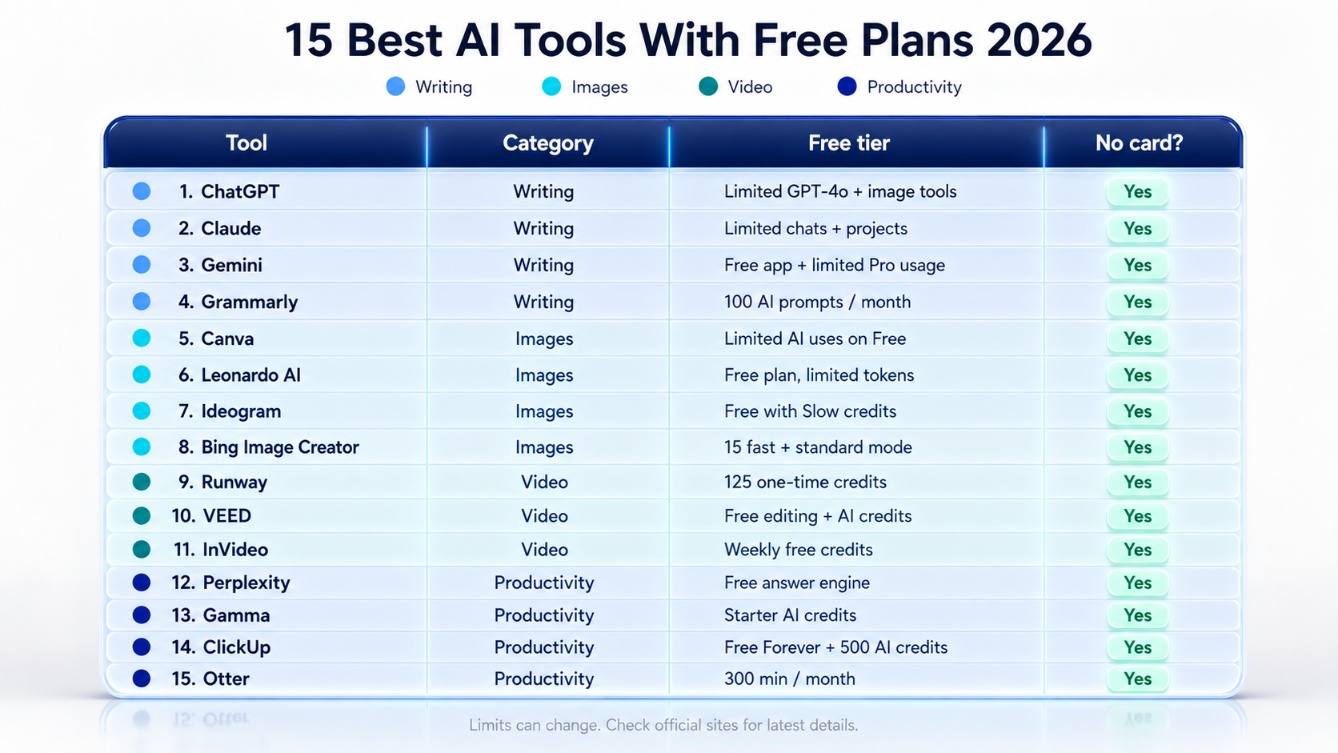
AI tools with free plans: comparison at a glance
| Tool | Category | Free tier | Credit card? |
|---|---|---|---|
| ChatGPT | Chat/writing | Generous daily use | No |
| Claude | Writing | Daily messages | No |
| Google Gemini | Chat/writing | Very generous | No |
| Perplexity | Research | Daily searches | No |
| Leonardo AI | Images | Daily free credits | No |
| Ideogram | Images (text) | Generous free | No |
| Canva | Design/images | Free AI features | No |
| Pika | Video | 80 credits/mo, no watermark | No |
| Hailuo AI | Video | ~100 credits/day | No |
| CapCut | Video editing | Capable free tier | No |
| Notion AI | Productivity | Free AI features | No |
| Grammarly | Writing | Free tier | No |
| Microsoft Copilot | Productivity | Free with image gen | No |
| Otter.ai | Transcription | Monthly minutes | No |
| Suno | Music | Daily credits | No |
Verify current free-tier limits on each vendor's site before relying on them, since these change often.
When should you upgrade from a free plan?
Free plans are genuinely useful, but there's a point where paying makes sense. Upgrade when:
- You hit the daily or monthly limit regularly. If free credits run out mid-task most days, a paid plan pays for itself in saved time.
- You need commercial rights. Free tiers often restrict commercial use. If you're selling client work, check the licence.
- You need higher quality or resolution. Free tiers often cap output quality, which matters for professional work.
- You need to remove watermarks. Except for tools like Pika, most free video and image tiers watermark output.
The smart approach: start free, learn the tool, and upgrade only the one or two you use daily. Most people waste money paying for tools they touch twice a month. For more tips, see Boost Productivity with These 8 Game-Changing AI Tools.
Waste money to common mistakes people make when choosing AI tools.
Free vs paid AI tools: what you give up
Free tiers are a genuine gift, but it helps to know the trade-offs honestly.
What free plans usually limit:
- Daily or monthly usage caps
- Output quality or resolution
- Commercial-use rights
- Priority processing (free users wait longer at peak)
- Advanced features locked to paid tiers
What free plans usually give you:
- Real, usable output for everyday tasks
- Enough to test whether a tool fits before paying
- No commitment and no credit card
Research from organisations like the Pew Research Center's work on public AI use shows adoption of these tools is climbing fast, and free tiers are the on-ramp for most people. For evaluating any AI tool's data practices before you sign up, the NIST AI Risk Management Framework</a> is a solid reference on what responsible AI providers should disclose.
FAQ
Which AI tool has the best free plan?
Google Gemini and ChatGPT have the most generous free chat tiers. For images, Leonardo AI leads. For video, Pika (no watermark) and Hailuo (100 daily credits) are best. The best free plan depends on the task, since writing, images, video, and productivity each have a different free leader. If you want broader tool coverage, see our Compare Best AI Tools in 2026.
Are there AI tools that are 100% free with no credit card?
Yes. ChatGPT, Claude, Google Gemini, Perplexity, Canva, Leonardo AI, and Ideogram all offer free access with no credit card required. Usage limits apply, but you get real, usable output without paying or entering payment details.
What are the best free AI tools for small businesses?
For small business, Canva (design and social graphics), ChatGPT or Gemini (content and support), Grammarly (writing), and Notion AI (organisation) cover most needs on free tiers. Together they handle marketing, customer support, and content creation without a subscription.
Which free AI tools can generate high-quality videos?
Pika (free, no watermark), Hailuo AI (100 daily credits), and CapCut (capable free editing) are the best free video options in 2026. For voiceovers and subtitles, CapCut's free tier handles both. Free tiers are enough to produce shareable content before upgrading.
What limitations should I expect from free AI tools?
Expect daily or monthly usage caps, limited output quality or resolution, restricted commercial-use rights, slower processing at peak times, and some features locked to paid tiers. Free tiers are genuinely useful for everyday tasks and testing, but heavy or professional use eventually justifies upgrading.
Are free AI tools good enough for professional graphic design?
For social media posts, simple logos, and marketing graphics, yes, Canva, Leonardo AI, and Ideogram produce professional-looking results on free tiers. For high-end print or complex brand work, paid tools or professional designers still have the edge, but free tools cover most everyday design needs.
Which free AI tools help freelancers?
Freelancers can use ChatGPT or Claude for proposals and client communication, Canva for portfolios and graphics, Notion AI for project management, and Grammarly for polished writing, all on free tiers. Together they cover writing, design, and organisation at no cost.
What are the best free alternatives to expensive AI software?
Instead of paying for premium suites, ChatGPT or Gemini replace many writing tools, Canva replaces basic design software, Leonardo AI replaces paid image generators, and CapCut replaces paid video editors for social work. Free tiers cover most business, education, and productivity needs.
Key Takeaways
- The best free AI tools span four categories: chat/writing (ChatGPT, Claude, Gemini, Perplexity), images (Leonardo, Ideogram, Canva), video (Pika, Hailuo, CapCut), and productivity (Notion, Grammarly, Copilot, Otter, Suno).
- Most need no credit card, and several are free forever, not just trials.
- Pika is the standout free video tool for its no-watermark output.
- Gemini and ChatGPT have the most generous free chat tiers.
- Upgrade only when you hit limits regularly or need commercial rights, higher quality, or watermark removal.
- Free plans limit usage, quality, and commercial rights but give real, usable output for everyday work.
- Verify current free-tier limits on each vendor's site, since they change often.
Conclusion
You don't need to spend a dollar to get real value from AI in 2026. The free tiers above cover writing, images, video, research, and productivity well enough for most people, and several are free forever with no card required. The smart play is to start free across a few tools, learn which ones you actually reach for, and pay only for the one or two that earn it.
Want deeper reviews of any tool on this list? Explore individual breakdowns at CompareBestAI, compare the video tools in our AI video generator comparison, or find the budget picks in our cheapest AI video generator guide at CompareBestAI.