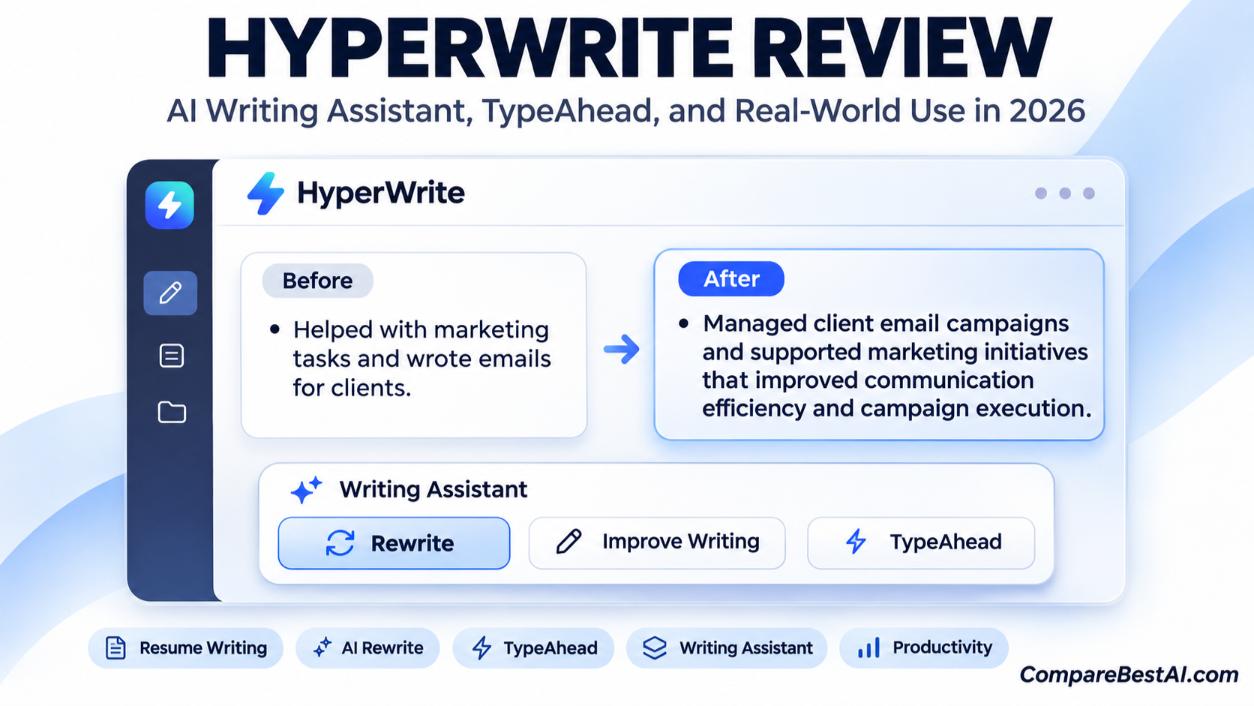

HyperWrite is worth it if you write a lot of short-form text in your browser, such as emails, LinkedIn posts, client messages, and cover letters, and want AI autocomplete that follows you across Gmail, Google Docs, and other sites. Premium costs $19.99 a month ($16 a month billed annually), and Ultra costs $44.99 a month ($29 a month billed annually). It's weaker for long-form articles and complex research, where ChatGPT or a dedicated SEO writer usually does better.
This HyperWrite review covers what the tool does, 2026 pricing, free vs premium differences, how it compares to ChatGPT, Grammarly, Jasper, and Sudowrite, and who should skip it.
What Is HyperWrite?
HyperWrite is an AI writing assistant made by OthersideAI. It combines three things:
- Inline autocomplete (TypeAhead): Suggests the next words or sentence as you type, which you accept with the Tab key.
- AI writing tools: Drafts emails, posts, and documents from a short prompt, plus a library of ready-made tools built by HyperWrite and its users.
- A browser assistant: An AI agent that can carry out simple tasks in your browser.
It runs in a web app and a Chrome extension. You can see a quick summary on our HyperWrite tool profile.
HyperWrite Features: What You Actually Get
TypeAhead AI Autocomplete
TypeAhead is HyperWrite's best-known feature. As you type, it shows a faded suggestion that completes your sentence based on the surrounding context. Press Tab to accept it or keep typing to ignore it.
HyperWrite autocomplete review: It's most useful for repetitive writing such as email replies and status updates. Fast typists may find the suggestions lag behind them at times.
HyperWrite Chrome Extension
The Chrome extension brings autocomplete into Gmail, Google Docs, ChatGPT, Gemini, and other sites. According to its Chrome Web Store listing, it has about 80,000 users and a 4.1 out of 5 rating from 136 ratings, and it was last updated in November 2026.
HyperWrite Chrome extension review: If most of your writing happens in the browser, this is the main reason to choose HyperWrite over a standalone chatbot.
AI Writer, Tools Library, and Custom Personas
HyperWrite can draft text from a prompt and offers a large library of prebuilt tools for tasks such as replying to emails and writing blog posts. Paid plans include custom personas, which let you save a writing style or role so drafts sound more like your brand voice. Premium includes 3 personas and Ultra includes 10.
HyperWrite Personal Assistant
The Personal Assistant is an AI agent that performs tasks in your browser, such as researching a topic and pasting a summary into a document. Pricing trackers list it as part of the Ultra plan.
HyperWrite Personal Assistant review: Independent testers report it works for simple, clearly defined tasks but struggles with longer, multi-step jobs. Treat it as a helpful extra, not the main reason to buy.
HyperWrite Pricing Plans (2026)
Plan | Monthly | Annual | AI messages | Custom personas | Best for |
|---|---|---|---|---|---|
Free | $0 | $0 | Limited | None | Trying the tool |
Premium | $19.99/month | $192/year (about $16/month) | 250 per month | 3 | Regular personal and work writing |
Ultra | $44.99/month | $348/year (about $29/month) | Unlimited | 10 | Heavy daily use and the Personal Assistant |
Prices as reported by independent pricing trackers, checked late October to early November 2026. Confirm on HyperWrite's pricing page before you subscribe.
HyperWrite Free vs Premium
The free plan is enough to test autocomplete and a few tools, but the allowance is small. Pricing trackers also report that free-plan output isn't licensed for commercial use, so check HyperWrite's terms before using free drafts for client work.
Upgrade to Premium if: you write daily and want reliable access, personas, and commercial use.
Upgrade to Ultra if: you hit Premium's 250-message cap or want the Personal Assistant.
Is HyperWrite Worth It for Solo Entrepreneurs?
Yes, for many. A solo founder or freelancer who spends hours a week on emails, proposals, and social posts can save real time with autocomplete and personas. If you mostly write long reports or blog posts, ChatGPT Plus at $20 a month covers more ground.
HyperWrite vs ChatGPT, Grammarly, Jasper, and Sudowrite
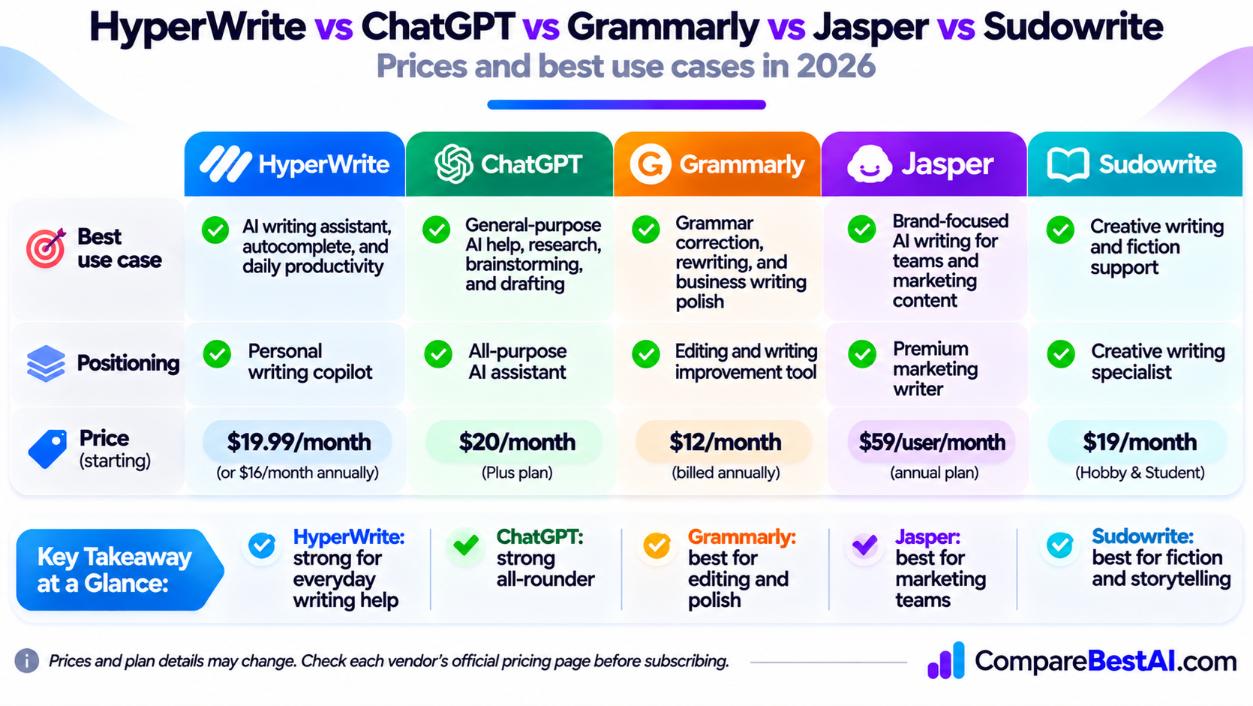
Tool | Best for | Starting paid price |
|---|---|---|
HyperWrite | Autocomplete and short-form writing across the browser | $16/month annual, $19.99 monthly |
All-purpose writing, research, and long-form drafts | $20/month (Plus) | |
Grammar, clarity, and tone editing | $12/month billed annually (Pro) | |
Jasper | Brand-voice marketing copy for teams | $59/user/month annual |
Sudowrite | Fiction and creative writing | $19/month (Hobby & Student) |
Competitor prices reported by independent pricing trackers in 2026.
HyperWrite vs ChatGPT
Choose HyperWrite for in-line autocomplete; choose ChatGPT for long-form writing and research. ChatGPT is stronger at drafting full articles, analyzing files, and answering complex questions. HyperWrite's advantage is that it works inside the text box you're already using, so you don't need to copy and paste.
HyperWrite vs Grammarly
Grammarly edits what you wrote; HyperWrite helps you write it. Grammarly is the better choice for catching grammar mistakes and polishing tone. HyperWrite is better at generating the next sentence. Many people use both. Read our Grammarly review for details.
HyperWrite vs Jasper AI
Jasper is built for marketing teams; HyperWrite is built for individuals. Jasper offers brand voice controls, team workflows, and campaign tools at a higher price. HyperWrite is cheaper and simpler for solo users. See our Jasper AI review.
HyperWrite vs Sudowrite
Sudowrite is the better pick for fiction writers. It's designed for novels and stories, with tools for plot, description, and character. HyperWrite is a general-purpose assistant for everyday writing.
HyperWrite AI Alternatives
Other options include QuillBot for paraphrasing and Wordtune for rewriting sentences. For a wider list, see our guide to the best AI writing tools.
Can HyperWrite Help You Write a Resume and Land a Job?
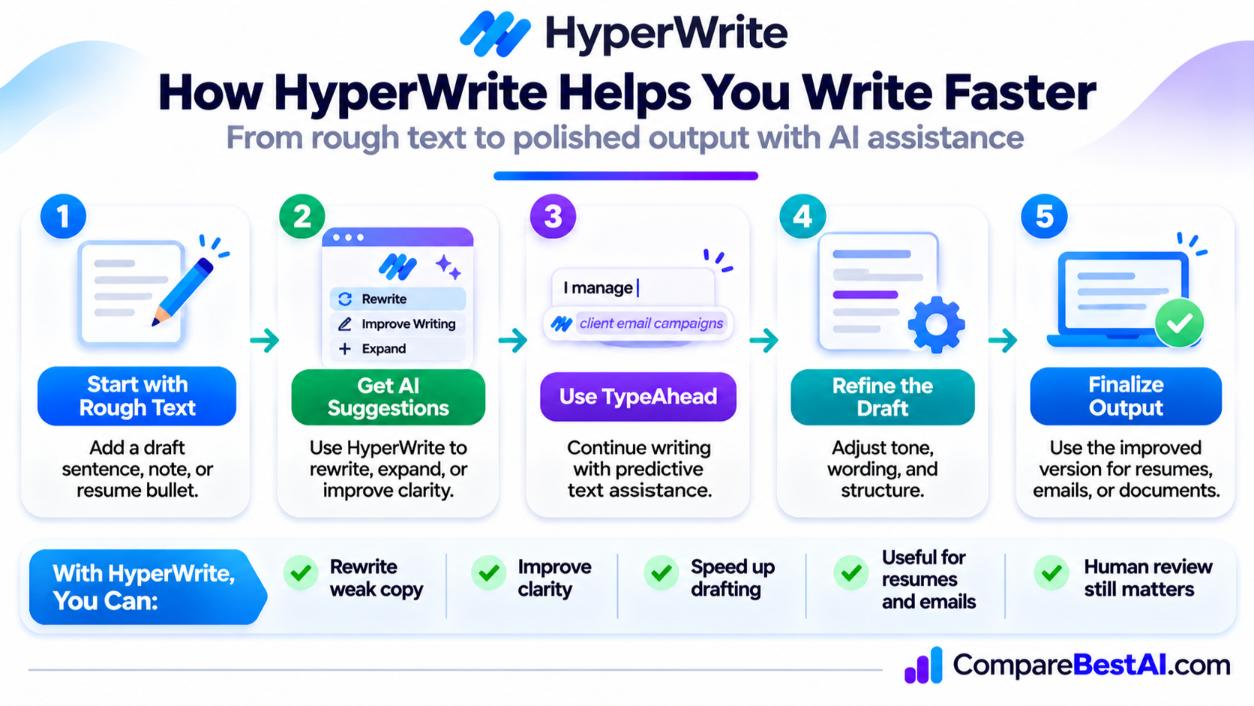
Yes, as a drafting partner. You can use HyperWrite to turn rough notes into resume bullet points, tailor a cover letter to a job description, and write follow-up emails faster.
How to use AI on your resume without hurting your chances:
- Start with facts: List your real roles, results, and skills before asking AI to rewrite them.
- Customize for each job: Paste the job description and ask for bullet points that match its key requirements.
- Keep the format simple: Use standard headings and plain text so applicant tracking systems (ATS) can read it.
- Edit for your voice: Remove generic phrases and add specific numbers and outcomes.
- Never invent experience: Employers can verify claims, and false information can cost you the job.
Will AI Content From HyperWrite Get You Penalized by Google?
No, not because it's AI-written. Google has said it rewards helpful, high-quality content however it's produced, and that using AI mainly to manipulate search rankings violates its spam policies. Read Google Search's guidance about AI-generated content for the full statement.
For blog posts, HyperWrite works best as a helper for outlines and paragraphs, not for publishing unedited articles in bulk. For tips on making AI drafts sound natural, see which AI writing tool produces the least AI-sounding output.
HyperWrite Pros and Cons
Pros
- Fast, in-line autocomplete across Gmail, Google Docs, and other sites
- Custom personas help keep a consistent voice
- Simple to learn
- Affordable Premium plan on annual billing
Cons
- Weaker for long-form articles and in-depth research
- Premium is capped at 250 AI messages a month
- Personal Assistant struggles with complex tasks
- Free plan is limited and may not allow commercial use
HyperWrite Review: Key Takeaways
- HyperWrite is an AI writing assistant best known for browser-wide autocomplete.
- Premium costs $19.99/month or $192/year, and Ultra costs $44.99/month or $348/year.
- It's ideal for emails, social posts, and short business writing.
- ChatGPT is better for long-form writing, Grammarly for editing, and Sudowrite for fiction.
- Always fact-check AI drafts and add your own expertise.
Frequently Asked Questions
Is HyperWrite worth it in 2026?
Yes, if you write lots of short-form text in your browser and want AI autocomplete. If you mainly write long articles, ChatGPT or a dedicated SEO tool is a better value.
How much does HyperWrite cost?
HyperWrite Premium costs $19.99/month or $192/year. Ultra costs $44.99/month or $348/year. A limited free plan is also available.
Is HyperWrite better than ChatGPT?
HyperWrite is better for in-line autocomplete inside other apps. ChatGPT is better for long-form writing, research, and complex tasks.
Is HyperWrite better than Grammarly?
They do different jobs. HyperWrite generates text, while Grammarly corrects and polishes it. Many writers use both.
Can HyperWrite match my brand voice?
Partly. Custom personas on Premium and Ultra help keep a consistent style. You'll still need to edit drafts to sound fully like you.
Is it ethical to use AI for client work?
Yes, if you're transparent when clients ask, follow any rules in your contract, and take responsibility for accuracy. AI should support your work, not replace your judgment.
Final Verdict: Is HyperWrite Worth Paying For?
The bottom line of this HyperWrite review: HyperWrite is a smart, affordable pick for solo entrepreneurs, freelancers, and job seekers who write a lot of short text in the browser. It's not the best choice for long-form content or deep research. Try the free plan with the Chrome extension for a week, and upgrade to Premium only if autocomplete becomes part of your daily routine.
At CompareBestAI, we review and compare AI tools side by side so you can choose with confidence. Use the CompareBestAI comparison tool to put HyperWrite, ChatGPT, Grammarly, and Jasper side by side before you subscribe.