
The best AI video repurposing tool for most creators in 2026 is OpusClip, which turns long videos into captioned vertical clips from $15 a month. Vizard is a strong alternative with team features, Klap suits high-volume clipping, Riverside is best for podcasters who record and clip in one place, and Pictory is best for turning scripts and blog content into videos.
Choose OpusClip for webinars and YouTube videos. Choose Riverside if you record podcasts. Choose Klap if you upload many hours a month. Choose Pictory to turn blog posts or scripts into videos. For a free, watermark-free option, use YouTube's built-in tools to make Shorts from your own uploads.
What Is an AI Video Repurposing Tool?
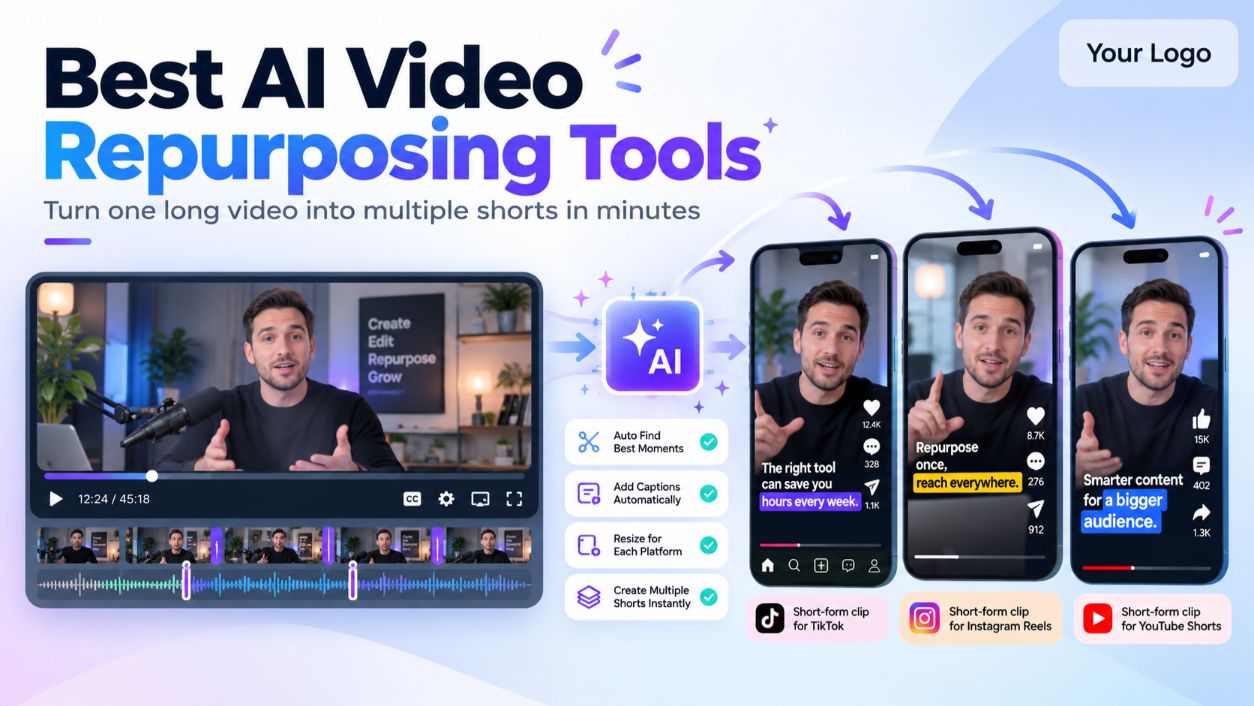
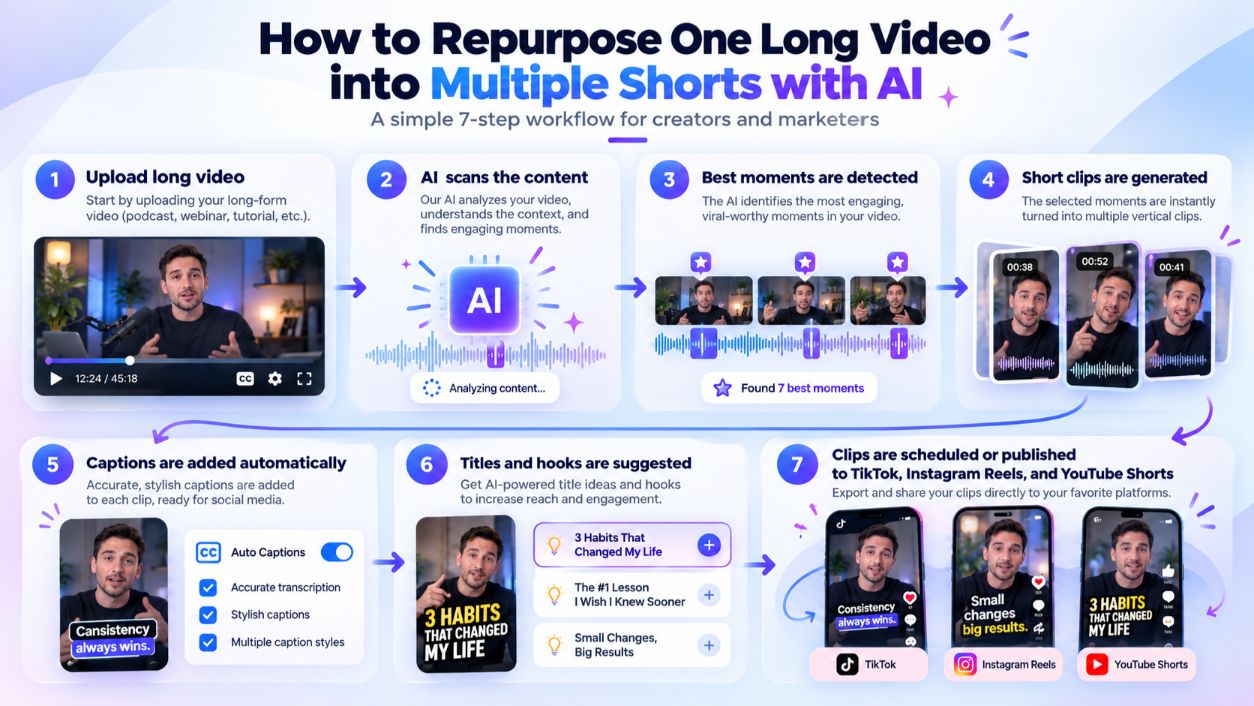
An AI video repurposing tool takes one long video, such as a webinar, podcast, or YouTube video, and automatically turns it into several short clips for TikTok, Instagram Reels, and YouTube Shorts. It finds the most engaging moments, reframes the video to a vertical 9:16 format, tracks the speaker, and adds captions. Some tools also score each clip's potential and schedule posts to your social accounts.
In this guide, you'll learn:
- Which AI video clipping tools work best for webinars, podcasts, and blogs
- What each tool costs in 2026, and which free plans add watermarks
- How to turn one long video into a week of short-form content
- What features matter and how much time AI repurposing really saves
AI Video Repurposing Tools Compared (2026 Pricing)
OpusClip has the cheapest monthly entry at $15, while Klap gives the most upload minutes per dollar on yearly plans. Prices below are US list prices cross-checked against recent 2026 pricing sources, and several of those sources are run by competitors, so confirm on each vendor's site before you buy.
Tool | Best for | Free option | Entry paid plan | Usage included | Last checked |
|---|---|---|---|---|---|
OpusClip | Webinars and YouTube videos | 60 credits/mo, watermarked | Starter: $15/mo | 150 min of source video | Oct 18, 2026 |
Vizard | Teams and social scheduling | Free plan, 720p exports | Pro: about $29/mo yearly | 200 clip credits/mo | Oct 18, 2026 |
Klap | High-volume clipping | 1 free video | Basic: $29/mo ($14 yearly) | 300 min uploaded/mo | Oct 18, 2026 |
Riverside | Podcasts (record and clip) | 2 hours one-time, watermarked | Pro: $29/mo ($24 yearly) | 5 recording hours/mo | Oct 18, 2026 |
Pictory | Scripts, URLs, and blog content | 14-day trial | Starter: $29/mo ($25 yearly) | 200 video min/mo | Oct 18, 2026 |
How Pricing Works for AI Clipping Tools
Most AI video clipping tools charge by the minutes of video you upload, not by the number of clips you get. OpusClip uses 1 credit per minute of source video, and Klap charges by uploaded minutes too. A 60-minute webinar uses about 60 credits on OpusClip, whether it produces 5 clips or 20.
The Best AI Video Repurposing Tools, Reviewed
Each tool below handles a different kind of source content. Pick the one that matches what you record most.
1. OpusClip: Best Overall AI Video to Shorts Generator
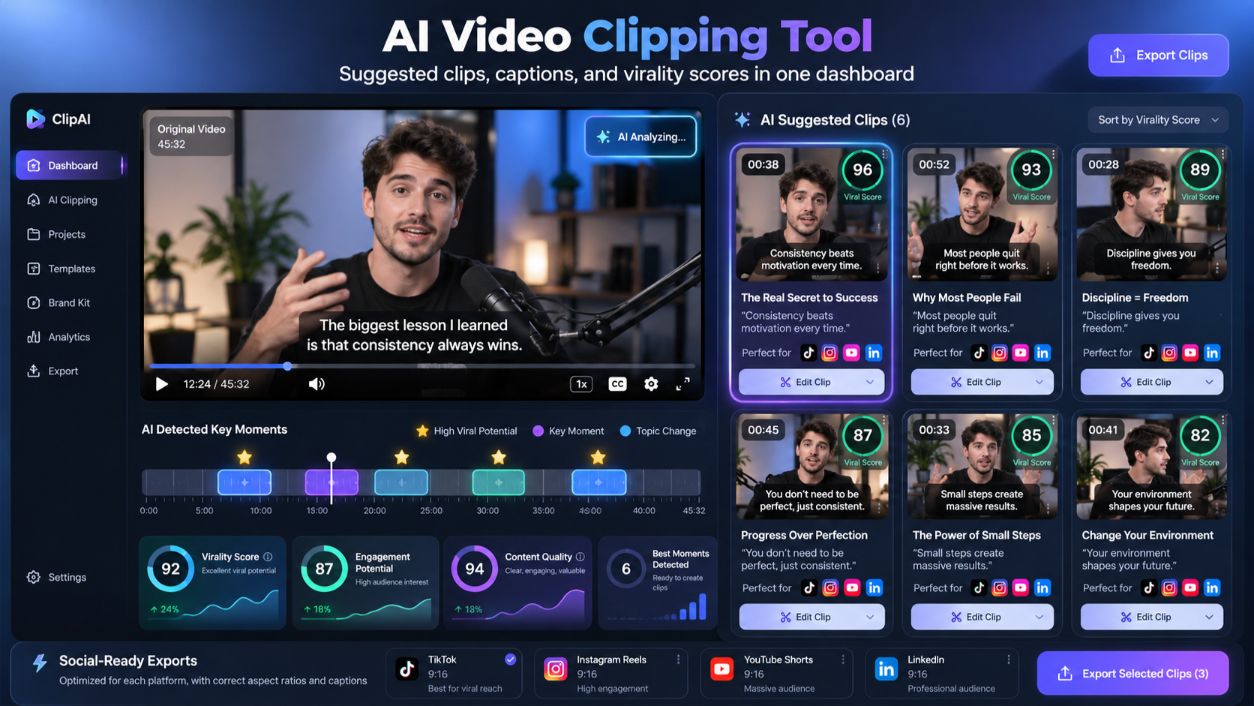
OpusClip is built for one job: turning long videos into short, captioned clips. Upload a webinar, talk, or YouTube video, and it picks highlight moments, reframes them vertically, adds captions, and gives each clip a virality score. Starter costs $15 a month for 150 minutes of source video. Pro costs $29 a month, or $14.50 a month billed yearly for 300 minutes a month.
- Pros: Very fast results, low entry price, good for webinars and stage talks
- Cons: Free plan adds a watermark and doesn't allow editing; monthly credits expire after 60 days
2. Vizard: Best for Teams and Social Scheduling
Vizard clips long videos and lets you connect social accounts to publish from one place. Its free plan exports at 720p and connects one social account. Paid plans unlock 4K export, no watermark, and more connected accounts. Pro starts around $29 a month on yearly billing with 200 clip credits.
- Pros: Built-in posting to multiple platforms, team workspaces and brand kits
- Cons: Credit-based pricing makes heavy monthly use harder to predict
3. Klap: Best for High-Volume Clipping
Klap now charges by the minutes you upload rather than per clip. Basic costs $29 a month, or $14 a month billed yearly, for 300 minutes. Pro gives 900 minutes for $79 a month ($39 yearly). On yearly billing, that works out to under $3 per hour of video.
- Pros: Strong value per upload hour on annual plans, unlimited clips per video
- Cons: Only one free video to test, and user reviews raise support and refund complaints
4. Riverside: Best AI Podcast Clip Generator
Riverside records high-quality podcasts and interviews, then creates short clips with its Magic Clips feature. Magic Clips is available on both the Free and Pro plans. Pro costs $29 a month ($24 yearly) with 5 recording hours. Free exports are watermarked and capped at 720p.
- Pros: Record, edit, and clip in one tool; great for remote podcast guests
- Cons: Less useful if you already record elsewhere
5. Pictory: Best for Turning Blog Posts Into Videos
Pictory turns scripts, URLs, and existing videos into short branded videos with stock footage and captions. That makes it a practical way to repurpose blog posts into short videos. Starter costs $29 a month ($25 yearly) with 200 video minutes. Read our Pictory review for more detail.
- Pros: Works with written content, not just video; large stock library
- Cons: Free trial blocks downloads until you subscribe
What About General AI Video Editors?
If you also need full editing, tools like Descript can create clips as part of a broader workflow. Our Descript review explains how its transcript-based editing works for podcasts and interviews.
Can You Turn Long Videos Into Shorts With AI for Free?
Yes, but almost every free plan comes with a catch. Most free AI video clipping tools add a watermark, lower the resolution, or delete your clips after a few days.
Free option | What you get | Main limit |
|---|---|---|
OpusClip Free | 60 minutes of source video a month | Watermark, no editing, clips expire after 3 days |
Vizard Free | 60 credits a month, uploads up to 60 minutes | 720p exports, 3-day storage |
Riverside Free | Magic Clips on 2 hours of recording | Watermark, 720p |
Klap | 1 free video | Must pay to keep clipping |
YouTube's built-in Shorts tools | Make Shorts from your own uploads | Manual selection, no AI highlight picking |
Long Video to Shorts AI Free Without Watermark
If you need clips with no watermark and no cost, your best option is YouTube's own tools. YouTube Help's guide to creating Shorts explains that Shorts can be up to three minutes long, and YouTube Help also covers creating Shorts from videos you've already uploaded. You pick the moments yourself, so it's slower than AI, but the clips are free and unbranded.
For AI highlight detection without a watermark, you'll need a paid plan. On monthly billing, OpusClip Starter at $15 a month is the cheapest way to remove the watermark among the tools here. On yearly billing, Klap Basic works out to $14 a month.
Is a Free Plan Enough?
A free plan is enough to test whether a tool finds good moments in your content. It's not enough for a steady posting schedule. If you plan to post clips every week, budget for a paid plan once the free test proves the tool works for your videos.
How to Turn One Long Video Into Multiple Shorts With AI
Here's a repeatable workflow for repurposing a webinar, podcast, or YouTube video into a week of short-form content.
- Start with strong source content. Clear audio and a speaker facing the camera give the AI more usable moments.
- Upload the full video. Paste a YouTube link or upload the file to your AI video repurposing tool.
- Set your clip length and platform. Most tools let you choose a target length and a 9:16 vertical format.
- Review the suggested clips. Keep the ones with a clear hook in the first few seconds and a complete thought.
- Fix captions and add branding. Correct names and terms, then apply your brand colors and logo.
- Write a fresh caption for each platform. TikTok, Reels, and Shorts audiences respond to different hooks and hashtags.
- Schedule and publish. Spread clips across the week instead of posting them all at once.
How to Repurpose Webinars Into TikTok Videos
Webinars work well because they're packed with specific tips. Clip single, self-contained answers, such as one Q&A response or one framework. Open each clip with the takeaway ("Here's the mistake most teams make with onboarding"), and cut slide-heavy sections, which are hard to read on a phone.
How to Keep AI-Repurposed Content Authentic
- Use your own original content. Repurposing works best with recordings you own.
- Keep your real voice. Avoid tools or settings that rewrite what you actually said.
- Add context. A short on-screen line can explain where the clip came from.
- Disclose sponsorships. If a clip includes a paid mention, US rules still apply. The FTC's guide, Disclosures 101 for Social Media Influencers, explains how to disclose brand relationships clearly.
Can AI Automatically Upload Clips to Multiple Platforms?
Some tools can. Vizard lets you connect social accounts and publish directly, with more accounts on paid plans. Other tools export files that you upload yourself or send to a separate scheduling tool.
What Features Should an AI Video Repurposing Tool Have?
The best AI short clip generators share a core set of features. Check for these before you pay:
- Highlight detection: The AI should find complete, interesting moments, not random cuts.
- Auto reframing: Speaker tracking that keeps faces centered in a 9:16 frame.
- Accurate captions: Editable captions with brand fonts and colors.
- Clip editing: The ability to trim, extend, or merge clips after the AI suggests them.
- Brand kit: Saved logos, colors, and caption styles for consistent output.
- Publishing or scheduling: Direct posting to TikTok, Instagram, and YouTube, or easy export.
- Fair usage limits: Enough source minutes each month for your recording schedule.
How Much Does AI Video Repurposing Cost?
Entry plans cost about $14 to $29 a month. OpusClip Starter starts at $15, Klap Basic at $14 a month on yearly billing, and Vizard, Riverside, and Pictory start near $24 to $29 a month. Higher tiers for more minutes and seats run from about $39 to $199 a month, such as Klap Pro at $79 a month or Pictory Team at $199 a month. For a broader view of where paid video tools are worth it, see our guide to paid AI video tools that are actually worth it.
AI Video Repurposing vs Manual Editing: Which Saves More Time?
AI repurposing saves the most time on the slowest parts of short-form editing: scrubbing through footage, reframing, and writing captions.
Task | Manual editing | AI repurposing tool |
|---|---|---|
Finding highlight moments | Watch the full recording | AI suggests clips in minutes |
Vertical reframing | Keyframe each clip by hand | Automatic speaker tracking |
Captions | Type or sync manually | Auto-generated, then proofread |
Final review | Still needed | Still needed |
You'll still spend time reviewing clips and writing post captions. But for a one-hour webinar, AI turns a long manual job into a short review session, which makes these tools practical for marketing and SaaS teams that need a steady flow of short-form content.
AI Video Repurposing FAQs
What is the best AI tool for turning long videos into short clips?
OpusClip is the best overall tool for turning long videos into short clips, with automatic highlight detection, reframing, and captions from $15 a month.
What is the best AI podcast clip generator?
Riverside is the best AI podcast clip generator if you record your show there, because Magic Clips works on recordings in the same tool. OpusClip is a strong choice for podcasts recorded elsewhere.
Can AI detect the best moments in a long video?
Yes. AI clipping tools analyze speech, topics, and pacing to suggest highlight moments. The suggestions are a good starting point, but you should still review them before posting.
Can AI automatically edit videos for social media? AI can handle most of the mechanical work, including cutting, vertical reframing, and captions. A quick human review keeps clips accurate and on-brand.
How do I repurpose YouTube videos for TikTok and Instagram Reels?
Paste the YouTube link into an AI video repurposing tool, choose a 9:16 format, review the suggested clips, and export a version for each platform with its own caption.
What is the best way to turn blog posts into short videos?
Use a script-to-video tool like Pictory. Paste your blog content or URL, let it build scenes with stock footage and captions, then edit the script down to the key points. For more direct head-to-head comparison, see our look at Google Vids vs Pictory.
What is the best AI video repurposing tool for SaaS companies?
OpusClip or Vizard work well for SaaS teams that repurpose webinars and product demos. Vizard adds team workspaces and direct social publishing.
Key Takeaways
- Best overall: OpusClip, from $15 a month for 150 source minutes
- Best for teams and scheduling: Vizard, from about $29 a month on yearly billing
- Best value for high volume: Klap, from $14 a month on yearly billing for 300 minutes
- Best for podcasts: Riverside, with Magic Clips on Free and Pro plans
- Best for blog-to-video: Pictory, from $29 a month
- Free without watermark: YouTube's built-in Shorts tools, with manual clip selection
- Pricing model: Most tools charge per minute of uploaded video, not per clip
Final Verdict: Pick the Tool That Matches Your Source Content
The best AI video repurposing tool is the one built for what you already create. OpusClip fits webinars and YouTube videos, Riverside fits podcasts, Klap fits heavy upload schedules, and Pictory fits written content. Test one free plan with a real recording, check the clips it picks, and upgrade only when it consistently finds moments worth posting.
At CompareBestAI, we compare AI video tools side by side on pricing, features, and real use cases, so you can choose with confidence. Ready to decide? Use the CompareBestAI comparison tool to put OpusClip, Vizard, Klap, and other AI clipping tools head to head. Or, see how the best AI video editor stacks up if you need advanced manual controls alongside automated repurposing.