Kapwing (AI)
by Kapwing, Inc.
Browser-based AI video editor for teams.
Score
Score
Our verdict
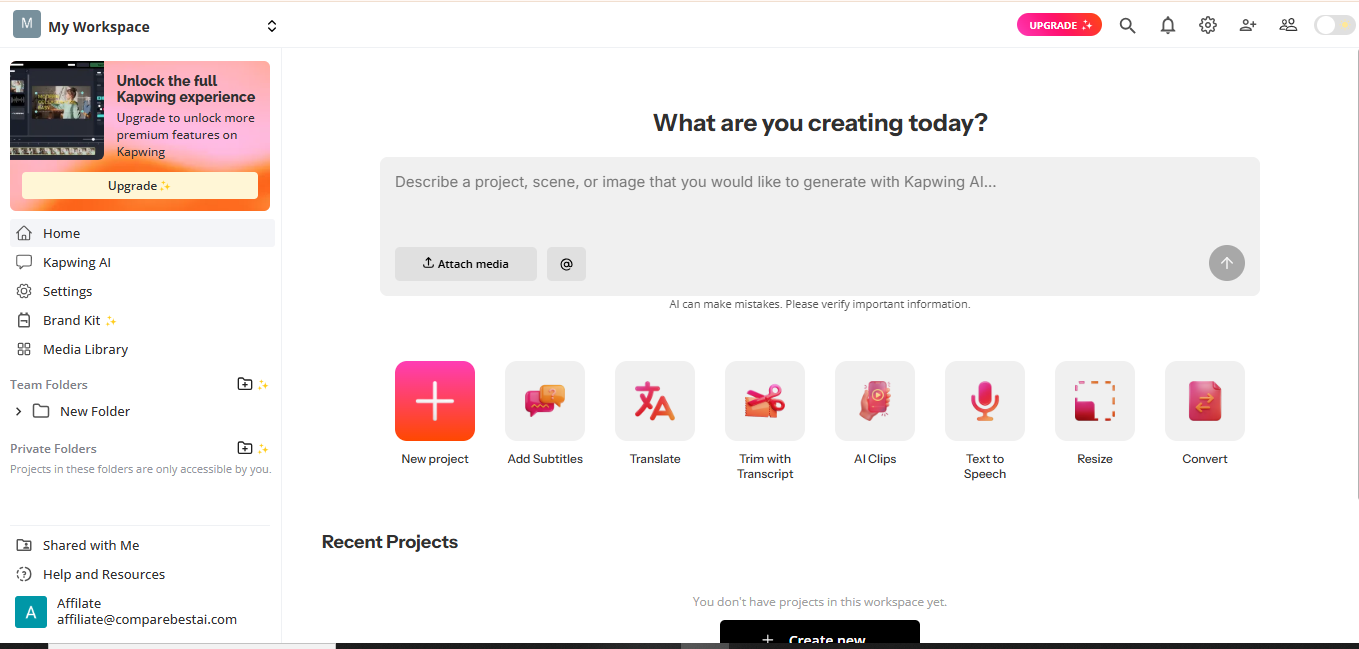
Kapwing (AI) is a browser-based video creation suite that blends AI generation with a capable timeline editor and team collaboration. In testing, it stood out for fast subtitling/translation, solid audio cleanup, and practical tools like Smart Cut and a built-in screen/camera recorder. The pricing is straightforward and transparent: Pro at $24 monthly ($16 billed yearly) and Business at $64 monthly ($50 billed yearly), with clear credit allowances for AI-heavy features. Real-time collaboration, brand kits, 4K export, and 2‑hour video length make it a strong fit for social teams and marketing orgs focused on short-form pipelines. Weak spots: there’s no general-purpose public REST API, so developers needing headless automation should look elsewhere. SSO and DPA require Enterprise, and the Free plan adds a watermark and tight limits (4-minute, 720p, 30 minutes/month). Overall, Kapwing is a pragmatic, fast, and approachable choice for creators and teams who need AI-assisted editing and localization without leaving the browser.
Overview
Screenshot
Score breakdown
Overall score
Scores are editorial assessments by the Compare Best AI team on a 0–10 scale.
Expert review
CBAI Editorial Team
Compare Best AI · Editorial Team
## Overview
How we tested
Days tested
7 days
Tasks evaluated
- ·Repurpose a 45-minute webinar into 5 TikTok/Reels clips
- ·Auto-subtitle and translate a 3-minute explainer into Spanish and German
- ·Dub a 60-second product video with lip sync
- ·Export 4K video and publish to TikTok/YouTube
Method
Compared against VEED and Descript using identical inputs
Reviewer
CBAI Editorial Team
Plans & pricing
Free
Get started creating and repurposing
- 10 credits
- Unlimited exports with watermark
- Export videos up to 4 minutes
- 720p
- 5 GB cloud storage
Pro
Individuals and small groups
- 1,000 credits / month
- Per member, per month
- No Kapwing watermark
- Upload files up to 6 GB
- 4K export
Business
Teams needing more
- Business tier listed on pricing page
Pricing may vary by region. Always verify on the vendor's website.
Feature comparison
| Feature | Kapwing (AI) | VEED | Descript |
|---|---|---|---|
| Platform | |||
| Browser-based editor | |||
| Collaboration | |||
| Real-time multi-user editing | |||
| Export | |||
| 4K export | |||
| AI Tools | |||
| Auto-subtitles/translation | |||
| Dubbing with lip sync | |||
| Security | |||
| SAML SSO (Enterprise) | |||
| Integrations | |||
| Direct publish to TikTok | |||
| Developer | |||
| Public API | |||
Is it right for you?
Good fit for
Social media teams
Quickly repurpose webinars and long videos into TikTok/Reels/Shorts with AI clipping, captions, and brand consistency.
Content localizers
Auto-subtitles, translation, and AI dubbing with optional lip sync streamline multilingual delivery.
Solo creators
A gentle learning curve and templates make it easy to publish polished videos fast.
Educators & comms
Screen/camera recorder, captions, and 4K exports simplify training and internal updates.
Less suited for
Developers building headless workflows
No general-purpose public REST API for programmatic editing/rendering.
Advanced film post-production
Lacks pro-grade color/grading, motion graphics, and plug-in ecosystems of desktop NLEs.
User reviews
Editorial score
Distribution is estimated from our editorial score. Verified user reviews coming soon.
Use cases
Typical ways teams rely on this tool — from everyday tasks to specialized workflows.
- Auto-subtitle & translate videos
- Repurpose long videos to short clips
- AI dubbing and lip sync localization
- Collaborative brand-safe editing
- Clean audio and remove silences
- 4K social video export
Integrations
Reported connectors
Apps and services commonly connected out of the box or via official connectors.
- TikTok (direct share)
- YouTube (publish/share)
- Google Drive/Google Photos (import)
Privacy & compliance
Security & data practices
Highlights we track from the vendor's documentation. Always confirm current terms, subprocessors, and regional policies on their official site.
- GDPR-ready (DPA available)
- SAML SSO (Enterprise)
- No training on user data
Details
Category
Price
- Free $0
- Pro $16/member/mo billed annually ($24 monthly)
- Business $50/mo annual ($64 monthly listed in scrape)
- Enterprise custom available via demo
Free version
Best for
- Repurposing long videos into TikTok/Reels/Shorts
- Auto-subtitling and translation for accessibility and reach
- AI dubbing to localize content
- Collaborative brand-safe editing in the browser.
Frequently asked questions
Kapwing (AI)
Content & Design
Ready to get started?
Visit the Kapwing (AI) website to explore plans and start your free trial.
Was this page helpful?
Compare Best AI may earn a commission when you click links on this page. This does not influence our editorial scores or recommendations. Advertiser disclosure
Alternatives to Kapwing (AI)
Tools similar to Kapwing (AI) that we have reviewed.
Clipchamp for Business
7.3/10Browser-based video editor by Microsoft with AI tools and stock content

OpusClip
7.5/10AI-powered tool that turns long videos into viral short clips.

CapCut
7.0/10AI-powered video editor for creators and teams.
Wisecut (AI)
7.0/10AI editor that clips, captions, and auto-posts.

FlexClip (AI)
6.5/10AI video maker for fast, polished edits.
Canva
7.5/10All-in-one design and AI content platform.