
The best AI note taker in 2026 depends on how you meet. Fireflies is best for teams that want strong integrations at a low price, Otter is best for live transcription, Fathom has one of the most generous free plans, tl;dv suits teams that want a searchable meeting library, and Avoma is built for sales teams that need CRM sync. Granola is a strong pick if you don't want a bot joining your calls. Paid plans start around $8 to $20 per user a month.
Choose Fathom if you want a capable free AI note taker. Choose Fireflies for affordable team plans and wide integrations. Choose Otter for real-time transcription. Choose Granola for bot-free notes. Choose Avoma if your notes need to sync with a CRM.
What Is an AI Note Taker?
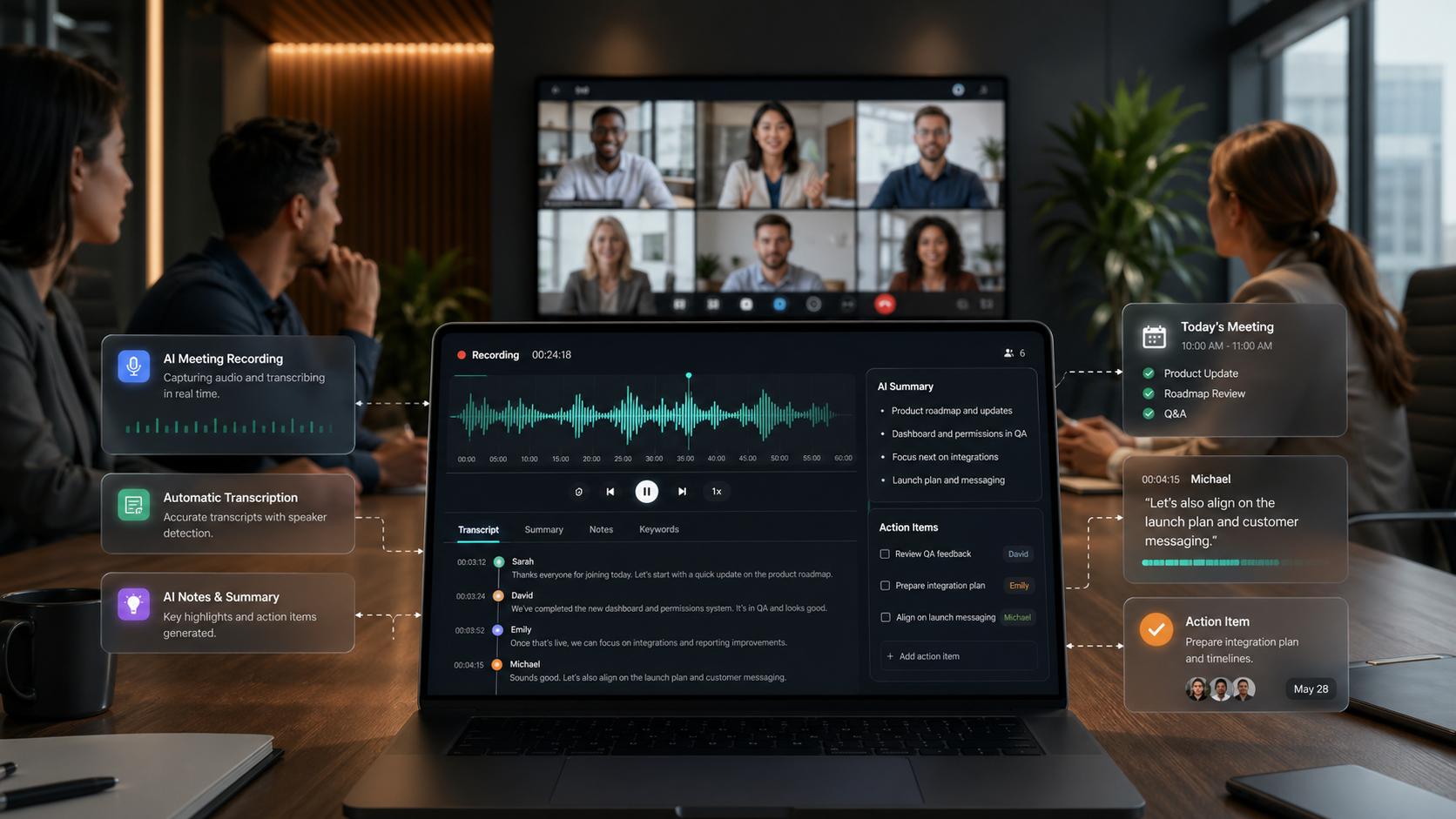
An AI note taker is software that records or listens to a meeting, transcribes the conversation, and turns it into a summary with key points, decisions, and action items. Most join Zoom, Google Meet, or Microsoft Teams as a bot participant, while some capture audio directly from your device.
How Do AI Note Takers Summarize Meetings?
- Capture audio: A bot joins the call, or an app records your device audio.
- Transcribe speech: Speech recognition converts audio to text and labels who said what.
- Summarize: A language model pulls out topics, decisions, questions, and action items.
- Share and sync: Notes go to email, Slack, your CRM, or another tool.
In this guide, you'll learn:
- Which AI meeting assistants fit Zoom, Google Meet, Teams, and in-person meetings
- What each tool costs in 2026, including free plans
- How recruiters can use AI note takers for interviews and screening calls
- The consent, privacy, and accuracy issues to check before you hit record
Insert image here: an AI meeting summary showing key points, decisions, and action items with speaker labels. Alt text: "AI note taker meeting summary with action items and speaker identification"
AI Note Takers Compared (2026 Pricing)
Otter Pro has the lowest paid entry at $8.33 per user a month billed yearly, followed by Fireflies Pro at $10. Fathom and Granola offer the most usable free plans. Prices are US list prices per user from each vendor's pricing page in October 2026 (tl;dv from a July 2026 tracker).
Tool | Best for | Free plan | Entry paid plan (monthly / yearly) | Joins as a bot? |
|---|---|---|---|---|
Fireflies | Teams that want integrations | Yes, 400 min team storage | Pro: $18 / $10 | Yes |
Otter | Live transcription | 300 min/mo, 30 min per conversation | Pro: $16.99 / $8.33 | Yes (plus mobile and in-person recording) |
Fathom | Generous free notes | Yes, unlimited recordings | Premium: $20 / $16 | Yes |
tl;dv | Searchable meeting library | 10 AI-noted meetings (lifetime) | Pro: $29 / $18 | Yes |
Avoma | Sales teams and CRM sync | 14-day trial | Startup: $29 / $19 | Yes |
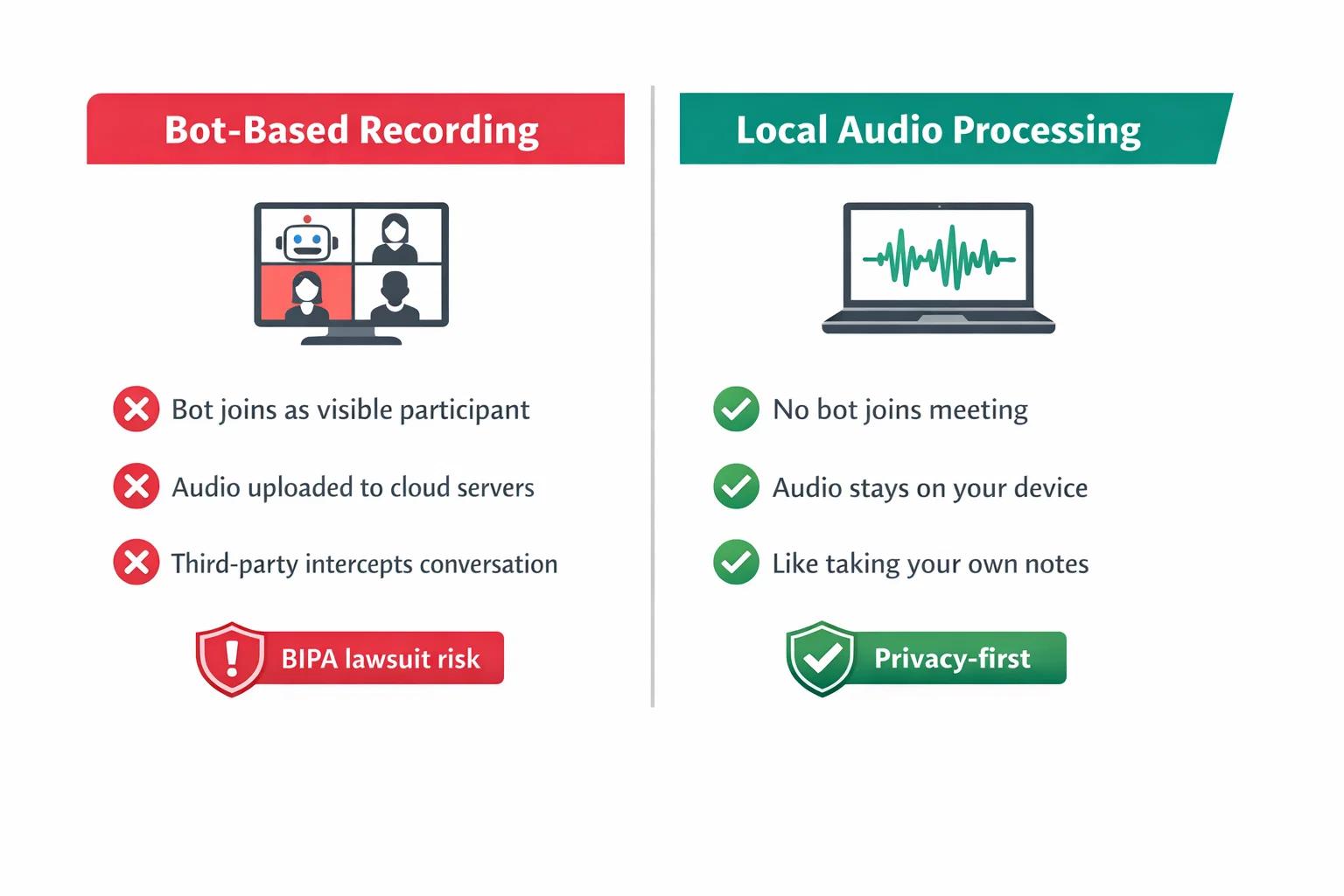
Granola | Bot-free notes | Yes | Business: $14 | No, captures device audio |
What You Get on Paid Plans
Paid plans generally add longer recordings, more storage, better AI summaries, and integrations with CRMs, Slack, and project tools. For example, Otter Pro raises your monthly limit from 300 to 1,200 minutes and conversations from 30 to 90 minutes. Fireflies Pro increases storage from 400 team minutes to 8,000 minutes per seat.
The Best AI Note Takers, Reviewed
1. Fireflies: Best AI Note Taker for Teams
Fireflies joins Zoom, Google Meet, and Teams calls, transcribes in 100+ languages, and creates summaries with action items. The free plan includes 400 minutes of team storage. Pro costs $18 per seat a month or $10 billed yearly, and Business costs $29 or $19 billed yearly.
- Pros: Low yearly price, many integrations, unlimited transcription on all plans
- Cons: Free storage fills up fast; recordings are capped at 2 hours on Free and Pro
2. Otter: Best for Live Transcription
Otter shows a live transcript during meetings and works with Zoom, Teams, and Google Meet. The free Basic plan gives 300 minutes a month with a 30-minute limit per conversation. Pro lists at $16.99 a month or $8.33 billed yearly for 1,200 minutes, and adds Salesforce and HubSpot for one user.
- Pros: Real-time transcript, low yearly price, CRM options on Pro
- Cons: Short conversation limit on the free plan
3. Fathom: Best Free AI Note Taker
Fathom offers a free-forever plan with unlimited recordings and instant AI call summaries. Premium costs $20 a month ($16 yearly), and Business at $34 ($25 yearly) adds CRM field sync with HubSpot and Salesforce.
- Pros: Generous free plan, fast summaries, CRM syncing on higher plans
- Cons: Team and Business plans need at least 2 users
4. tl;dv: Best for a Searchable Meeting Library
tl;dv records and summarizes meetings and keeps them in a searchable library. Its free plan covers 10 AI-noted meetings over the life of the account. Pro costs $29 a month or $18 billed yearly. Read our tl;dv review for more.
- Pros: Clean meeting library, unlimited AI notes on Pro
- Cons: Very limited free plan; user reviews raise billing complaints
5. Avoma: Best AI Meeting Assistant With CRM Integration
Avoma combines note taking with scheduling and sales coaching. Startup costs $29 per recorder seat a month or $19 billed yearly, with unlimited transcription and AI notes. It connects natively with Salesforce, HubSpot, Zoho, Pipedrive, and more, and viewers don't need a paid seat.
- Pros: Deep CRM integration, free viewer seats, 14-day trial with no card
- Cons: No free plan; coaching features cost extra
6. Granola: Best AI Note Taker Without a Bot
Granola captures audio directly from your computer, so no bot joins the call. It doesn't store meeting audio, only the transcript and your notes. The free plan covers the basics, and Business costs $14 per user a month.
- Pros: No bot in the meeting, simple interface, works for in-person meetings near your device
- Cons: You still need to tell participants you're transcribing
AI Note Takers for Interviews and Recruiting
AI note takers are especially useful for recruiters, who spend hours on screening calls and interviews. Instead of typing while a candidate talks, you can focus on the conversation and review an accurate summary afterward.
Best AI Note Taker for Recruitment Screening Calls
- Fireflies or Fathom work well for video screening calls on Zoom, Google Meet, and Teams, with low-cost or free plans.
- Otter is useful when you want a live transcript to glance at during the interview.
- Granola fits candidates who may feel uneasy about a bot joining the call, though you still need to disclose that you're taking AI notes.
AI Note Taker for Phone Screening Calls
Bot-based tools join video meetings, so phone calls need a different setup. Options include using a calling app that connects to your note taker, running the call through a video platform with dial-in, or using a mobile recording app like Otter's. Check consent rules before recording any phone call.
What Should an AI Note Taker Capture From Interviews?
- Answers to your structured interview questions
- Specific examples the candidate gives about past work
- Skills, tools, and certifications mentioned
- Salary expectations, availability, and location preferences
- Questions the candidate asks you
How AI Note Takers Help Compare Candidates Faster
When every interview follows the same questions, AI summaries make it easier to compare answers side by side. Many tools also let you ask questions across meetings, such as "Which candidates mentioned Salesforce experience?" Use these summaries to support your judgment, not to replace it.
Can AI Note Takers Reduce Interview Bias?
They can help by creating a consistent written record, so decisions rely less on memory and first impressions. But AI can also introduce problems if you let it score or rank candidates. In New York City, for example, Local Law 144 requires a bias audit and candidate notice before employers use automated employment decision tools. Keep hiring decisions with people.
How to Integrate AI Note Takers With Your ATS
Check whether your note taker connects directly to your applicant tracking system or works through Zapier or a similar tool. A common setup sends the interview summary to the candidate's profile automatically, so hiring managers see notes in one place.
Is It Legal to Record Meetings and Interviews With AI?
Recording is legal in the US in many situations, but consent rules vary by state. Federal law generally follows a one-party consent rule, meaning one participant can agree to the recording. However, according to Kilpatrick Townsend's overview of US wiretap laws, 13 states require all parties to consent: California, Connecticut, Delaware, Florida, Illinois, Maryland, Massachusetts, Montana, Nevada, New Hampshire, Oregon, Pennsylvania, and Washington.
When participants are in different states, the safest approach is to get consent from everyone. This guide isn't legal advice, so check with an employment attorney for your specific situation.
How to Disclose AI Note Taking to Job Candidates
- Mention it in the interview invite. For example: "We use an AI note taker to record and summarize interviews so we can focus on our conversation."
- Ask again at the start of the call. Confirm the candidate is comfortable before recording begins.
- Offer an alternative. Let candidates opt out and take manual notes instead.
- Explain how notes are used. Say who can see them and how long you keep them.
Do Candidates Mind AI Recording Their Interviews?
Reactions vary. Clear notice up front and the option to decline usually make candidates more comfortable. A bot that joins without explanation is more likely to feel intrusive.
AI Note Taker Privacy: Where Do Your Notes Go?
Before choosing a tool, check:
- Storage: Whether audio, video, and transcripts are stored, and for how long. Granola, for example, says it doesn't store meeting audio.
- AI training: Whether your data is used to train AI models, and whether you can opt out.
- Access controls: Who on your team can view recordings.
- Compliance: Options like SSO and HIPAA support, which Otter and Avoma list on their Enterprise plans.
- Deletion: How to delete recordings when a candidate asks or your retention period ends.
How to Choose and Set Up an AI Note Taker
How to Choose AI Note Taker Software in 5 Steps
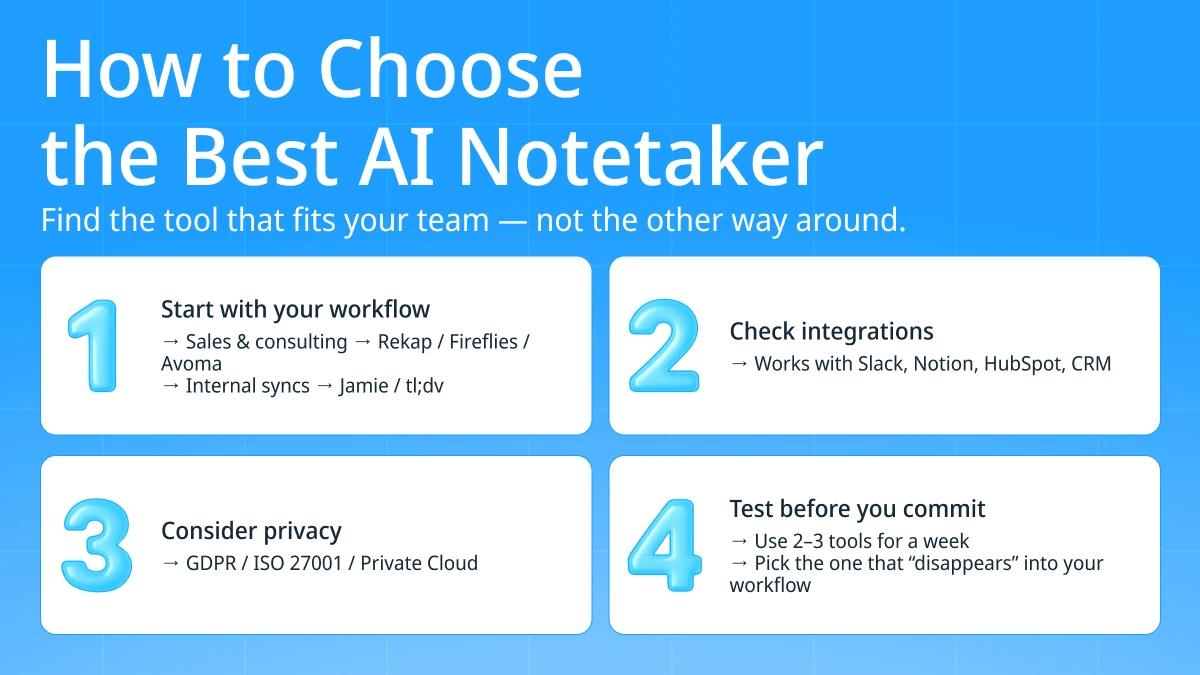
- List your meeting platforms. Confirm the tool works with Zoom, Google Meet, Microsoft Teams, phone calls, or in-person meetings, depending on what you use.
- Decide on bot vs bot-free. Bot-based tools are easy to set up; bot-free tools like Granola feel less intrusive.
- Check integrations. Look for your CRM, ATS, Slack, or project tool, such as HubSpot or Notion.
- Review limits. Compare monthly minutes, maximum meeting length, and storage on the plan you'd actually use.
- Test with real meetings. Run the free plan or trial on three or four real calls and judge the summaries.
AI Note Taker Setup Guide for Teams
- Connect your calendar so the note taker joins scheduled meetings automatically.
- Set default sharing rules, such as sending summaries only to internal attendees.
- Create a summary template with the sections your team needs, such as decisions and action items.
- Add a consent line to your meeting invites.
- Train the team to review and correct summaries before sharing them.
How Accurate Are AI Note Takers?
Accuracy is usually good for clear audio with one person speaking at a time. It drops with heavy accents, crosstalk, poor microphones, and industry jargon. Speaker identification can also mix up voices when people sound similar or join from one room. Always review summaries before they go into a CRM or candidate record.
Common AI Note Taker Mistakes
- Recording without consent, especially in all-party consent states
- Trusting summaries blindly, which can spread small errors into records
- Letting the bot join sensitive meetings like HR or legal discussions by default
- Ignoring storage limits, then losing older recordings on free plans
- Keeping recordings forever instead of setting a retention period
When Manual Notes Still Make Sense
Manual notes are a better fit for highly sensitive conversations, candidates who decline recording, and short calls where a few bullet points are enough. They also make sense when you can't confirm consent from every participant.
For more tools that save time at work, browse our AI productivity tools hub.
AI Note Taker FAQs
How much does an AI note taker cost?
Most AI note takers cost $8 to $20 per user a month at their lowest listed rates. Otter Pro is $8.33, Fireflies Pro is $10, Granola Business is $14, and Fathom Premium is $16. Fathom, Fireflies, Otter, and Granola also have free plans.
What is the best free AI note taker for meetings?
Fathom is one of the best free AI note takers, with unlimited recordings and instant summaries on its free plan. Otter's free plan is useful too, but it limits conversations to 30 minutes.
Which AI note taker works best with Zoom?
Fireflies, Otter, Fathom, tl;dv, and Avoma all join Zoom calls. Fathom is a strong free choice, and Fireflies is a low-cost choice for teams.
Is there an AI note taker without a bot?
Yes. Granola captures audio from your computer instead of joining the call as a bot. You should still tell participants that you're transcribing.
Can AI note takers replace manual interview notes?
For most structured interviews, yes, as long as you review the summary. Keep manual notes for sensitive conversations or when a candidate declines recording.
Can an AI note taker integrate with my CRM?
Yes. Avoma connects natively with Salesforce, HubSpot, Zoho, and Pipedrive. Fathom Business syncs CRM fields, and Otter Pro includes Salesforce and HubSpot for one user.
Can AI note takers summarize candidate fit in seconds?
They can summarize what a candidate said within moments of the call ending. Judging fit should stay with the hiring team, especially where laws regulate automated hiring tools.
Does my recruitment team need an AI note taker?
If your recruiters run several screening calls a day, an AI note taker can save writing time and keep notes consistent. Small teams can start with a free plan before paying.
Key Takeaways
- Best free AI note taker: Fathom, with unlimited recordings on its free plan
- Lowest paid price: Otter Pro at $8.33 per user a month billed yearly
- Best for teams: Fireflies, from $10 per seat a month billed yearly
- Best without a bot: Granola, with Business at $14 per user a month
- Best for CRM sync: Avoma, from $19 per seat a month billed yearly
- For recruiters: Disclose AI note taking in the invite and again at the start of the call
- Legal check: 13 states require all-party consent to record
Final Verdict: Pick the AI Note Taker That Fits How You Meet
The best AI note taker is the one that fits your platforms, budget, and privacy needs. Start with Fathom or Otter if you want a free option, choose Fireflies for affordable team plans, Granola if you'd rather skip the bot, and Avoma if your notes need to land in a CRM. Recruiters should pair any tool with clear consent steps and keep hiring decisions with people.
At CompareBestAI, we compare AI productivity tools side by side on pricing, features, and real use cases, so you can choose with confidence. Ready to decide? Use the CompareBestAI comparison tool to put Fireflies, Otter, Fathom, and other AI meeting assistants head to head.