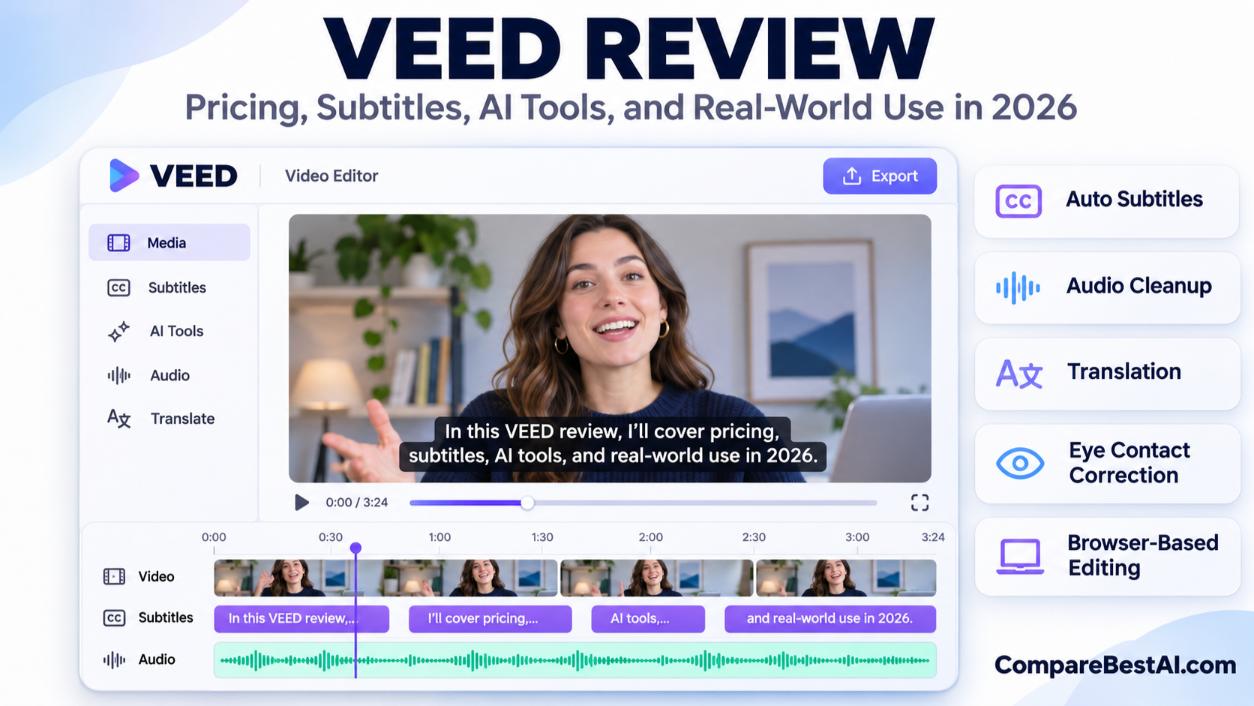

VEED is worth paying for if you make short social videos, talking-head clips, or subtitled content and want a simple editor that runs in your browser. Its auto-subtitles, audio cleanup, and templates save real time. The free plan is fine for testing, but it exports at 720p with a watermark. Paid plans start at $12 per user per month billed annually ($25 monthly). Watch two catches: AI credits expire and don't roll over, and refunds are very limited once you've used the service.
This VEED review covers features, 2026 pricing, user complaints, the refund policy, and how VEED compares to CapCut, Descript, Kapwing, Canva, and InVideo.
What Is VEED.io?
VEED (VEED.io) is a browser-based video editor with built-in AI tools for subtitles, audio cleanup, avatars, and short AI-generated videos. You upload or record footage, edit on a simple timeline, and export without installing software. It also offers a mobile app.
VEED is a London-based company co-founded by Sabba Keynejad. In 2022 it raised a $35 million Series A led by Sequoia Capital. You can see its listing on our VEED.io tool profile.
VEED AI Features: What You Actually Get
- Auto-subtitles and translation: Generate captions automatically, style them, and translate them into other languages.
- Clean audio: Remove background noise, filler words, and silences in one click.
- Eye contact correction: Adjusts your gaze so you appear to look at the camera.
- AI avatars and text-to-speech: Add an AI presenter or narration in different voices. Avatar availability varies by country.
- Gen-AI Studio: Turns a script into a short video with stock footage, avatars, subtitles, and music. Maximum length depends on your plan.
- Fabric 1.0: VEED's own AI model that turns a still image into a lip-synced talking video. See our Fabric 1.0 by VEED profile.
- Collaboration: Shareable review links and timestamped comments for teams.
Does VEED Auto-Captioning Work Well?
Yes, for clear audio. Accuracy drops with background noise, strong accents, crosstalk, and industry jargon, so always proofread captions before publishing.
VEED.io Pricing Plans (2026)
Plan | Billed annually (per user) | Billed monthly (per user) | AI credits | Export and limits |
|---|---|---|---|---|
Free | $0 | $0 | Limited or none (varies by region) | 720p, VEED watermark |
Creator | $12/month ($147/year) | $25/month | 6,000/year or 500/month | 1080p, no watermark |
Pro | $22/month ($265/year) | $45/month | 30,000/year or 2,500/month | Up to 4K, brand kits, translation |
Studio | $39/month ($465/year) | $79/month | 180,000/year or 15,000/month | Up to 4K, unlimited storage, custom templates |
Enterprise | Custom | Custom | Custom | Admin and security controls |
US prices as reported by independent pricing trackers, checked October to November 2026. VEED raised list prices in July 2026 and regularly tests different prices on its pricing page, so confirm the figure at checkout.
Is VEED Really Free?
Yes, but the free plan is a trial in practice. It exports at 720p and adds a VEED watermark. AI generation is limited or unavailable depending on your region. For clean, full-HD videos, you need at least the Creator plan.
Tip: Upgrading does not remove the watermark from videos you already exported. Re-export the project after you upgrade.
How Do VEED AI Credits Work?
AI features such as Gen-AI Studio, avatars, and AI video generation use credits. Three rules matter:
- Credits are charged when you click Generate, whether or not you keep the result.
- Credits don't roll over and expire at the end of your subscription period.
- Credits are non-refundable and have no cash value.
Tip: Write a clear script and start with short test generations before making longer AI videos, since every attempt uses credits.
VEED Bait and Switch": What Customers Should Know
Some users feel prices changed between visits. The likely reasons are VEED's July 2026 price increase and its ongoing price tests, which can show different visitors different plans. Before paying, take a screenshot of the plan and price at checkout, and check whether you're on monthly or annual billing.
VEED.io Reviews: What Users Say
On Trustpilot, VEED holds a 4.2 out of 5 TrustScore from about 3,900 reviews, with around 70% five-star and 15% one-star ratings at the time of writing. VEED replies to most negative reviews.
What users praise:
- Easy for beginners
- Strong free-tier editing tools
- Useful subtitles, audio cleanup, and background removal
- Quick support responses for some users
Common complaints:
- Credits deducted for AI results that turned out unusable
- Difficulty finding how to cancel a subscription
- Refund requests declined
- Occasional bugs, lost projects, or export problems
- Pricing that feels high for freelancers
Why Is VEED So Buggy for Some Users?
VEED runs in your browser, so performance depends on your browser, device memory, and internet connection. To reduce problems:
- Use an up-to-date Chrome or Edge browser.
- Close other heavy tabs while editing.
- Split long projects into shorter clips.
- Let uploads finish completely before editing.
VEED Refund Policy
According to VEED's Terms of Sale, consumers can get a full refund within 14 days only if they have not used the service. After you use it, cancellations generally aren't refunded. Plans renew automatically, and you must cancel at least two business days before your renewal date. You keep access until the end of the paid period.
Protect yourself: Test the free plan first, start monthly if you're unsure, and set a reminder before renewal. You can cancel from the Billing section of your workspace.
Is VEED.io Safe?
VEED is a legitimate, venture-backed company, and it's safe for everyday social and marketing videos. Like any cloud editor, your uploads are stored on its servers. Read its privacy policy before uploading confidential footage, and consider the Enterprise plan if you need admin and security controls.
VEED vs CapCut, Descript, Kapwing, Canva, and InVideo
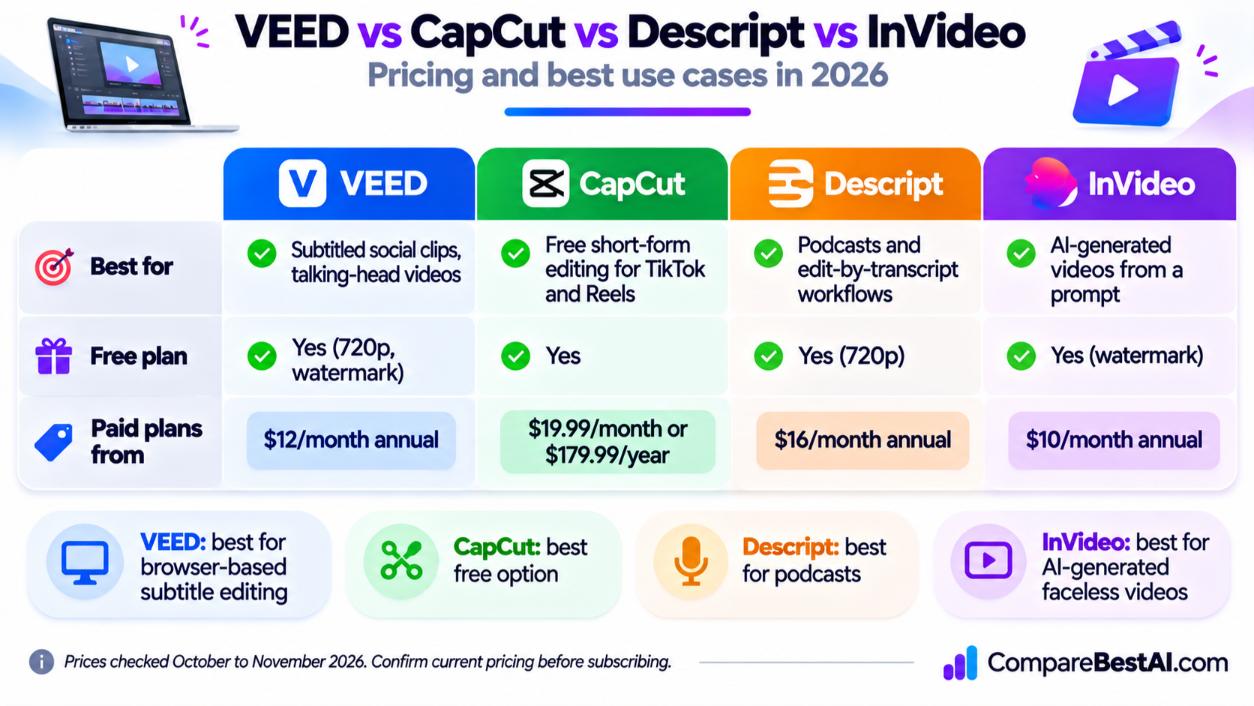
Tool | Best for | Free plan | Paid plans from |
|---|---|---|---|
VEED | Subtitled social clips, talking-head videos | Yes (720p, watermark) | $12/month annual |
Free short-form editing for TikTok and Reels | Yes | $19.99/month or $179.99/year (Pro, web) | |
Podcasts and edit-by-transcript workflows | Yes (720p) | $16/month annual (Hobbyist) | |
Collaborative browser editing and memes | Yes | Paid plans available | |
Simple branded videos alongside design work | Yes | Paid plans available | |
AI-generated videos from a prompt | Yes (watermark) | $10/month annual (Starter) |
Prices checked October to November 2026.
VEED vs CapCut
CapCut is the better free option; VEED is better for teams and polished subtitles. CapCut's free plan offers a lot of editing power, and CapCut Pro costs $19.99/month. VEED's advantages are its browser-first workflow, team review tools, and cleaner subtitle styling.
VEED vs Descript
Choose Descript for podcasts and long talking videos, since you edit by deleting words in a transcript. Choose VEED for quick social clips and simpler timeline editing.
VEED vs InVideo AI
InVideo AI generates whole videos from a prompt; VEED edits footage you already have. If you film yourself, pick VEED. If you want faceless AI videos, pick InVideo.
VEED for Content Creators: Is It Worth It?
VEED is worth it for creators who publish short, subtitled videos every week. The Creator plan removes the watermark and unlocks 1080p for about $12 a month on annual billing.
Who should pay for VEED:
- Social media managers and marketers making Reels, Shorts, and TikToks
- Coaches, educators, and businesses recording talking-head videos
- Small teams that need shared review links
Who should skip it:
- Creators on a zero budget (CapCut's free plan goes further)
- Podcasters (Descript fits better)
- Editors who need advanced color grading or multicam work (use desktop software)
How Long Does It Take to Learn VEED?
VEED is built for beginners. Trimming, captioning, and exporting a short clip are simple to pick up quickly, while the AI tools, brand kits, and templates take a little longer to learn.
How to Add Captions Without Paying for VEED
- Use CapCut's free auto-captions for short-form videos.
- Use YouTube Studio's free automatic captions for YouTube uploads.
- Use VEED's free plan for testing if a 720p watermarked export is acceptable.
VEED Mobile App vs Web Editor
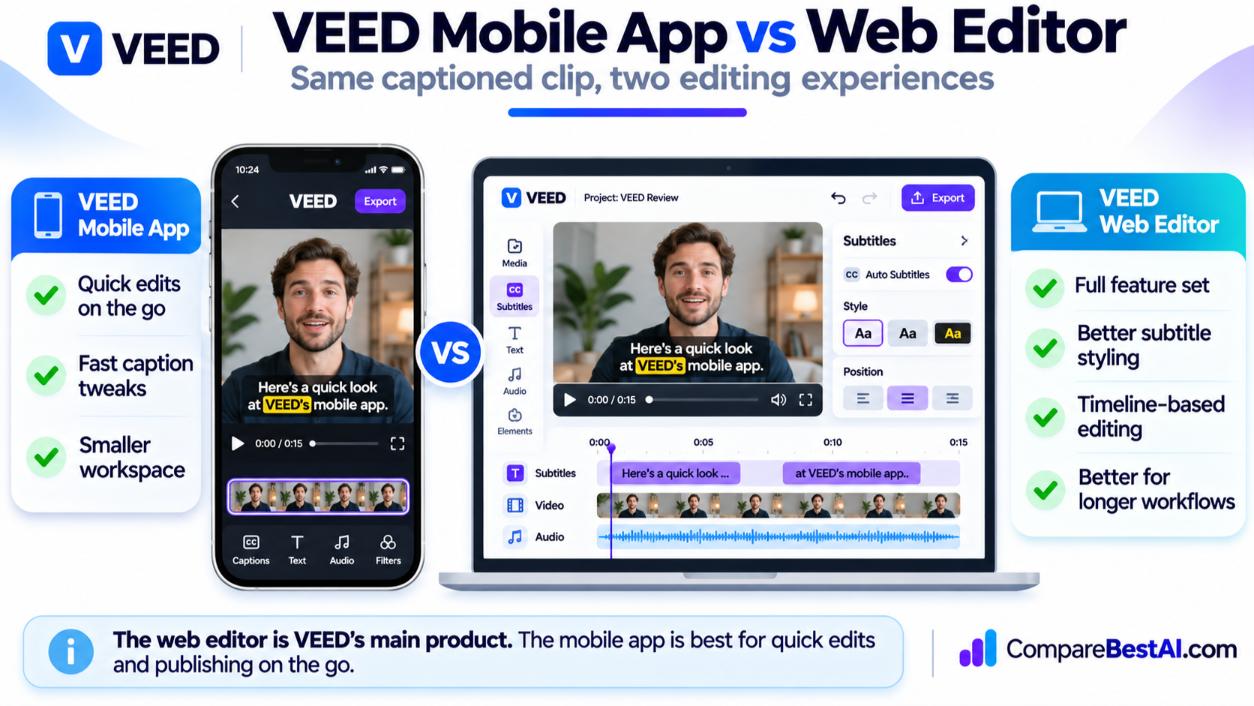
The web editor is VEED's main product and has the full feature set. Use the mobile app for quick edits on the go. Web and mobile subscriptions may be billed as separate products, so check before you buy on your phone.
VEED Pros and Cons
Pros
- Very easy to learn, entirely in the browser
- Strong auto-subtitles, translation, and audio cleanup
- Useful team review and collaboration tools
- Affordable entry plan on annual billing
Cons
- Free plan is limited to 720p with a watermark
- AI credits expire and are charged per generation
- Strict refund policy after first use
- Performance depends on your browser and connection
VEED Review: Key Takeaways
- VEED is a browser-based video editor best for short, subtitled social and talking-head videos.
- Paid plans start at $12 per user per month billed annually, or $25 monthly.
- The free plan exports at 720p with a watermark.
- AI credits don't roll over, and refunds are only guaranteed within 14 days if you haven't used the service.
- CapCut is the best free alternative, Descript is better for podcasts, and InVideo is better for AI-generated videos.
Frequently Asked Questions
Is VEED really free?
Yes, VEED has a free plan, but exports are limited to 720p with a watermark. Paid plans remove the watermark.
How much does VEED cost?
VEED's Creator plan costs $12 per user per month billed annually or $25 monthly. Pro costs $22 annually or $45 monthly, and Studio costs $39 annually or $79 monthly.
Is VEED better than CapCut?
VEED is better for teams, browser-based workflows, and polished subtitles. CapCut is better for free short-form editing.
Can I get a refund from VEED?
Only within 14 days and only if you haven't used the service. After that, cancellations generally aren't refunded.
Is VEED.io safe and legit?
Yes. VEED is a London-based company backed by Sequoia Capital. Review its privacy policy before uploading confidential content.
Can you make money with videos edited on VEED?
Yes. Paid-plan exports have no watermark, so you can use them for YouTube, client work, and social media. Make sure any music or stock media you use is licensed for commercial use.
Final Verdict: Is VEED.io Worth Paying For?
The bottom line of this VEED review: VEED is worth paying for if you make short, subtitled videos regularly and value speed and simplicity over advanced editing. Start on the free plan, test the subtitles and audio cleanup on your own footage, and upgrade to Creator once the watermark becomes the only thing holding you back.
At CompareBestAI, we review and compare AI tools side by side so you can choose with confidence. See our picks for the best AI video tools, or use the CompareBestAI comparison tool to put VEED, CapCut, Descript, and InVideo side by side before you subscribe.
Want a direct head-to-head comparison? Check out Dough vs VEED 2026: AI Video Generation, Editing & Pricing for more insights.
For an in-depth look at how VEED, Pictory, and InVideo compare, see Pictory vs InVideo vs VEED: Which AI Video Maker Is Better?.
If you're shopping for the best paid AI video solutions, check our list of the Best Paid AI Video Tools in 2026: 7 Worth Paying For.